EasyManua.ls Logo

AUTIC APPC-8429T - I;O Panel; COM Ports

AUTIC APPC-8429T
62 pages
Print Icon
To Next Page IconTo Next Page
To Previous Page IconTo Previous Page
Loading...
Autic System Marine PC Rev. 1.1 Page 12
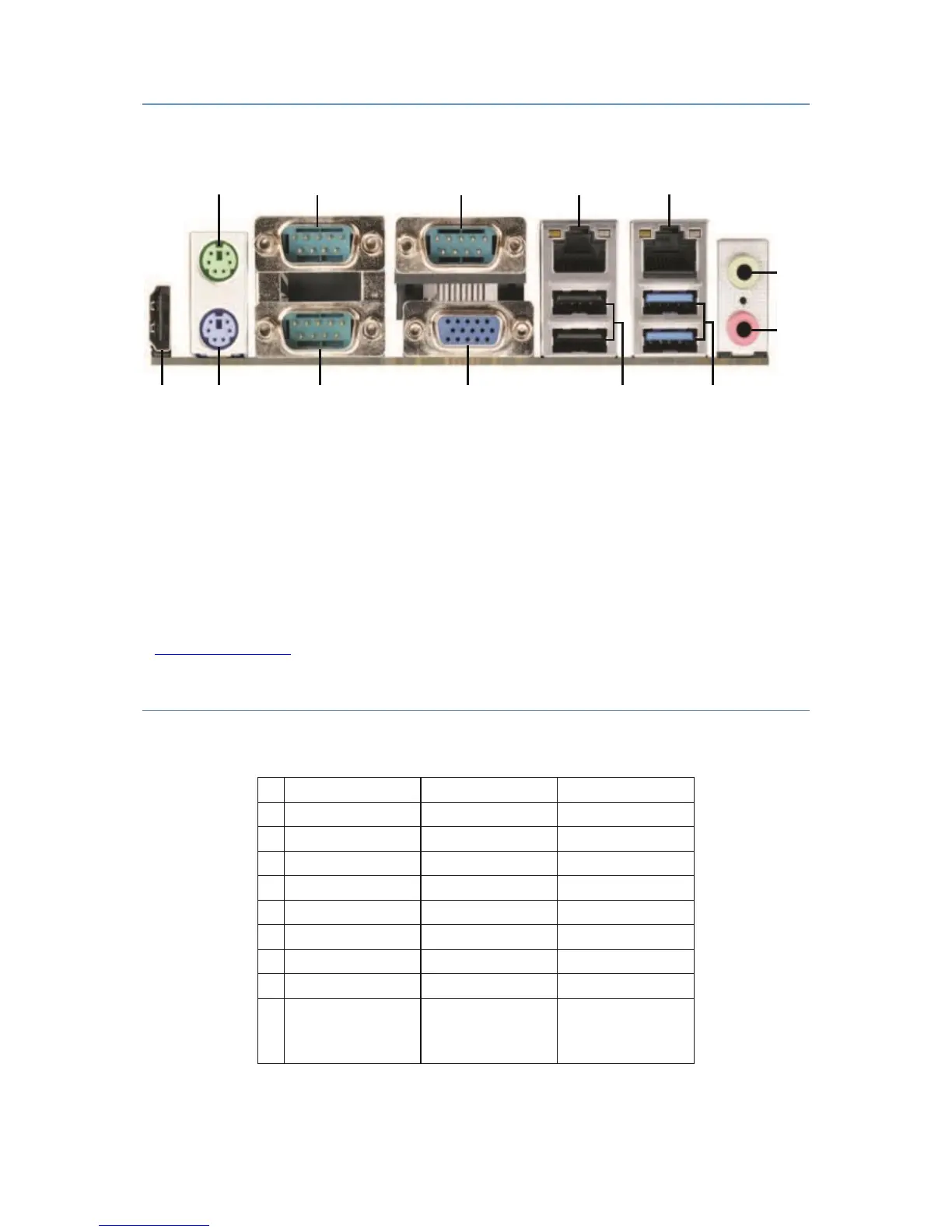
I/O PANEL
13 12 11 10 9 8
1: PS/2 Mouse Port
8: USB 3.0 Ports (USB3_0_1)
2: COM Port 1 (COM1)*
9: USB 2.0 Ports (USB_0_1)
3: COM Port 3 (COM3)*
10: VGA Port (VGA1)
4: LAN RJ-45 Port
11: COM Port 2 (COM2)*
5: LAN RJ-45 Port
12: PS/2 Keyboard Port
6: Line out (Green)
13: HDMI Port (HDMI1)
7: Microphone (Pink)
* This motherboard supports RS232/422/485 on COM ports 1~3. Please refer to below table for the pin
definition. In addition, COM1~3 ports (RS232/422/485) can be adjusted in BIOS setup utility > Advanced Screen
> Super IO Configuration
COM PORTS
COM1-3 D-sub 9-Pin RS-232/485/422
PIN
RS232
RS422
RS485
1
DCD
TX-
RTX-
2
RXD
RX+
N/A
3
TXD
TX+
RTX+
4
DTR
RX-
N/A
5
GND
GND
GND
6
DSR
N/A
N/A
7
RTS
N/A
N/A
8
CTS
N/A
N/A
9
COM1:
+5V/+12V/+5VSB
COM2, 3: +5V/+12V
COM1:
+5V/+12V/+5VSB
COM2, 3: +5V/+12V
COM1:
+5V/+12V/+5VSB
COM2, 3: +5V/+12V
When setting COM 1~3 to RS-485 in BIOS, also enable Auto Flow Control if applicable.
6
1
2
4
3
5
7

Table of Contents