Page 7 579-1165AC Rev C
4007ES Operator’s Manual
4.2.1 Processing Alarms
There are three actions that may be taken when an alarm condition occurs:
1. Acknowledge an Alarm
2. Silence the Alarm
3. Reset the System
Each step is explained in detail in the rest of this section.
4.2.2 Acknowledge an Alarm
Two types of acknowledging modes can be configured on the panel:
Global Acknowledge
All the zones inside the Zone Alarm list are acknowledged at once.
Individual Acknowledge
Each zone inside the Zone Alarm list is acknowledged separately
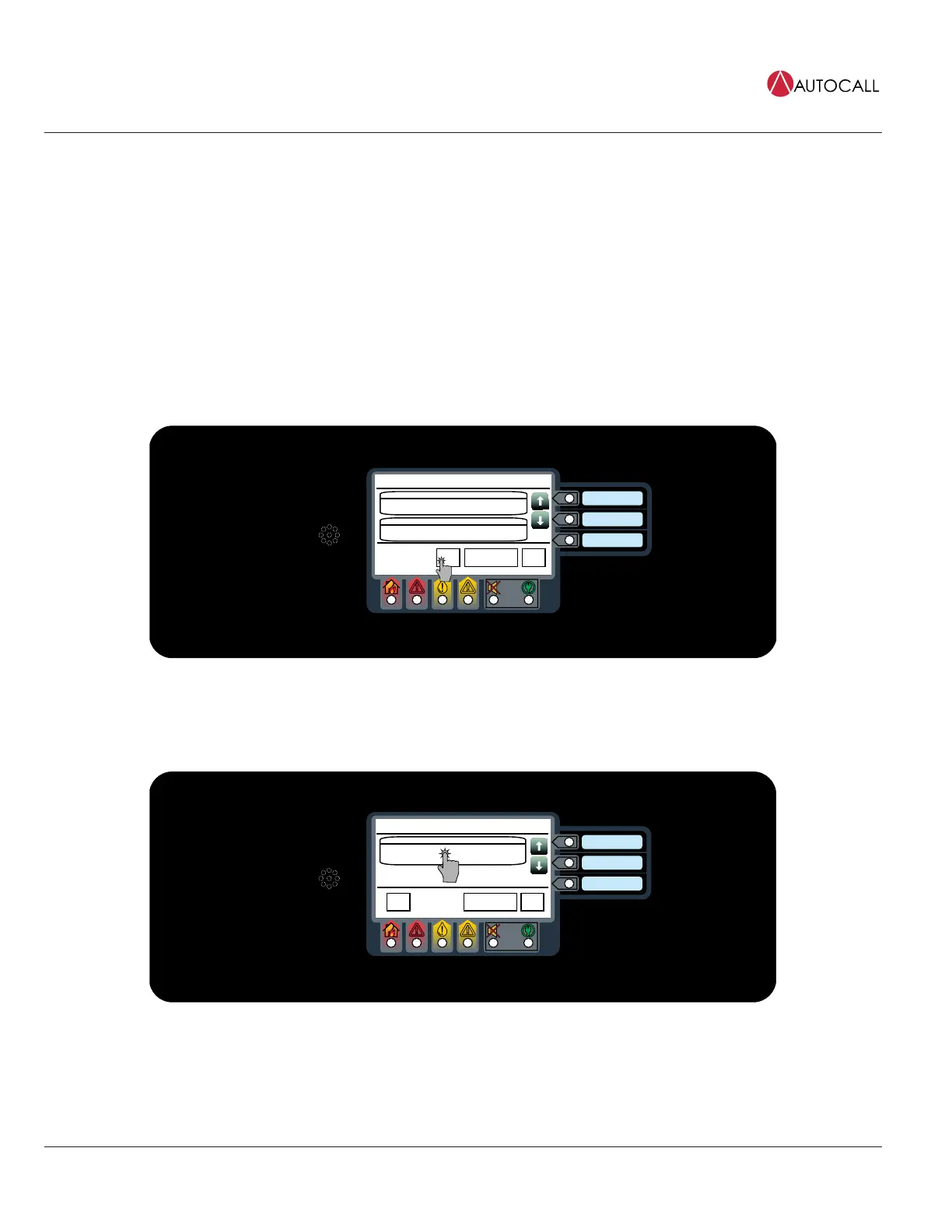
4.2.3 Global Acknowledge
Tap the ACK button.
Date
Time
Trouble in System
ACK
5
Alarm Functions Menu
CARD 1, NAC POWER SUPPLY
NAC MISWIRE TROUBLE
Date
First of 5
SYSTEM TIME/DATE INVALID OR NOT SET
ABNORMAL
Date
Most Recent of 5
Fig 5: Acknowledge
4.2.4 Individual Acknowledge
Tap the unacknowledged alarm from the Zone Alarm List.
Date
Time
Fire Alarm in System
PULL STATION 1
FIRE ALARM
Date
First of 1
MenuAlarm Functions
ACK
1
Fig 6: Unacknowledged alarm
Note: The alarms that have not been acknowledged display the text Press to acknowledge on the top right of the button.



 To Next Page