18
GDO-6v3 EasyRoller
®
Owner Installation Instructions
Adjusting Safety Obstruction Force
The Safety Obstruction Force is calculated automatically
during setup. Adjusting this is normally only necessitated
by environmental conditions such as windy or dusty areas,
and areas with extreme temperature changes.
WARNING: Doors that exert more than
400N (40kgf) closing force must have a
Photo Electric Beam (P.E. Beam, Model:
PE-2) fitted for safety.
Step 9.1 - To Increase Force Pressure
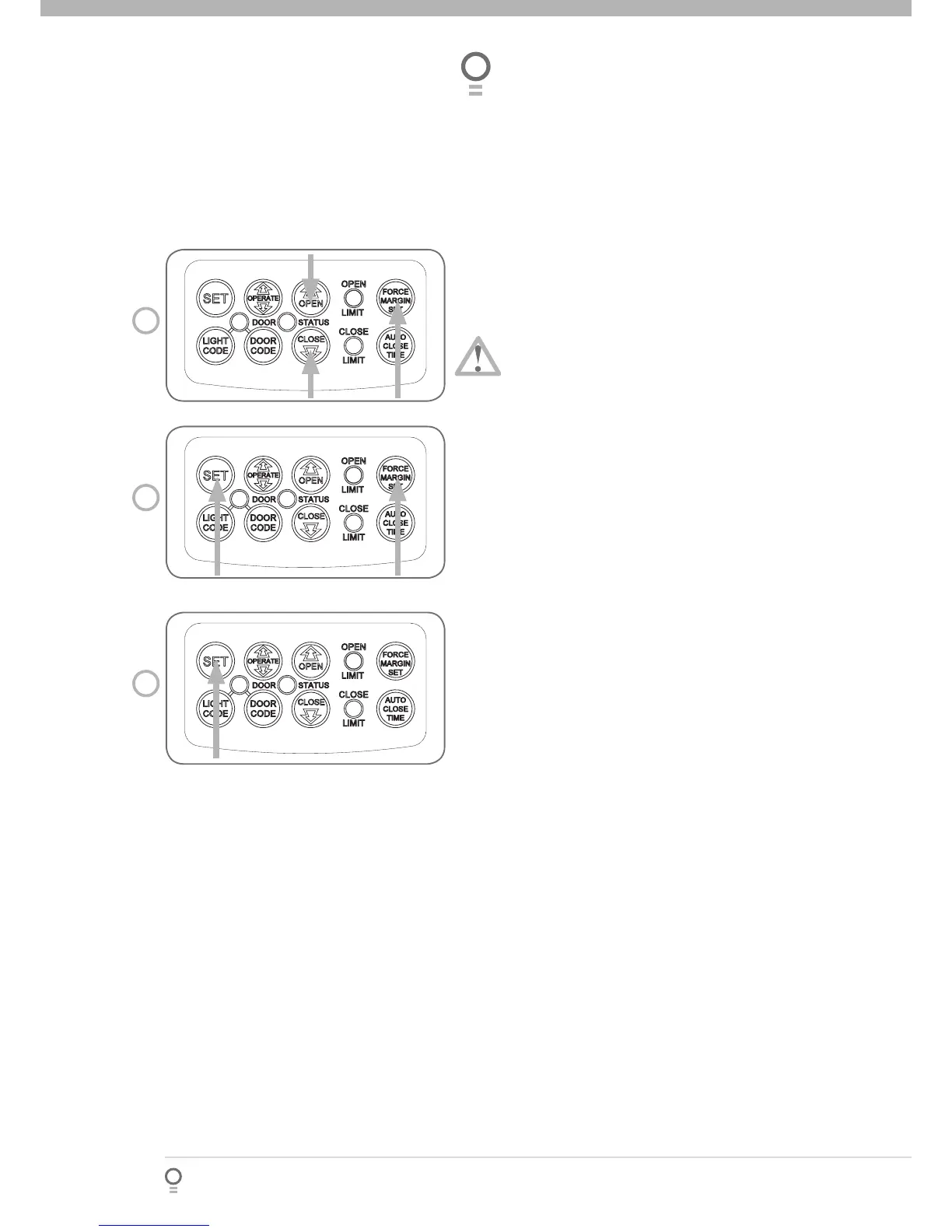
Hold down FORCE MARGIN SET button (Fig. 17)
While holding the FORCE MARGIN SET button,
press the OPEN button. Each press increases the
force margin.
The OPEN LIMIT LED will fl ash each time the OPEN
button is pressed to indicate a force increase
If the OPEN LIMIT LED fl ashes continuously
when pressing the OPEN button this
indicates that the maximum setting has
been reached.
Test the force again as per Steps 8.1 and 8.2
Step 9.2 - To Decrease Force Pressure
Hold down FORCE MARGIN SET button (Fig. 17)
While holding the FORCE MARGIN SET button,
press the CLOSE button. Each press decreases the
force margin.
The CLOSE LIMIT LED will fl ash each time the CLOSE
button is pressed to indicate a force increase
If the OPEN LIMIT LED fl ashes continuously
when pressing the OPEN button this
indicates that the maximum setting has
been reached.
Test the force again as per Steps 8.1 and 8.2.
Step 9.3 - To Recall Factory Set Force
While holding down the FORCE MARGIN SET button, press the SET button for two (2) seconds (Fig.18).
Release both buttons. The default setting should now be recalled.
Step 9.4 - To Recalculate Force Margins
Press and hold the SET Button for two (2) seconds, the beeper will sound once (Fig. 19).
The door will start to move and re-calculate force margins. The door can move between the open and close
limit positions up to four (4) times (depending on the position of the door and the power up condition).
A single beep will be heard once the process is complete.
Test the force again as per Steps 8.1 and 8.2.
a.
b.
c.
»
d.
a.
b.
c.
»
d.
a.
b.
a.
b.
c.
d.
Adjusting Safety Obstruction Forces
17
fi g
18
fi g
19
fi g








 To Next Page