Avantik Cryostat QS11 / QS11UV
Avantik
36 Commerce St.
Springfield NJ 07081 / USA
387 779 - English
60
5-4 CLEANING THE COOLING
LAMELLA
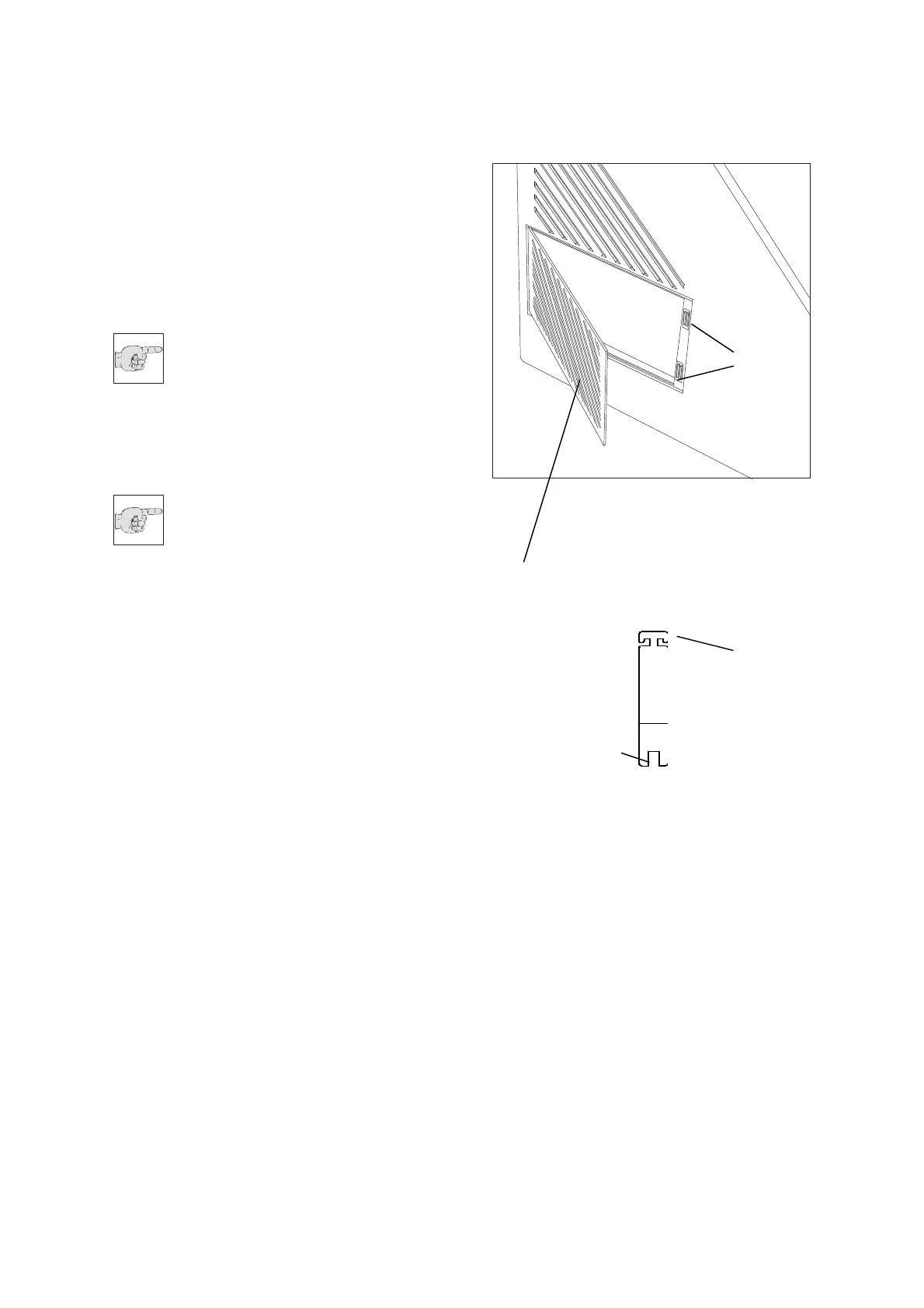
• Open the cleaning opening via the
attached tool (fig. 29.1).
• For this, insert the tool through one of the
middle ventilation slots.
• Turn the tool by 90° so that the t-shaped
holder latches into the adjacent slots.
• Pull the tool to open the grid (fig. 28.1) of
the cleaning hole.
Note:
The grid of the cleaning hole is kept
on the right side by a magnet (fig.
28.2) an is inserted on the left side.
• Remove the dust from the cooling lamella
by means of a commercially available
vacuum cleaner.
Note:
Carry out this cleaning in regular
intervals. Thus extending the
lifetime of the compressor.
Fig. 28
Fig. 29
1
1
2
2


 To Next Page