Avantik Cryostat QS11 / QS11UV
Avantik
36 Commerce St.
Springfield NJ 07081 / USA
387 779 - English
41
UVC
min
3000
UVC
min
3000
UVC
min
3000
2-8 MODULE U (OPTIONAL)
The Cryostat can be additionally equipped with
the Module U. The Module U consists of an UV
lamp and a controller unit which is used to
adjust the disinfection time. When the Module
U is activated, the Cryostat chamber is
radiated with a germ-reducing UV light. This
allows quick disinfection during processing and
is even possible at temperatures down to -35
°C
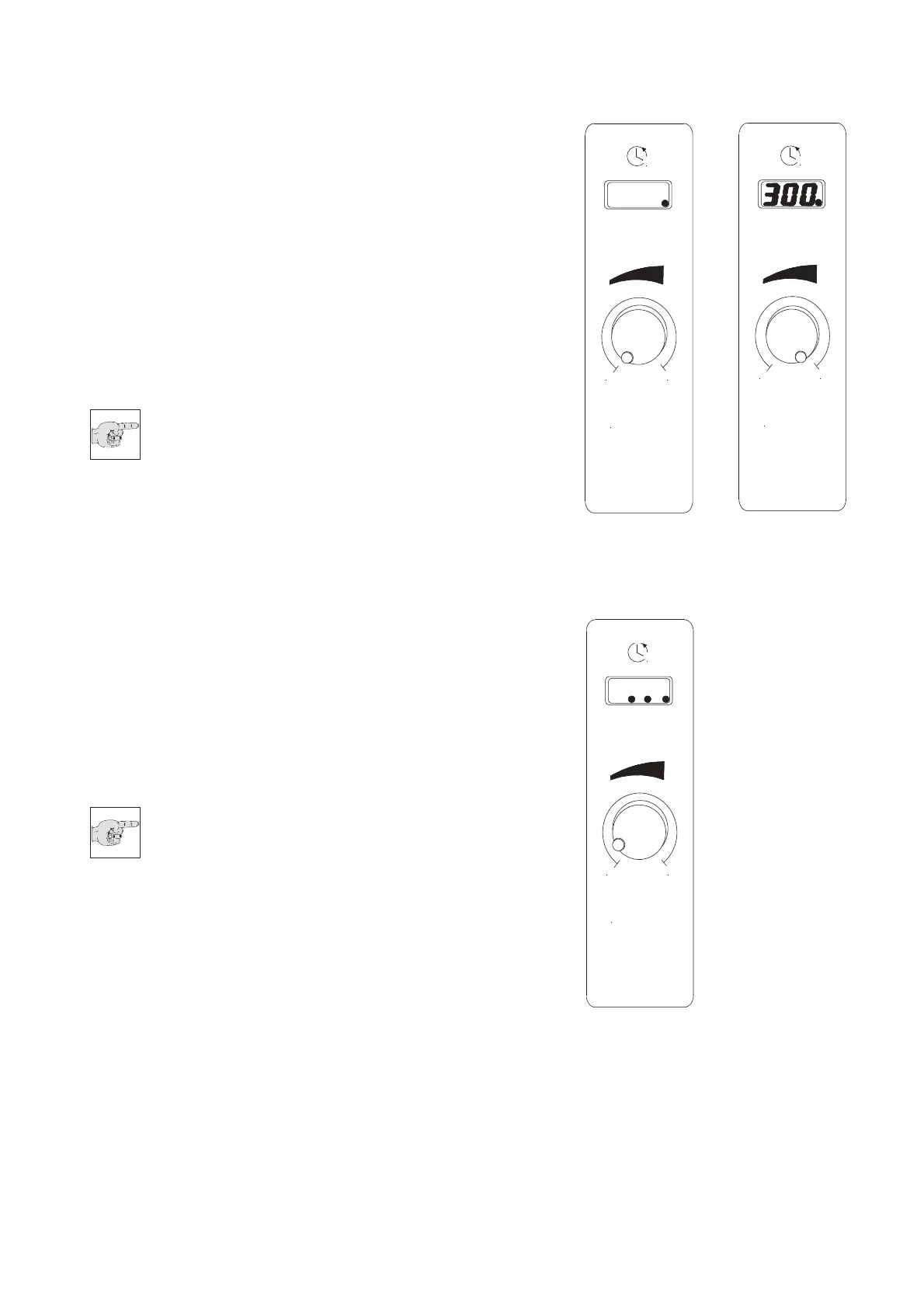
• The UV-unit is ready for use when the blue
LED dot in the lower right corner at the
display is active (Fig. 24.b).
Note:
Before activating the disinfection, fold
away the anti-roll guide system and
remove carefully the section waste
from the chamber.
Adjusting the disinfection time:
• The duration of the UV radiation ca
n be
adju
sted, in one minute steps, from 1
minute up to 300 minutes.
• By turning the regulator knob (Fig. 24.c)
clockwise, the disinfection time is set.
• If no further adjustments at the regulator
are made within 2 seconds, the timer for
the UV disinfection-process starts and the
LED dot in the display is blinking.
• The UV lamp inside the chamber is
activated and the timer starts.
• The timer counts down and the remaining
time is indicated on the display.
Note:
The disinfection time can be re-
adjusted by any time. To increase the
disinfection time, turn regulator
clockwise, to decrease the disinfection time,
turn the regulator anticlockwise.
• After the selected disinfection time is up,
three LED dots on the display are shown.
This informs the user about an
accurate
disinfe
ction process. (Fig. 24.d). The UV
lamp is switched off automatically.
Interrupt disinfection cycle:
• To interrupt the disinfection cycle, open the
cryostat chamber lid. Note that the
selected time is still counting backwards.
Fig. 24.b Fig. 24.c
Fig. 24.d


 To Next Page