7 — Appendices
7 - 12 Service Instructions RP-A301CE/RP-A351CE/RP-A355CE
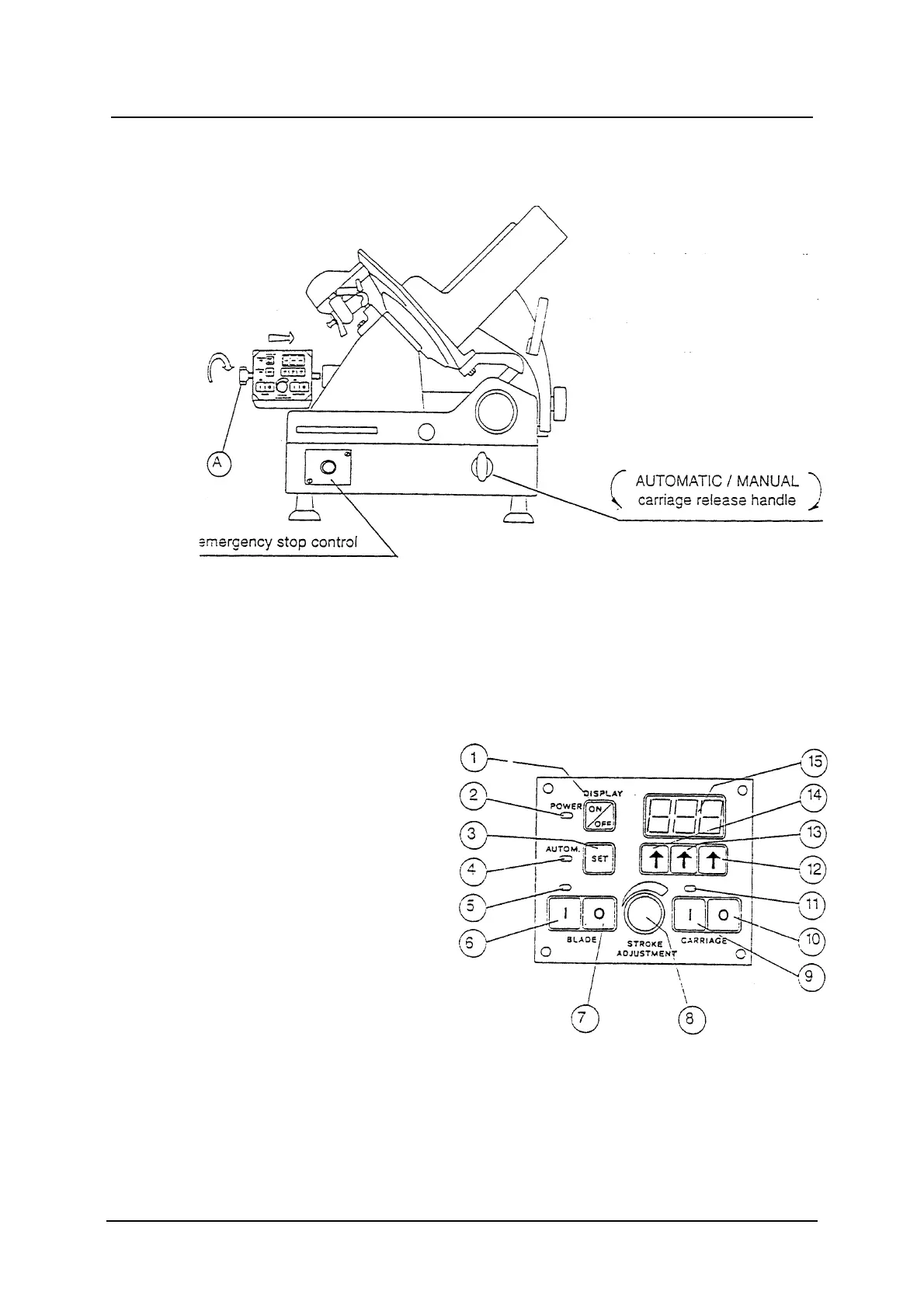
1 Fit the slice counter device on its bracket by turning the handle (A) clockwise.
2 Adjust the inclination of the device, according to your needs, before firmly
fastening the handle (A).
List of controls
1 On-off slice counter switch
2 Power supply lamp
3 No. of slices preselection
pushbutton
4 Automatic service lamp
3 Blade working lamp
6 Blade start pushbutton
7 Blade stop pushbutton
8 Stroke adjustment knob
9 Product holder start pushbutton
10 Product holder stop pushbutton
11 Product holder working lamp
12 Units preselection pushbutton
13 Tens preselection pushbutton
14 Hundreds preselection pushbutton
15 Display
Slice counter fitting



 To Next Page