7 — Appendices
Service Instructions RP-A301CE/RP-A351CE/RP-A355CE 7 - 19
Installation
The slicer must be placed on a flat, no sliding
and stable surface fit for bearing the weight.
A 800 mm high working table is advisable.
Verify that nothing stops the feed carriage
travel and that it is easy to load the product.
The machine must be near a socket.
Check that the external voltage corresponds
to the data on the label and that the socket
has the earthing.
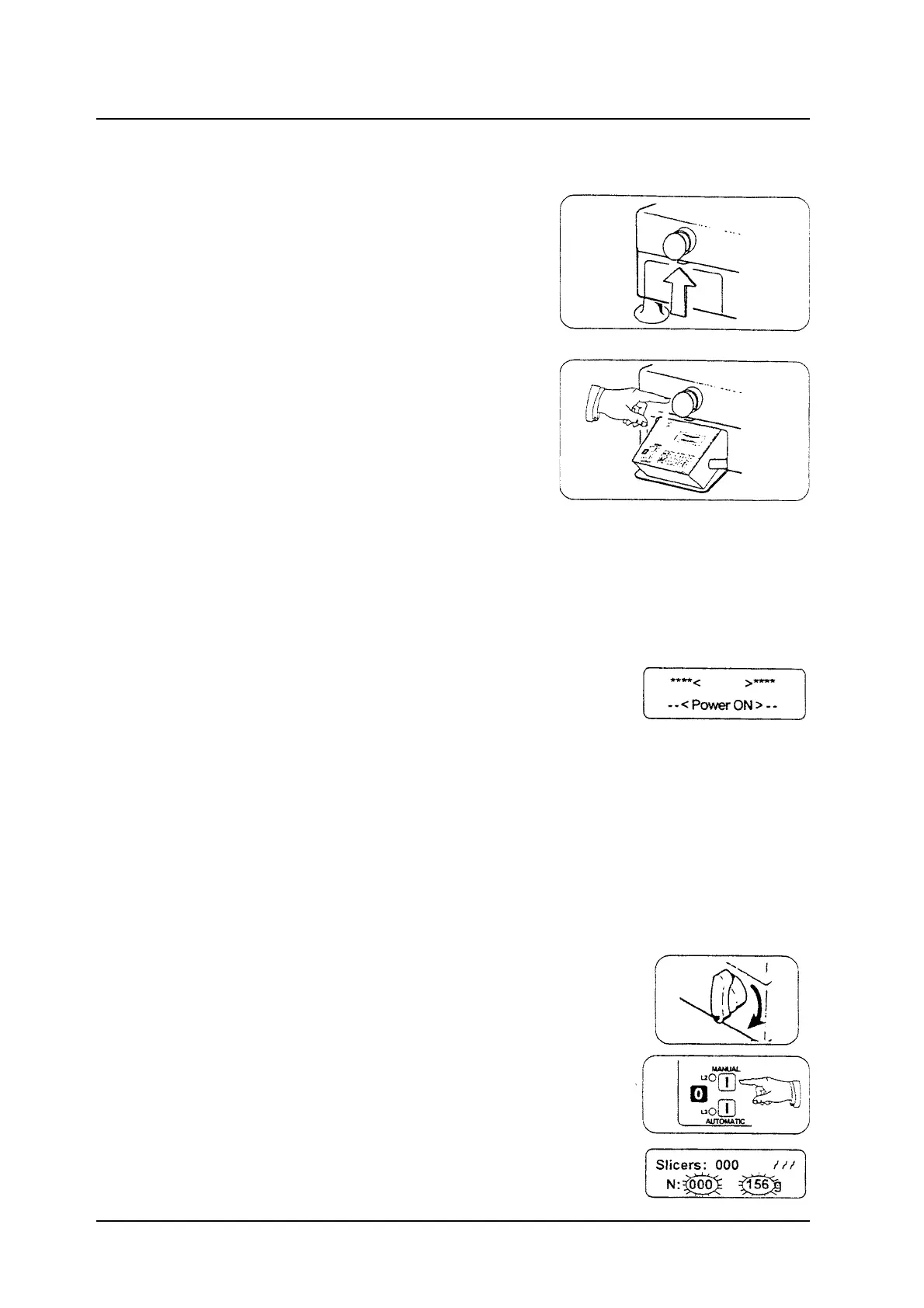
Pushing the small lever up the “Programmable
Portioner” drawer opens, and it goes
down automatically.
Pushing the emergency button, the machine
stops working immediately; turn the button to
right to go back to the normal working.
Operation
Connecting the machine to the socket, the
external tension is revealed and at the end of the
initialisation cycle the Programmable Portioner
turns off.
Pressing the ON/OFF button, the programmable
portioner turns on and for a few seconds it
visualises the <Power ON> message.
In this condition, led L1 on, the Programmable
Portioner is ready for the working selection
(pause).
Manual operation
Turn the carriage release handle 180 to right.
Press the MANUAL button to start the blade (led
L2 on).
Put the slices of product on the product holder;
immediately on the display it will be visualised the
weight and the slice number.
After working press the O button.



 To Next Page