How to Send Your Image to SharePointOnline
SharePoint Online, a platform within Microsoft Office 365, is a cloud-based
service provided directly by Microsoft.
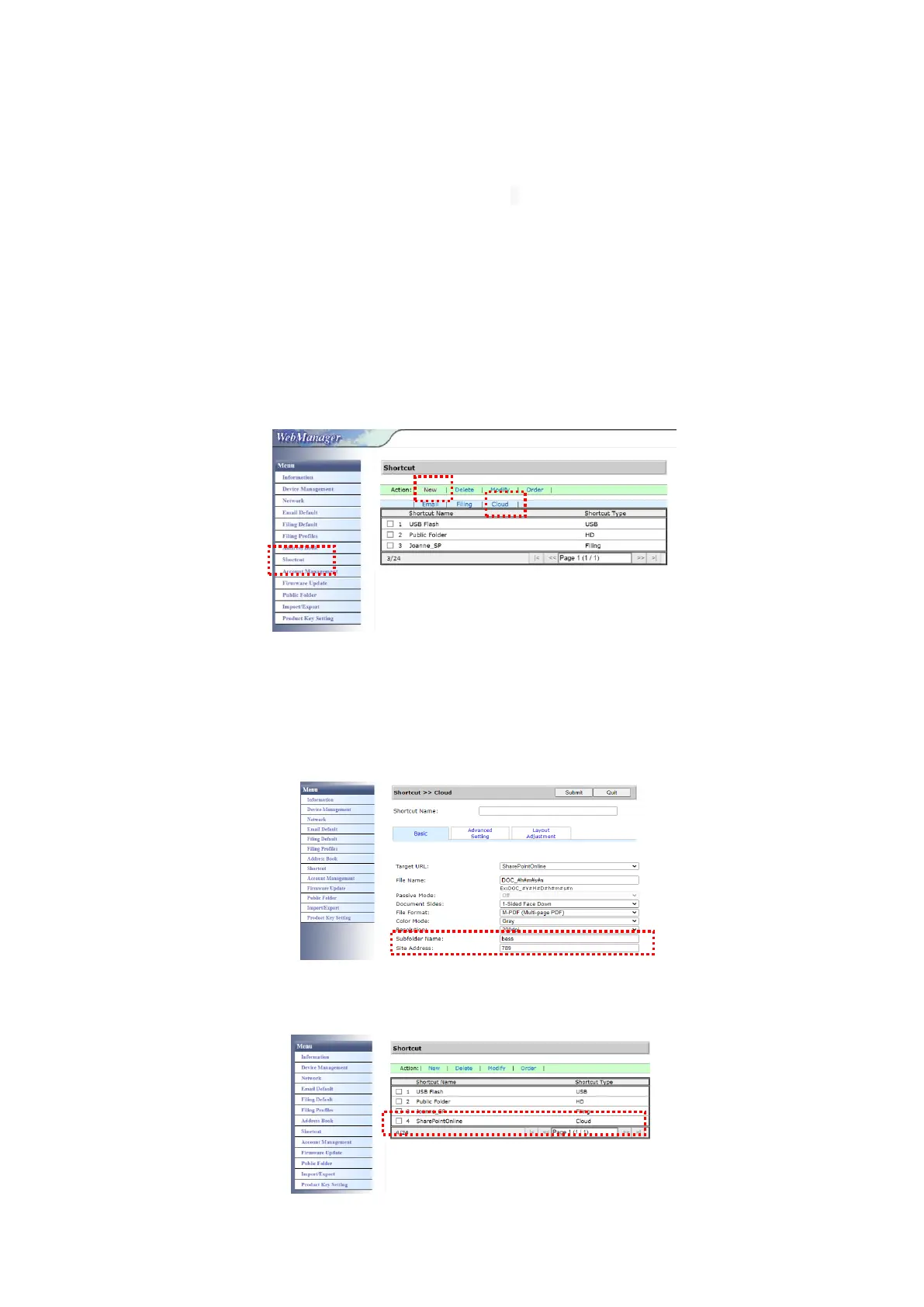
To set SharePointOnline Setting:
1. Open your browser and type and IP address of your scanner. An embedded
webpage appears.
2. Login the page to acess more settings with default user name and
password – admin.
3. Click [ShortCut]>[New]>[Cloud] in succession to create a new ShorCut to
speed up the process.
4. Enter your Shortcut Name. For example, ShortPointOnline.
5. Select [SharePointOnline] from the [Target URL] field.
6. Enter your subfolder name to store the image. For example, bess. (You can
create next subfolder by adding “/”, for example, bess/invoice.
7. Enter your site address (group name). For example, 789. Or using default
site address to be stored in [Group website] site.
8. Click [Submit] to complete the settings.
9. If succesful, a new SharePointOnline will be added to the list as indicated in
below.



 To Next Page