PAGE 20
Putting into Operation
3.3 Earthing of the system
For EMC reasons an earthing via the earthing screw of the system must be car-
ried out in either case.
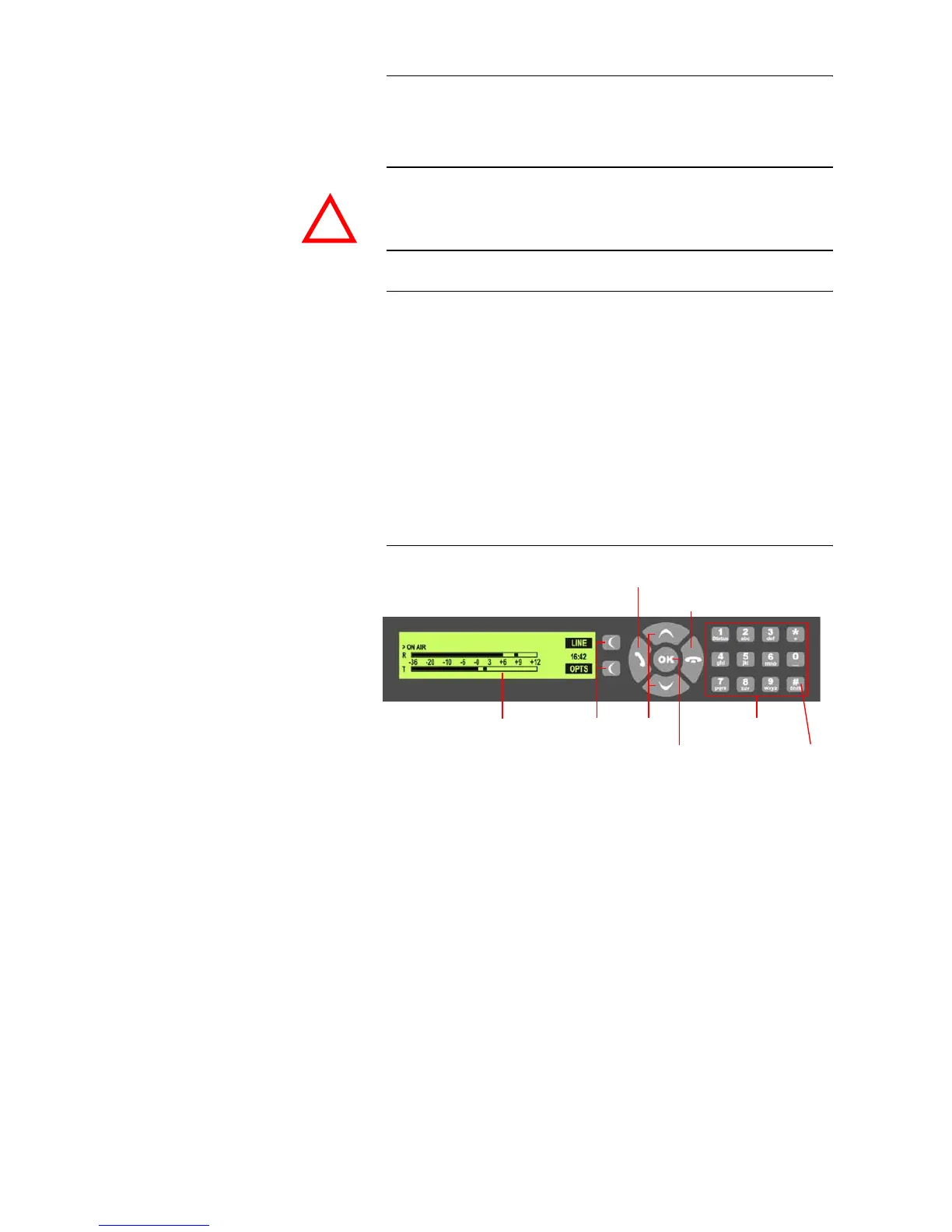
3.4 Operating elements on the front side
The system has an illuminated graphical display with a resolution of 160 x 32
Pixels and 21 operating buttons.
On the right next to the display there are two softkeys whose current func-
tions are indicated on the display. In the middle there are two buttons for nav-
igation (selection upwards/downwards), two buttons for accepting/drop-
ping calls as well as an
OK
button. The numerical pad supports in addition to
the numericals
0...9
also the ’
*
’and ’
#
’button. For entering text the numerical
pad can also be used as a normal keypad.
The operation is similar to standard mobile phones.
FIG. 3 OPERATING ELEMENTS ON THE FRONT SIDE
ATTENTION Earthing
A lacking earthing can cause functional deficiencies within the unit.
!
Softkeys Navigation
buttons
Initiate call/
Accept call
Drop/
Lock Line/
Keypad for dialling/
Text entry
B Channel
Shift
( ISDN only)
Confirm
entry/
Graphical
display
Status window
Main Menu



 To Next Page