PAGE 35
Windows PC Software
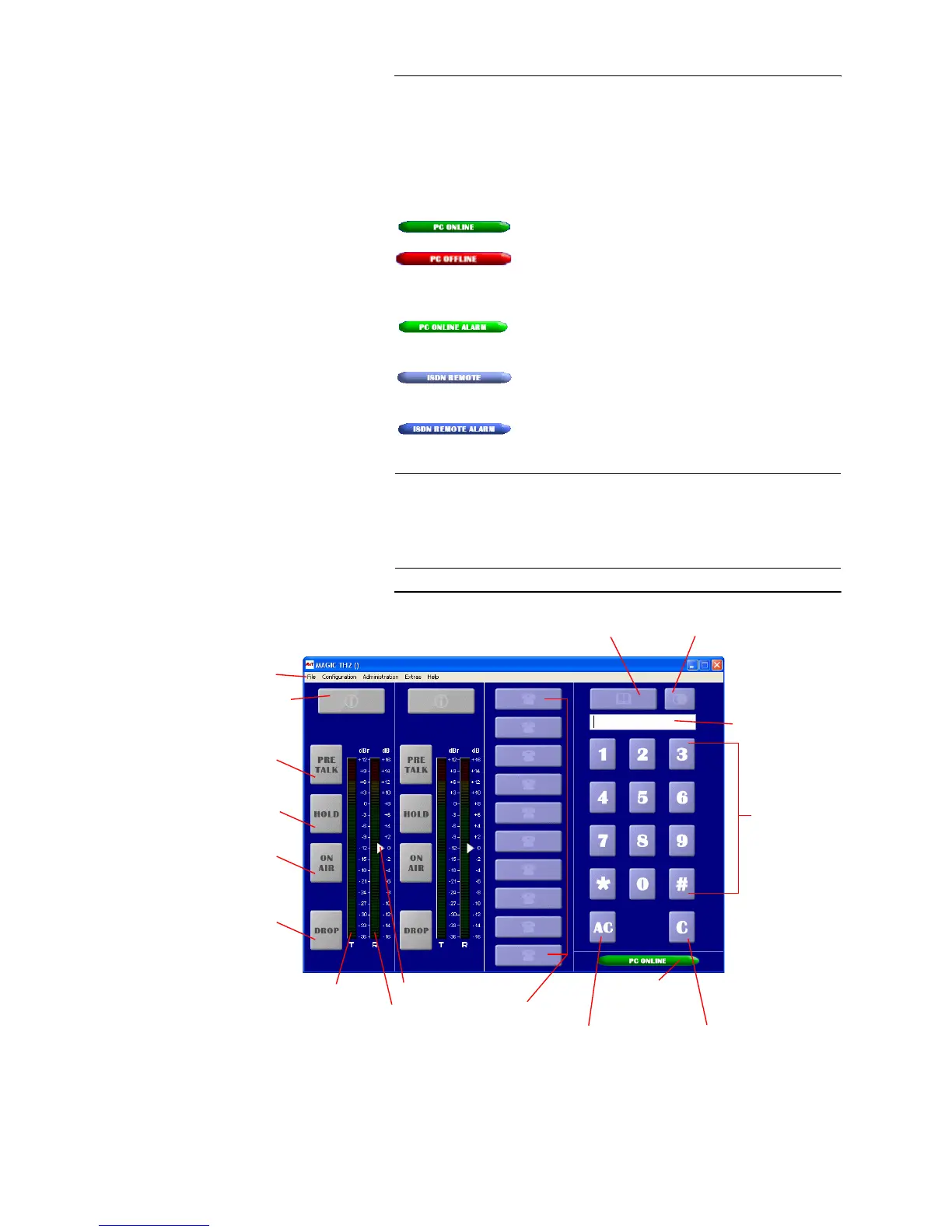
5.4 The MAGIC TH2 main window
After starting the MAGIC TH2 Software, the main window is displayed auto-
matically (see Fig. 8).
The connection status between PC and system is displayed in the bottom right
corner of the window:
PC ONLINE: Connection is okay.
PC OFFLINE: Connection with PC is faulty
Following further status messages are possible:
PC ONLINE ALARM: Upcoming alarm
(see System Monitor, green-dark green blinking)
ISDN REMOTE: A remote connection exists
(red-white blinking)
ISDN REMOTE ALARM: Upcoming alarm in remote
system (blue-dark blue blinking)
FIG. 8 MAIN WINDOW OF THE MAGIC TH2 SOFTWARE
NOTICE
If the connection is faulty, please check the following points:
– External power supply of the system is plugged in (display available)
– Serial 1:1 cable is connected with PC and system
– Correct COM port and correct baud rate are selected in the software (Con-
figuration
→ COM Port, see Page 69)
Status of the
PC connection
Caller Information
(Name, Phone Number)
Menu bar
PreTalk
Hold call
On AIR
Drop/
Transmitting level
Received level
Level control
Quick Dial keys
Numerical Pad
Delete entry
Delete last cypher
Phone number display
Phone book
Redialling
(Last 10 phone numbers)
Lock Line
Caller Preselection



 To Next Page