BASIC OPERATION
15
4. BASIC OPERATION
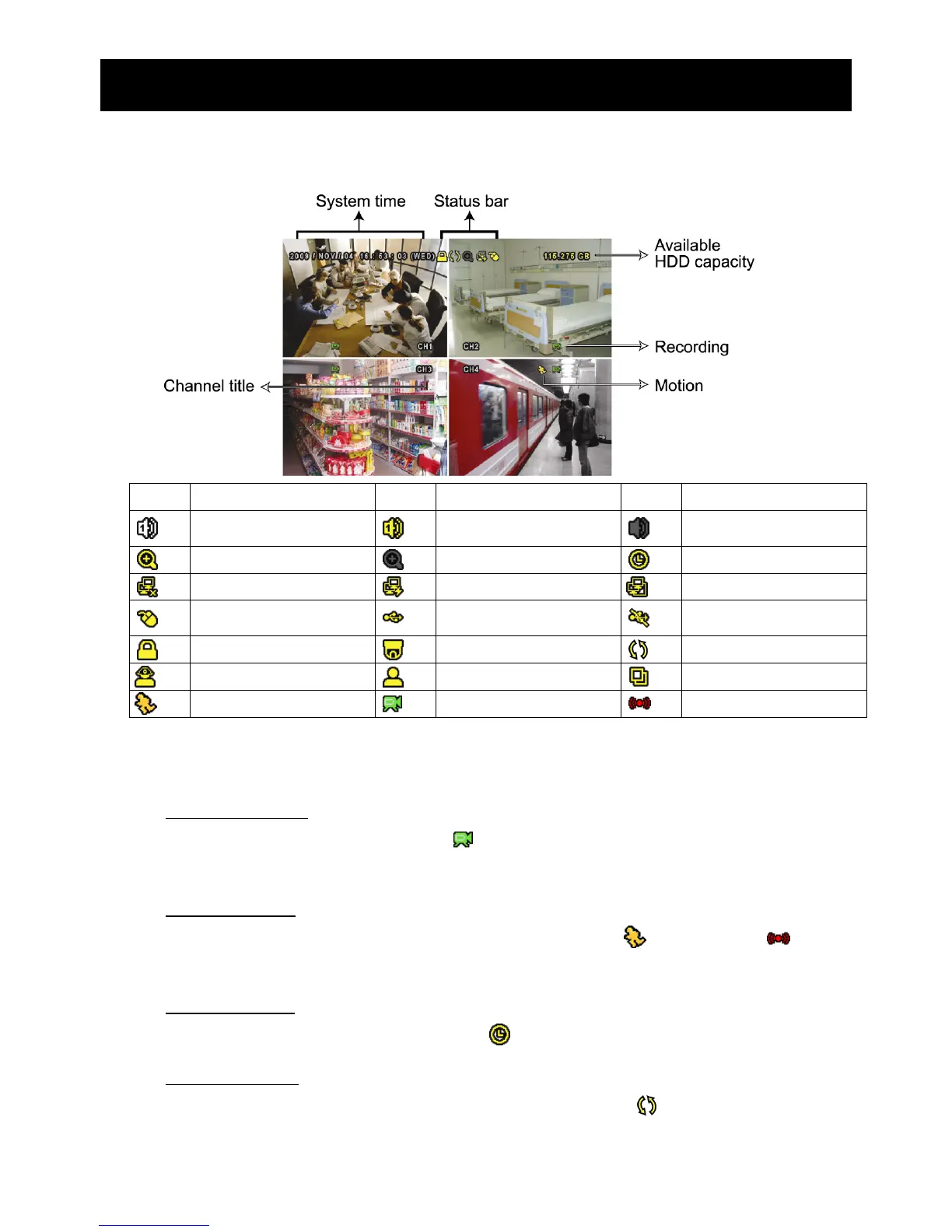
4.1 Live Page
Icon Function Icon Function Icon Function
Live audio channel (1~4)
Playback audio channel
(1~4)
Audio channel off
Digital zoom on
Digital zoom off
Timer recording
Network disconnected
Internet connected
LAN connected
USB mouse connected
USB flash drive / device
connected
No USB device
connected
Key lock
PTZ mode on
HDD overwrite
Administrator
Operator
Sequence
Motion
Recording
Alarm
4.2 Record Icon
1) Manual Recording
By defaults, manual recording is on (
) when the DVR is powered on and a HDD is
installed.
2) Event Recording
When the motion detection or alarm is on, the motion icon (
) or alarm icon ( ) shows
on the screen for any motion or alarm event.
3) Timer Recording
When timer recording is on, you will see “ ” on the screen.
4) HDD Overwritten
Be defaults, the HDD overwritten function is set to ON, and “ ” will be shown on the
screen.



 To Next Page