30 ChroMate
®
Microplate Reader Operator’s Manual Rev. Q
Edit a Curve (Continued)
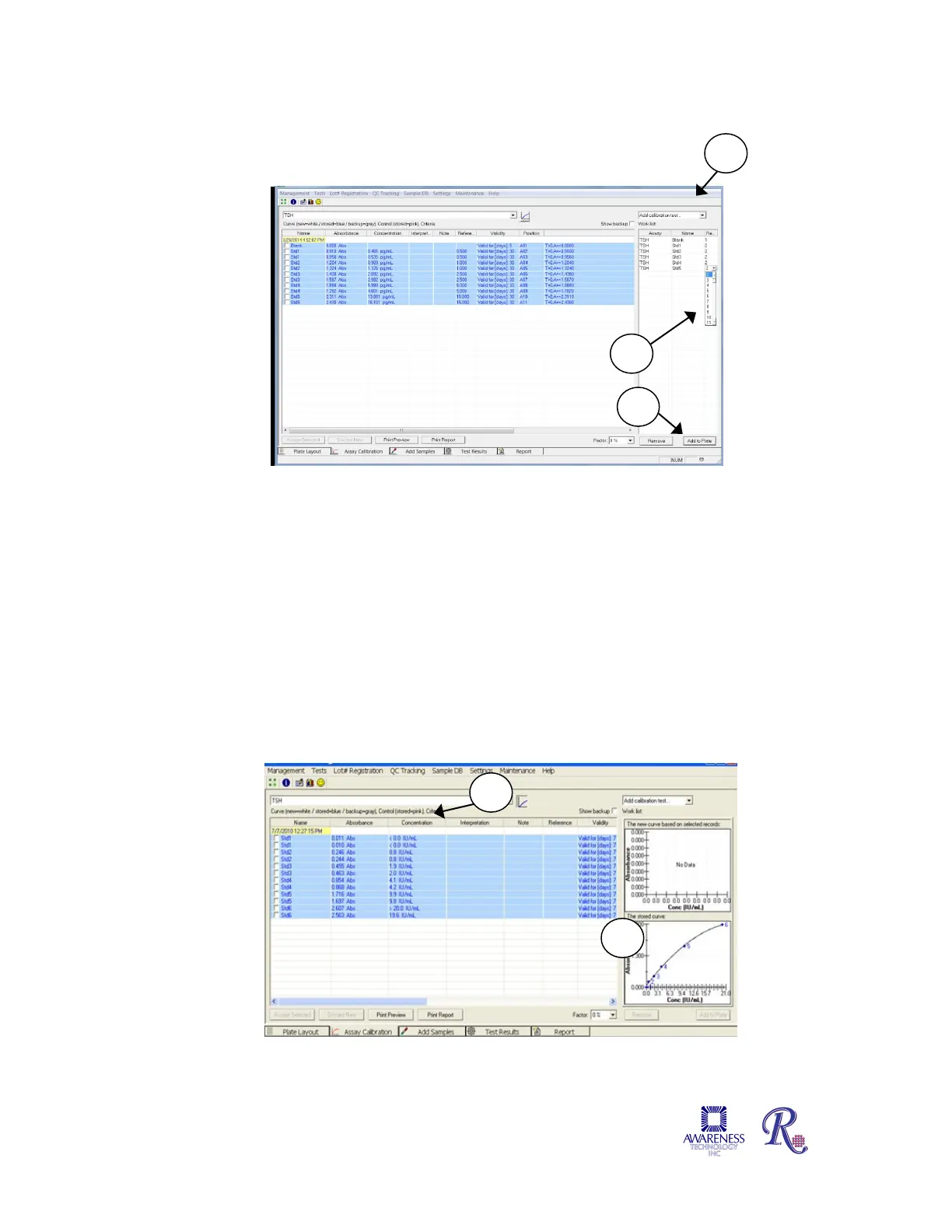
Change the repetition numbers by using menu options (2).
Figure 4.2.2.3-2 Work list displayed
Select Curve from the drop-down menu. Press the New Curve button once for each blank
and calibrators you intend to run. Select Controls to add controls.
Press Add to Plate (3); the Plate Layout tab will open. A new assay with a correct valid
curve is automatically accepted. The option to change the curve is available. If the curve is
invalid, it will need to be selected and then accepted before it can be used to calculate
sample concentrations. Click on the Accept button to accept results.
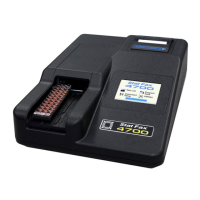
Once the calibrators have been moved into the Assay Calibration Tab they need to be
accepted. However, selecting the calibration does not make the calibration graph visible.
Select the assay from the drop down list (Figure 4.2.2.3-3) and then click on the graph icon
(1) and the stored calibration curve will display on the right hand side of the screen (2).
Figure 4.2.2.3-3 Example Standard Curve Example


 To Next Page