ENG
-VIDEOWALL SETTINGS & VIDEOWALL SECTION SETTINGS -
Usually, VideoWalls video formats are not standard.
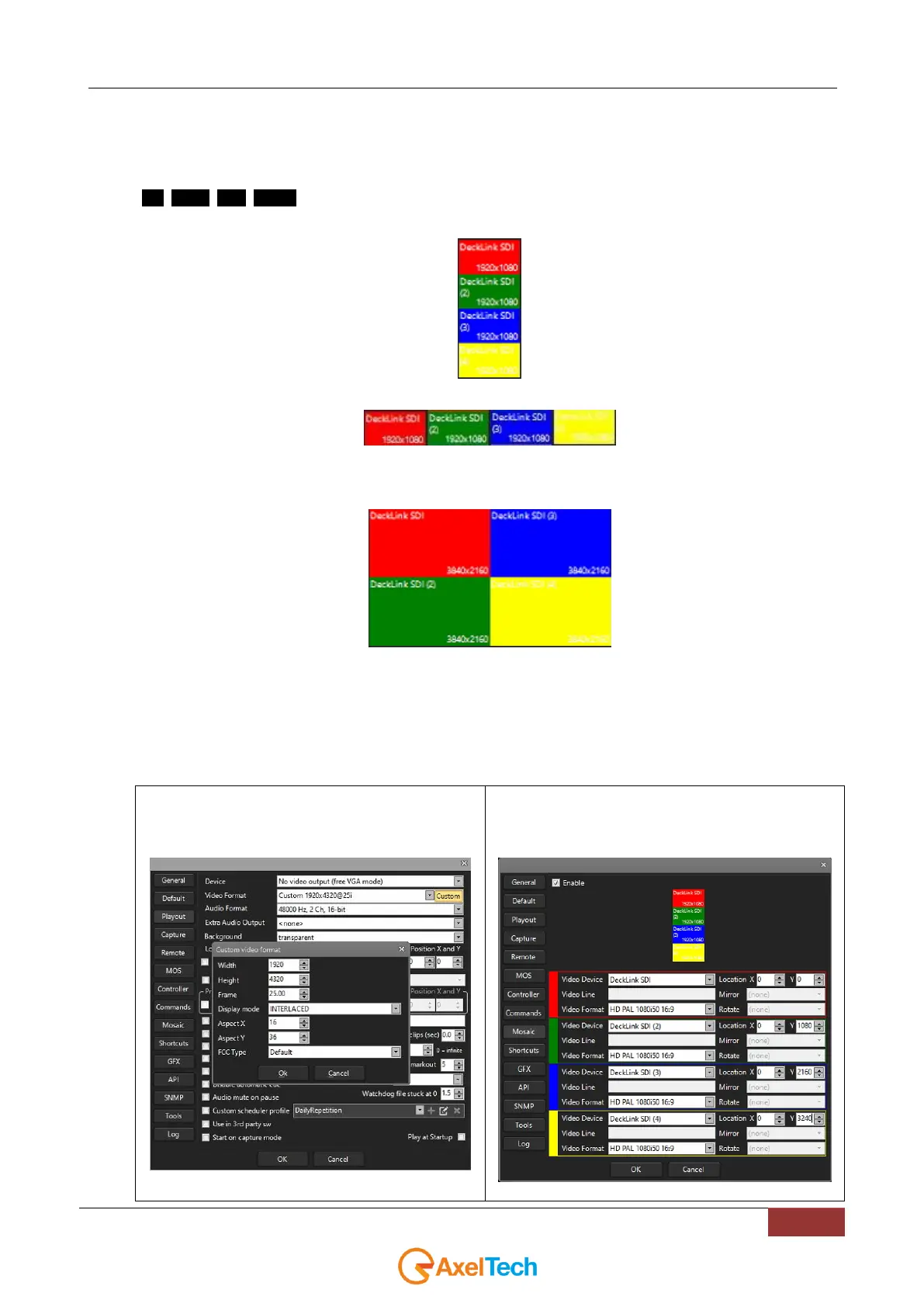
If our unit of measurement was a 1920x1080 monitor, in our mosaic case (designed with 4 different and customizable
outputs: red, green, blue, yellow) you can use the following 3 VideoWalls video formats:
- 1920x4320 (16:36) (1x4)
- 7680x1080 (64:9) (4x1)
- 7680x4320 (64:36) (4x4)
By clicking on Youplay > Settings > Playout > Video Format = CUSTOM you will be able to set the desired
customizable Video Format for the whole VideoWall(you can set one of the 3 previous formats 1920x4320 7680x1080
7680x4320).
The 3 results obtainable in the case of a DECKLINK QUAD in relation with the 4 available mosaic outputs will be 1x4,
4x1, 4x4:
1. 1x4 VIDEO WALL
Youplay > Settings > Playout > Video Format =
Custom = 1920 x 4320 (16:36)
Youplay > Settings > Mosaic
(1x4)



 To Next Page