AXISA1001NetworkDoorController
•Forinformationabouthowtoconnectotherwires,suchaspowerwirestolocks,readers
andotherdevices,seethemanufacturers’instructions.
5.Collectallthewiresneatlyandsecurethemusingthesuppliedcableties.
6.Labelthecablesforfuturereference.
7.IfusingPoweroverEthernet,connectthenetworkcabletothenetwork.
8.IfusingEthernetandexternalpower(10–30VDC),connectthenetworkcabletothe
networkandconnectpower.UseaSELVcompliantlimitedpowersource(LPS).Formore
information,seePowerConnectoronpage25.
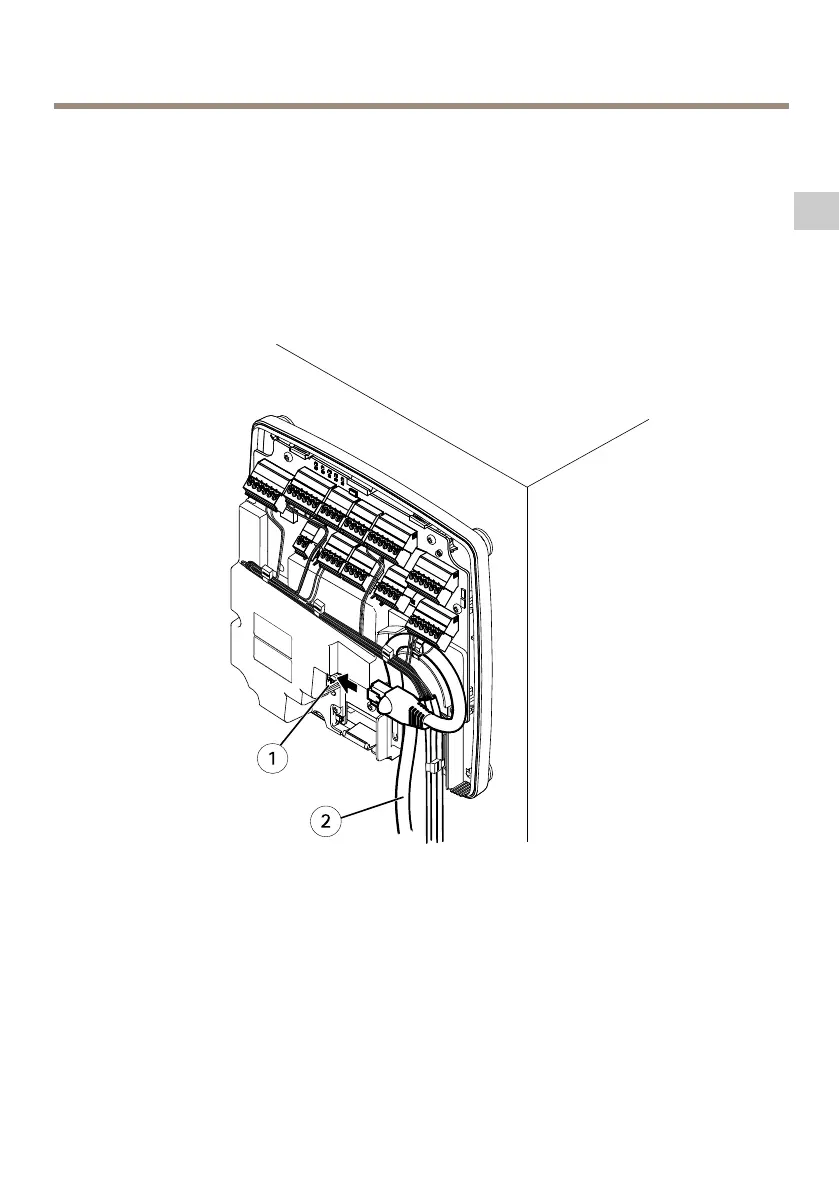
Cableconnectionexample
1
Networkconnector
2
Networkcable
9.MakesurethattheLEDsindicatethecorrectconditions.SeeLEDIndicatorsonpage18.
10.Attachthecovertothebaseandtightenthecoverscrew.
35
EN



 To Next Page