AXISA1001NetworkDoorController
3.Stripthecablesandwiresasrequiredusingacrimptool.
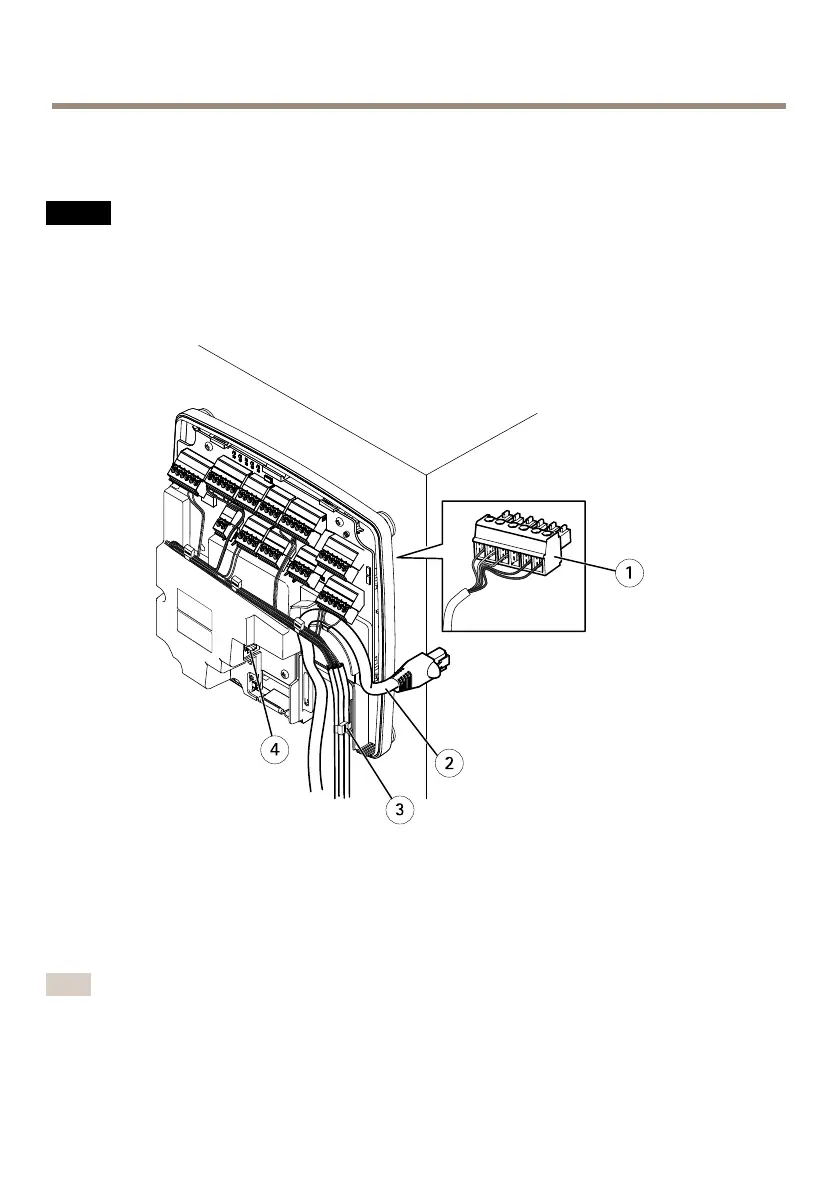
4.Connectthewiresbetweenthedoorcontrollerandthelocks,doorsandotherdevices.For
moreinformationabouttheconnectorsandtheirspecications,seepage18andpage22.
NO NO
NO
TICE TICE
TICE
•Makesureallthewiresareconnectedcorrectly.Incorrectwiringcouldcausedamage
totheproduct.
•Makesuretousewiresthatmeettherequirements.Formoreinformation,seeWireArea
onpage22and,forULcompliance,RequirementsforCompliancewithUL2946thEdition7.
Cableconnectionexample
1
6-pinplugconnector
2
Networkcable
3
Cabletie(4x)
4
Networkconnector
Note
•Fordevicesthathavebeenconguredintheproduct’shardwarecongurationpages,use
thehardwarepinchartasaguideonhowtoconnectthepins.Formoreinformation
abouthardwarecongurationandthehardwarepinchart,seeConguretheHardwareon
page41.
34



 To Next Page