16
CAUTION
Do not operate the console keys using a sharp object such as a mechanical pencil
or screwdriver. Doing so might damage the console.
Make sure that the selected analog output type matches the input type of the
receiving device. The receiving device could be damaged if the analog output
type selection is incorrect.
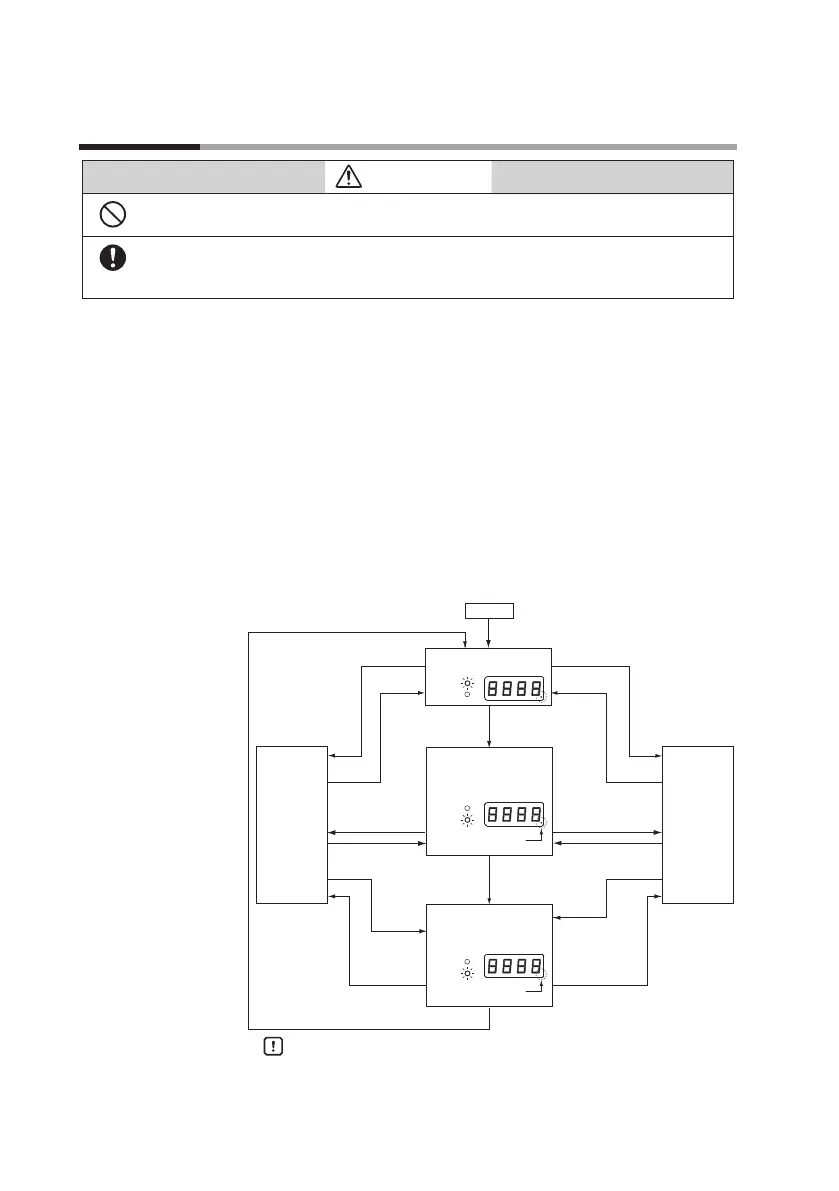
State transition
With the default settings, when the power is turned on the display
indicates the instantaneous flow rate and the instantaneous flow rate
indicator lights up.
Using the CMS0500 as an example, the following diagram shows the
relationship between mode transitions and the display.
If the measurement mode (function setup
02
) is set to
0
1
, or
02
,
when the [DISP] key is pressed while the instantaneous flow rate is
being shown, the last 4 digits of the totalized flow or reverse-totalized
flow are displayed.
If the [DISP] key is pressed again, the first 4 digits of the totalized flow
or reverse-totalized flow are displayed. Pressing the key once more
restores the instantaneous flow rate display.
If at some point in the above-described actions the power is turned
OFF and then back ON again, the display status before the power was
turned OFF is restored.
Handling Precautions
• If the [MODE] key is pressed during setup, the setting returns
to its previous value.
• Leave the device powered up for about 30 minutes before
use to allow it to stabilize.
Power-on
Instantaneous ow rate
Function setup
mode
Parameter setup
mode
[MODE] key
[ENT] key
[MODE] key
[DISP] key
[DISP] key
[DISP] key
[DISP] key
[DISP] key
[DISP] key
[DISP] key
[DISP] key
[DISP] key
[MODE] key
Last 4 digits of totalized ow
or reverse-totalized ow
Dot indicator ON
First 4 digits of totalized ow
or reverse-totalized ow
Dot indicator OFF
L / min
X10L
L / min
X10L
L / min
X10L
[ ▼ ] key 3 seconds or more
+
[ENT] key
[ ▼ ] key held down
for 3s or more
+
[ENT] key
[ ▼ ] key held down
for 3s or more
+
Chapter 4. Operation


 To Next Page