21
Chapter 4. Operation
Parameter setup
If the key lock is ON, parameters cannot be changed.
Press the [ENT] key and [▼] key for 3 seconds or longer to change to
parameter setup mode.
If the function setup item does not relate to any parameters,
P---
will be displayed.
Normally, in parameter setup mode,
P-
_ _ will be displayed.
The last two digits on the display represent the parameter setup item.
Pressing the [▼] key displays the next item No., and pressing the [▲]
key displays the previous item No.
Press the [ENT] key when the desired item No. is displayed.
The current parameter will be displayed.
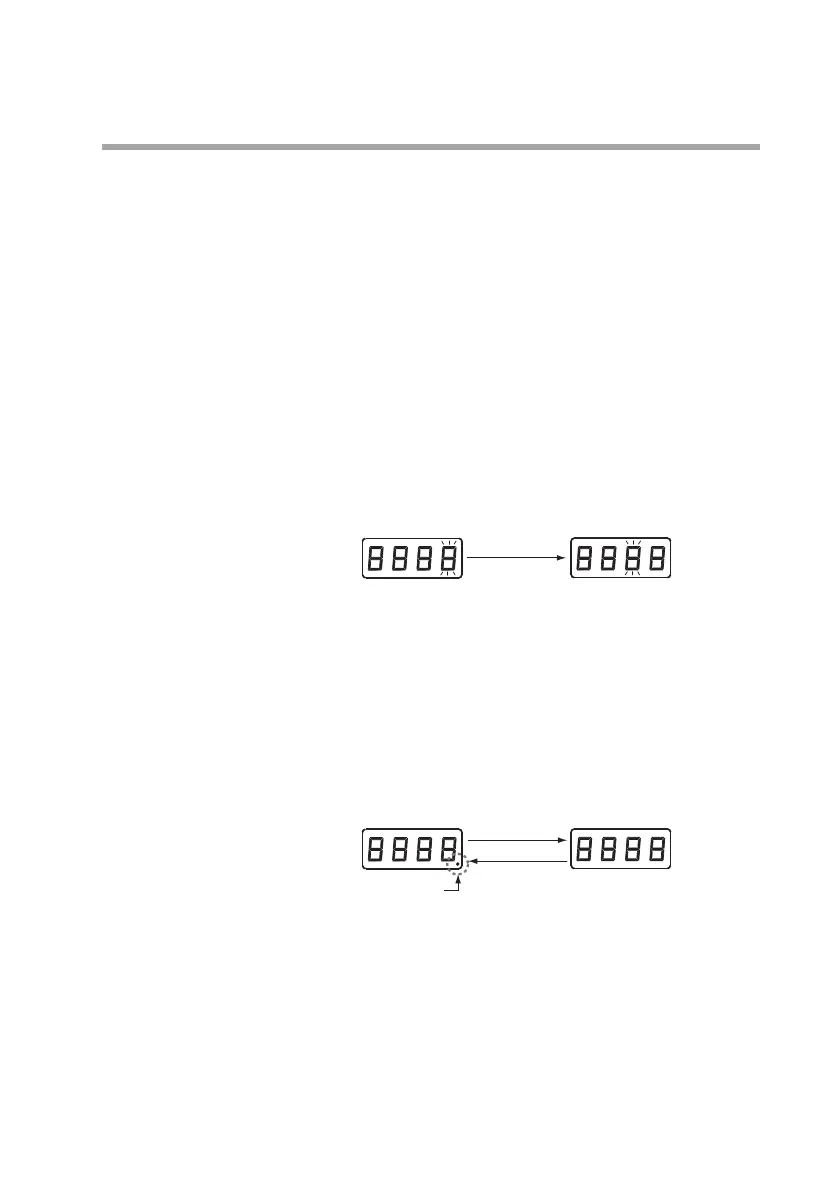
If the [ENT] key is pressed again, the last digit will begin blinking.
Pressing the [MODE] key moves the blinking digit to the left.
Change the value of each digit, using the [▲] or [▼] key.
To save the setting, press the [ENT] key.
If function setup items
03
and/or
04
are set to
03
or
04
, set an
8-digit value in
P-0
1
,
02
, and/or
07
.
In this case, the first 4 digits and the last 4 digits are alternately dis-
played when the keys are pressed as shown below.
The following pages show the parameter setup tables.
Parameters
P-0
1
to
P-0G
are displayed according to the function
settings.
[ MODE ] key
Last 4 digits
First 4 digits
Dot indicator
[ ▼ ] key
[ ▲ ] key


 To Next Page