17
Chapter 4. Operation
Function setup
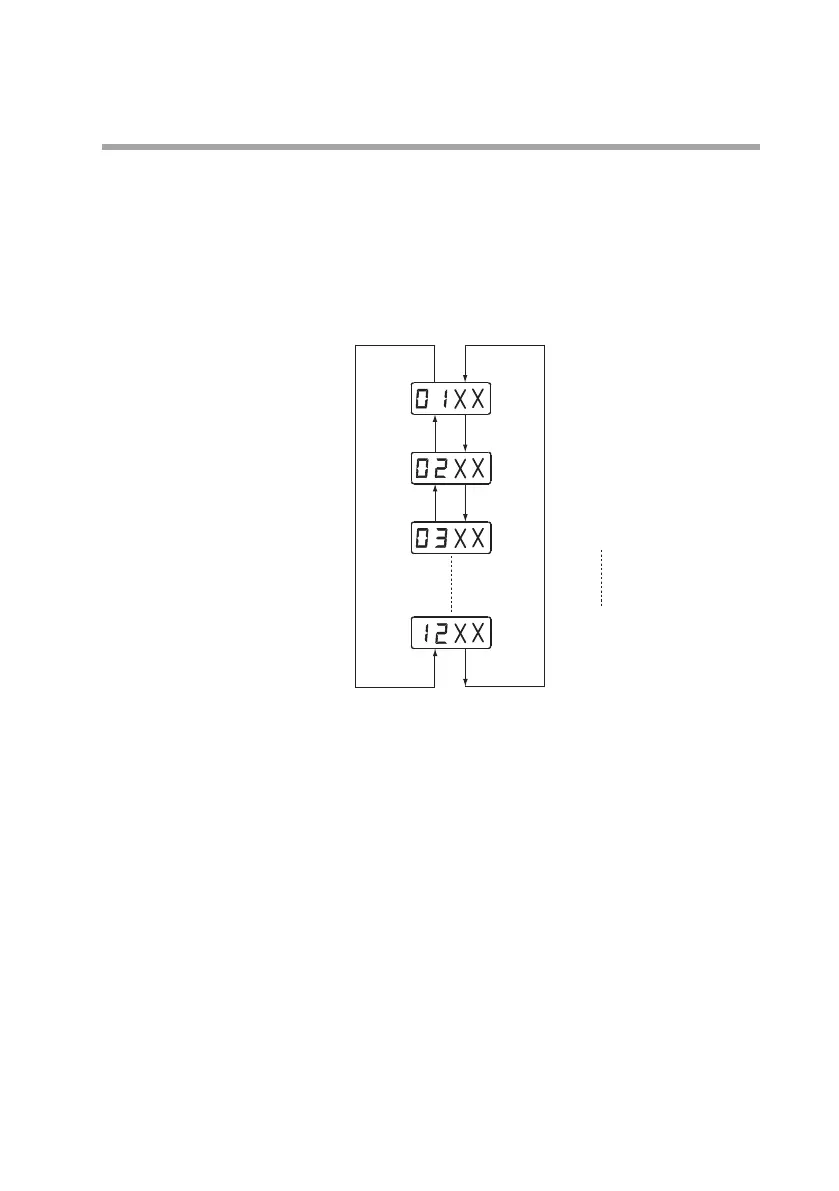
• To enter the setup mode, press the [MODE] key.
The first two digits on the display will begin blinking.
The first two digits show the function setup item No., and the last
two digits show the setting.
• Pressing the [▼] key displays the next item No., and pressing the
[▲] key displays the previous item No.
• While
12
*2
is displayed, pressing the [▼] key again returns the
display to
0
1
.
While
0
1
. is displayed, pressing the [▲] key again returns the
display to
12
.
*2
• When the first two digits display the desired setup item, press the
[ENT] key while the digits are blinking.
The setup item is selected, and the last two digits will begin blinking.
• Press the [▲] or [▼] key to select the desired setting to the last two
digits and then press the [ENT] key. All four digits will be lit.
• Check that the selected item and setting are correct.
• To continue setup, press the [MODE] key again and repeat these steps.
The function setup menu is shown on the next page.
*1. On communication models,
30
,
3
1
, and
32
are displayed, fol-
lowing
12
.
*2. On communication models,
32
is the last item.
[ ▲ ] key [ ▼ ] key
[ ▲ ] key [ ▼ ] key
[ ▼ ] key
Keylock
Measurement mode
Event 1 type
Low ow cuto
*1


 To Next Page