25
Chapter 4. Operation
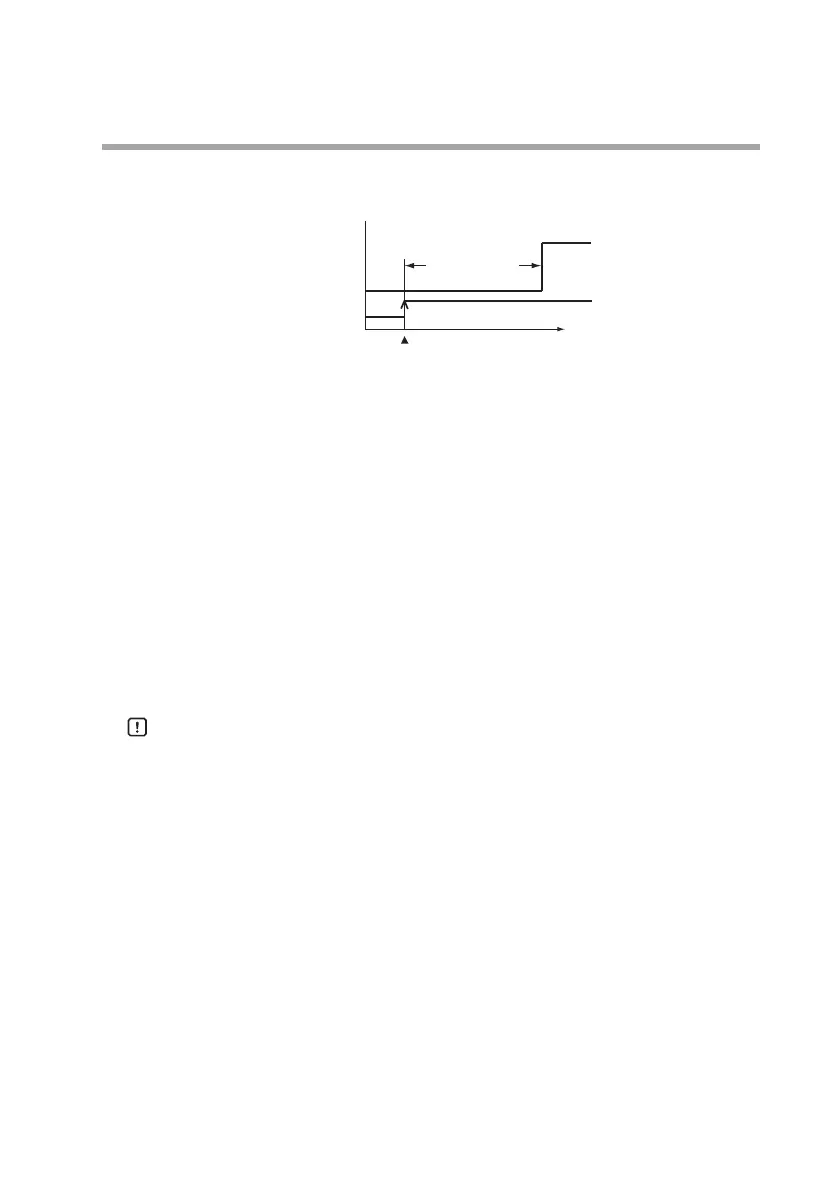
Event ON-delay
An ON-delay time (0 to 60 s) can be set for both events 1 and 2.
ON-delay time
Time
Event detection
Event output
Instantaneous
ow rate
OFF
ON
Event ON
Zero flow rate calibration
When the indicated flow rate is not zero even though the actual flow
rate is zero, if an incorrect sensor zero point is likely to be causing the
problem, execute zero flow rate calibration as shown below.
(1) Display the instantaneous flow rate or totalized flow.
(2) Press and hold the [ENT] key.
(3) After about 10 seconds,
0.
CAL
will begin blinking on the flow
rate display.
(4) Press and hold the [ENT] key again.
(5) After about 1 second,
0.
CAL
will stop blinking and remain lit. At
this time, the sensor output is regarded as zero.
(6) Pressing the [DISP] key restores the instantaneous flow rate or
totalized flow display.
Handling Precautions
• Before executing zero flow rate calibration, fill the flow path
completely with the gas, and make sure that the actual flow rate
is stable at zero.


 To Next Page