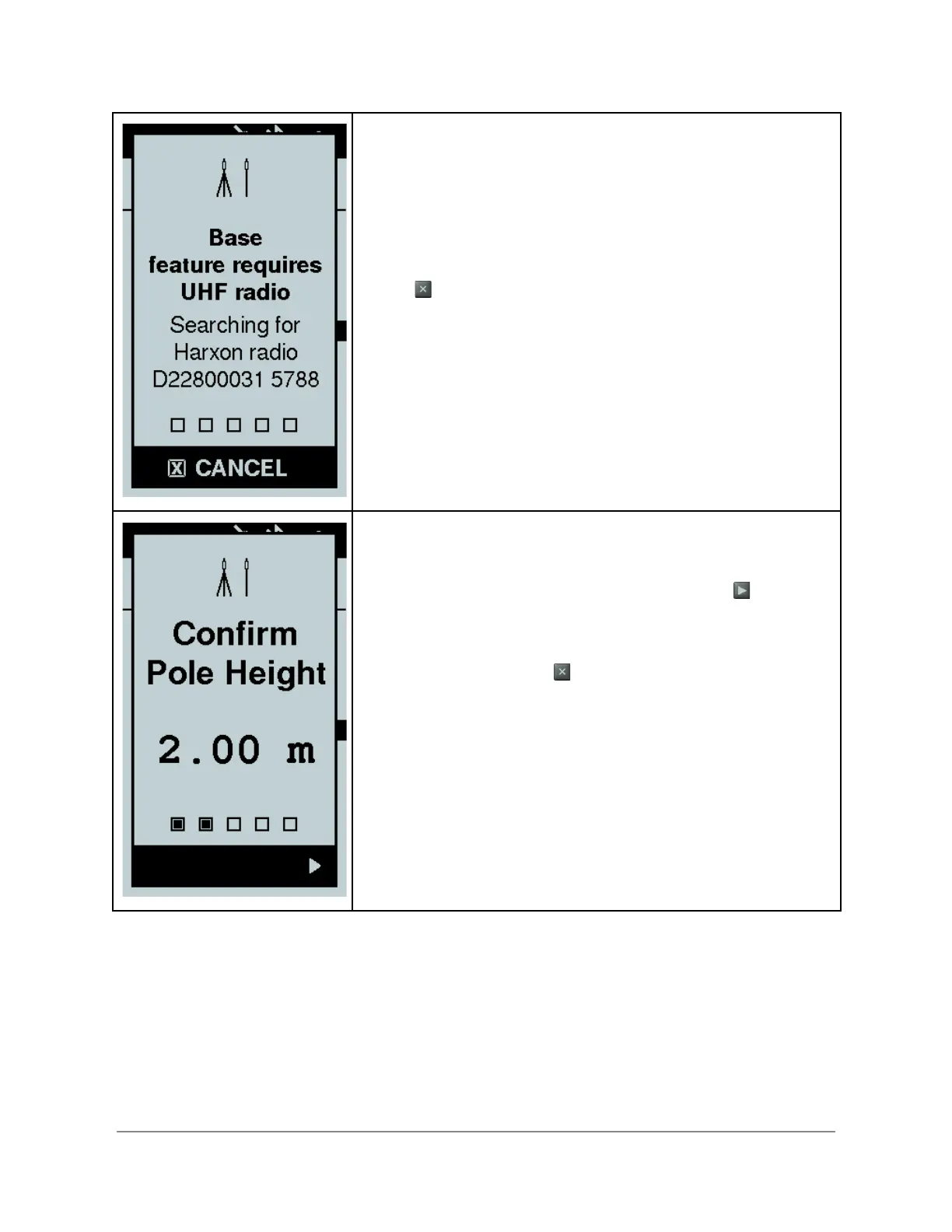
The Bad Elf Flex automatically attempts to restore the
Bluetooth pairing with the last radio it used. The display
shows the radio it is searching for and the serial number for
reference. This process takes 5-10 seconds and requires the
radio to be on.
If you want to pair with a different radio or are having any
issues pairing with your radio, Cancel by pressing the back
button and use the Bluetooth feature from the menu of the
Bad Elf Flex to establish a new pairing.
Once the Bad Elf Flex confirms Bluetooth pairing with a radio,
the checklist displays a confirmation of pole height.
If your pole height is correct, use the right button to
proceed to the next item in the checklist.
If your pole height is incorrect, cancel the checklist by
pressing the back button and use the Bad Elf Flex app on
your phone or tablet to change the default pole height.
Copyright © 2022. Bad Elf, LLC. 34
All Rights Reserved.


 To Next Page