R5905753 /17 DPxK-19B/23B/P68
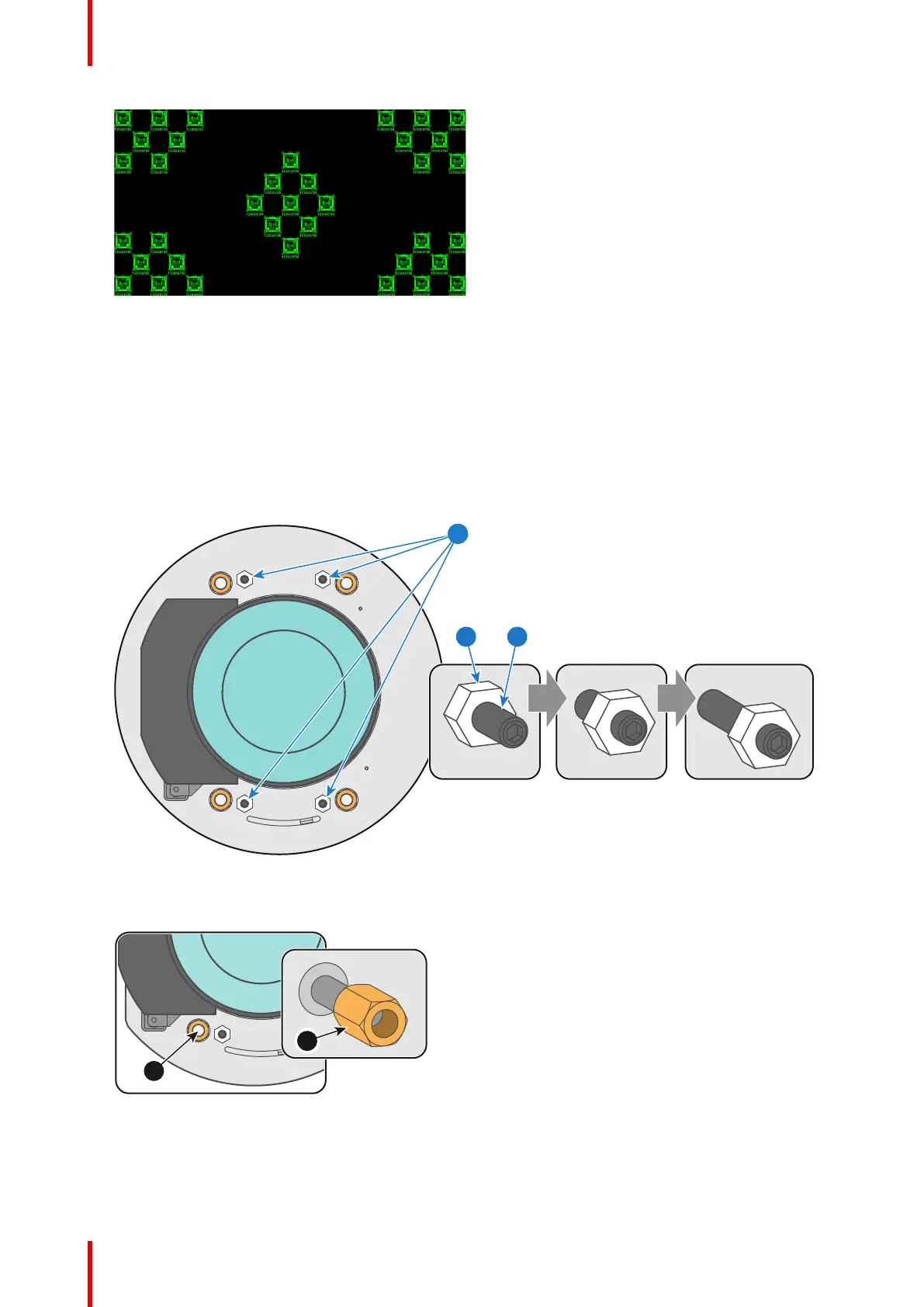
Image 5–14
5. Zoom the lens for maximum image on the screen (WIDE).
6. Is it possible to focus the center of the projected image?
► If yes, the Back Focal Length is OK.
► If no, the Back Focal Length needs realignment. Proceed with the next procedure.
How to adjust the Back Focal Length?
1. Unlock and loosen the 4 set screws (reference 11 Image 5–15) of the Lens Holder by 1 centimeter. Use a
10mm nut driver for the lock nuts (reference 21 Image 5–15) and use a 3mm Allen wrench for the set
screws.
Image 5–15
2. Fully loosen the Scheimpflug nut at the lower left of the Lens Holder (reference 4 Image 5–16). Use a
13mm nut driver.
Image 5–16
3. Turn the three Scheimpflug adjustment nuts, reference 1, 2 and 3 Image 5–17, until the front of the nut
(reference 5 Image 5–17) is equally aligned with the front of the threaded rod (reference 6 Image 5–17).
Use a 13mm nut driver.
Lenses & lens holder



 To Next Page