29
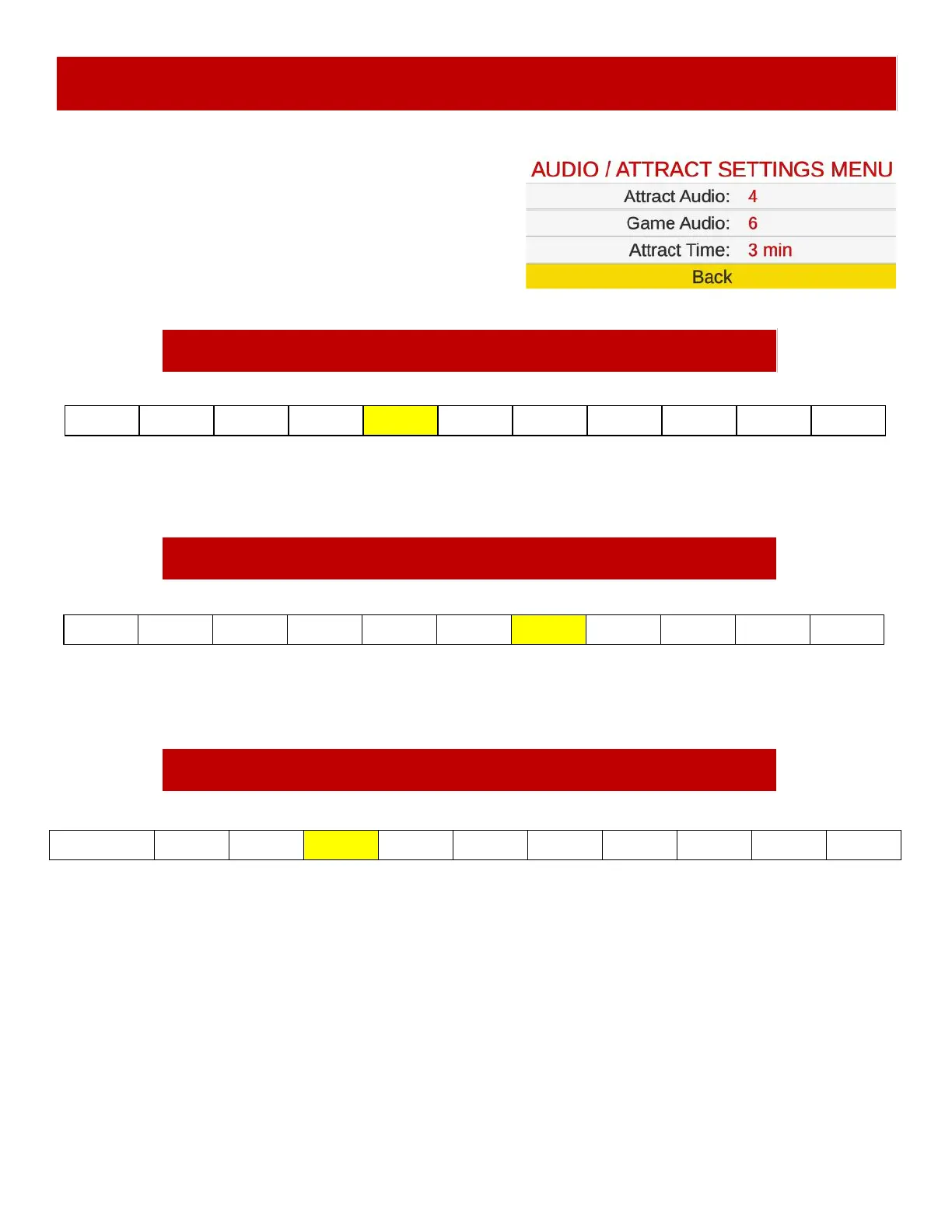
AUDIO / ATTRACT SETTINGS MENU
Off 1 2 3 4 5 6 7 8 9 10
Change selection with the “SELECT” Button. Default settings are highlighted in yellow below.
Change selection with the “SELECT” Button. Default settings are highlighted in yellow below.
Sets the time in minutes between attract sound cycles.
Sets the game’s playing volume. “Off” means the volume is off.
Off 1 2 3 4 5 6 7 8 9 10
1 2 3 4 5 6 7 8 9 10 Disabled
Attract Audio
Game Audio
Sets the volume level of the attract loop when the game is not being played.
“Off” means the attract volume is off.
Attract Time
Change selection with the “SELECT” Button. Default settings are highlighted in yellow below.
Scroll through the options by pressing the “MENU” button.
Change selection with the “SELECT” button.
Scroll to “BACK” and press the “SELECT” button to go
back to the main menu.
Default settings are highlighted in yellow below.













 To Next Page