37
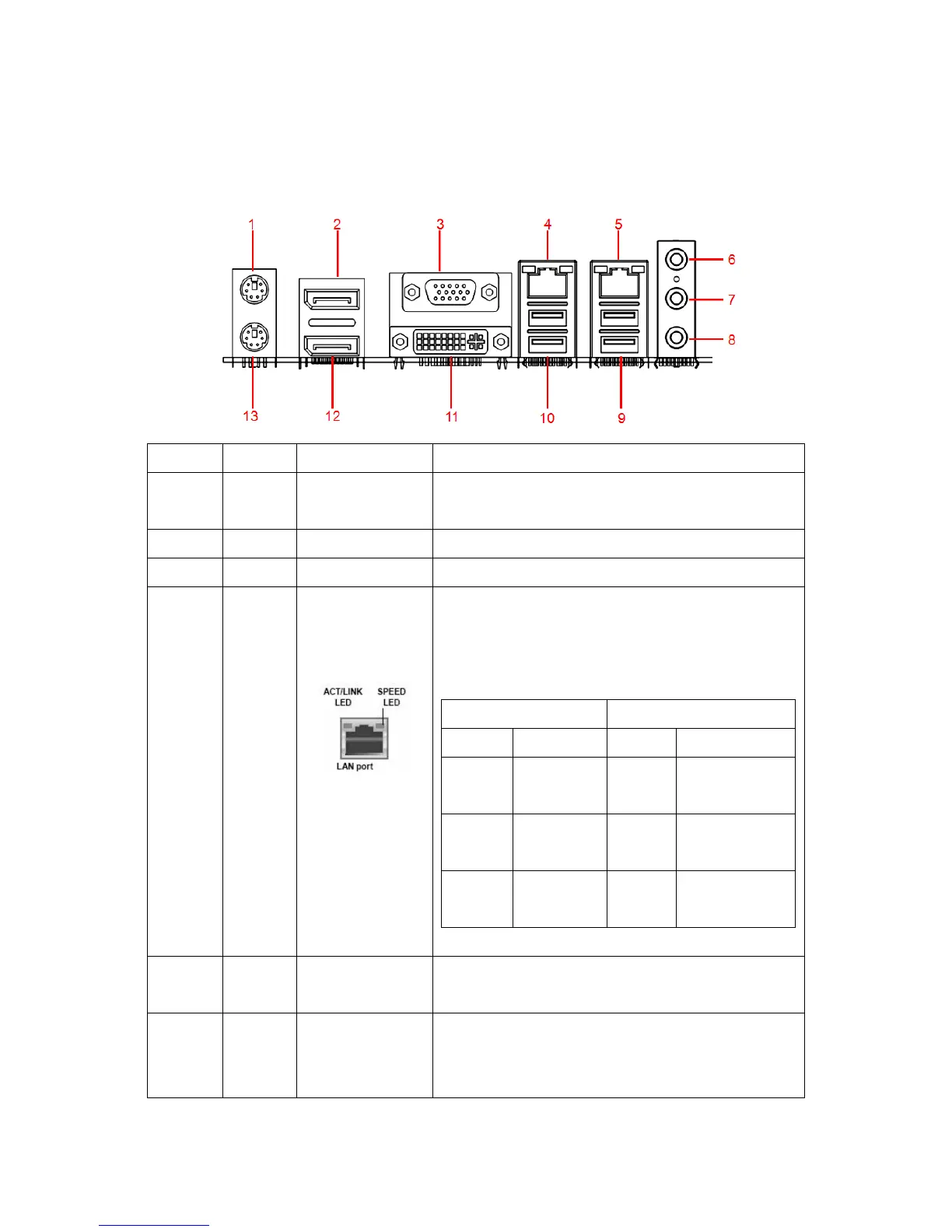
1.10 Back Panel
1.10.1
Back Panel Connectors
Item Name Function Description
1 KBMS PS/2 Mouse
Connector
The port is for a PS/2 mouse.
2 DP2 Display Port 2 Provides “displayport” type connection to monitor.
3 VGA VGA Video Port The VGA15-pin Connector.
4/5 LAN1/
LAN2
Gigabit LAN
(RJ-45)
Connectors
This port allows Gigabit connection to a Local Area
Network (LAN) through a network hub. Refer to the
table below for the LAN port LED indications.
ACT/Link LED Speed LED
Status Description Status Description
OFF No link OFF 10Mbps
connection
Orange Linked Orange 100Mbps
connection
Blinking Data
activity
Green 1Gbps
connection
6 AUDIO Line-in port
(Light blue)
This port connects a tape, CD, DVD player, or other
audio sources.
7 AUDIO Line-out port
(Lime)
This port connects a headphone or a speaker. In
4-channel, 6-channel, and 8-channel configuration,
the function of this port becomes Front Speaker



 To Next Page