75.5835.05 FALCON FAMILY 20190822 Page 3 of 475.5835.05 FALCON FAMILY 20190822 Page 3 of 4
3
X
X
XXS
0.5 s
XS
1 s
1
bi
A
S
2 s
2
uni
P
>
3 s
3
uni
AWAY
>
4 s
4
>
5 s
5
>
6 s
6
L
7 s
XL
8 s
XXL
9 s
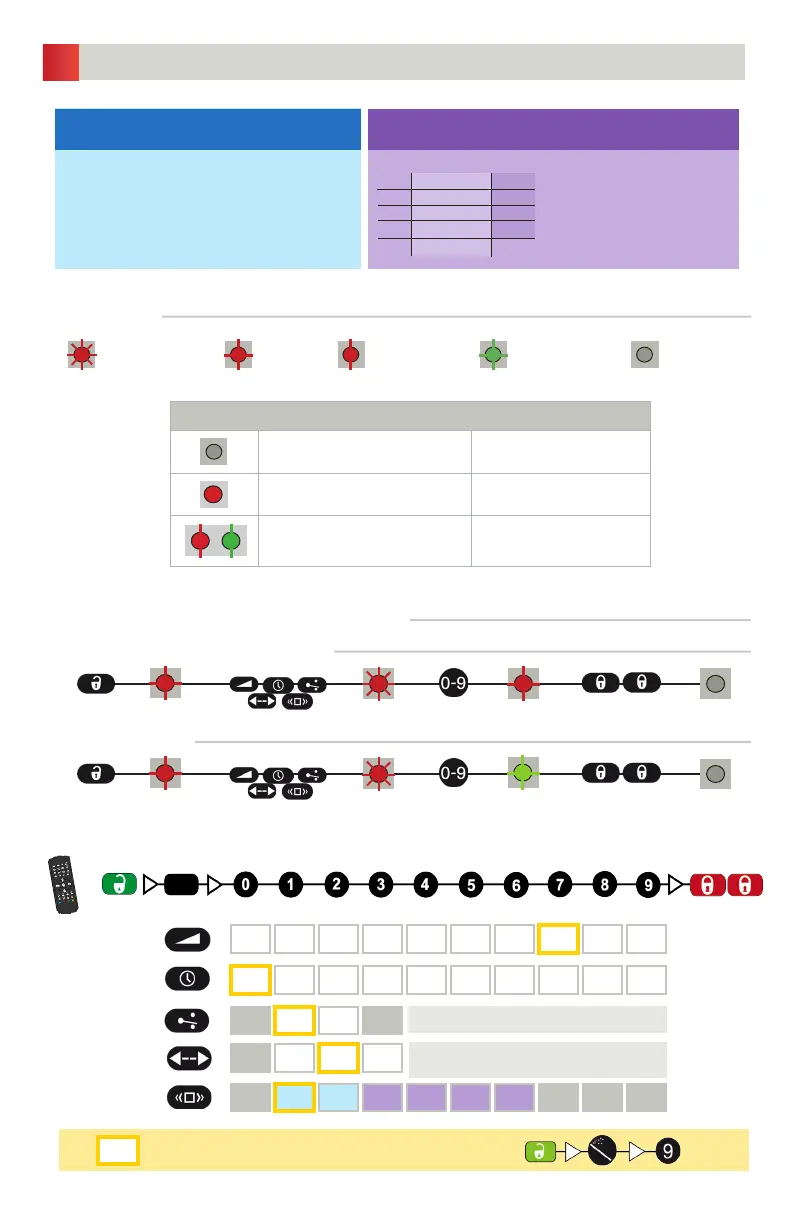
RESETTING TO FACTORY VALUES:
DETECTION FILTER (REJECTION MODE)
LED flashes quickly LED flashes
LED flashes slowly LED flashes x times
LED is off
LED SIGNALS
NORMAL MODE
no LED no detection
red detection
red & green blinking power on / learn
red
red
red
red
red
green
off
off
POSSIBLE SETTINGS BY REMOTE CONTROL
ADJUSTING ONE OR MORE PARAMETERS
CHECKING A VALUE
x = number of flashes = value of parameter
FIELD SIZE
DETECTION MODE
OUTPUT
CONFIGURATION
FACTORY VALUES
HOLD-OPEN TIME
DETECTION FILTER
bi = two-way detection
uni = one-way detection towards sensor
uni AWAY = one-way detection away from sensor
A = active output; relay energizes upon detection
P = passive output; relay de-energizes upon detection
Choose the correct detection filter for your application with the remote control or push buttons.
Detection of all targets
(pedestrians and parallel traffic are detected)
Detection only of vehicles moving toward the sensor*
(pedestrians and parallel traffic are not detected + disturbances are filtered)
1 = no specific filter
2 = filter against disturbances
(recommended in case of vibrations, rain etc.)
Value recommendations according to angle and height:
Always check if the chosen value is
optimal for the application.
The object size and nature can
influence the detection.
23 ft − 11.5 ft 8 ft
3 3
4 4
5 4
6 5
XL
-15°
-30°
-45°
+45°
* The vehicle detection filter increases the response time of the sensor.



 To Next Page