Checking that the running direction is correct
The direction of rotation can only be changed if no limit position has been set.
There are several ways to change the direction of rotation:
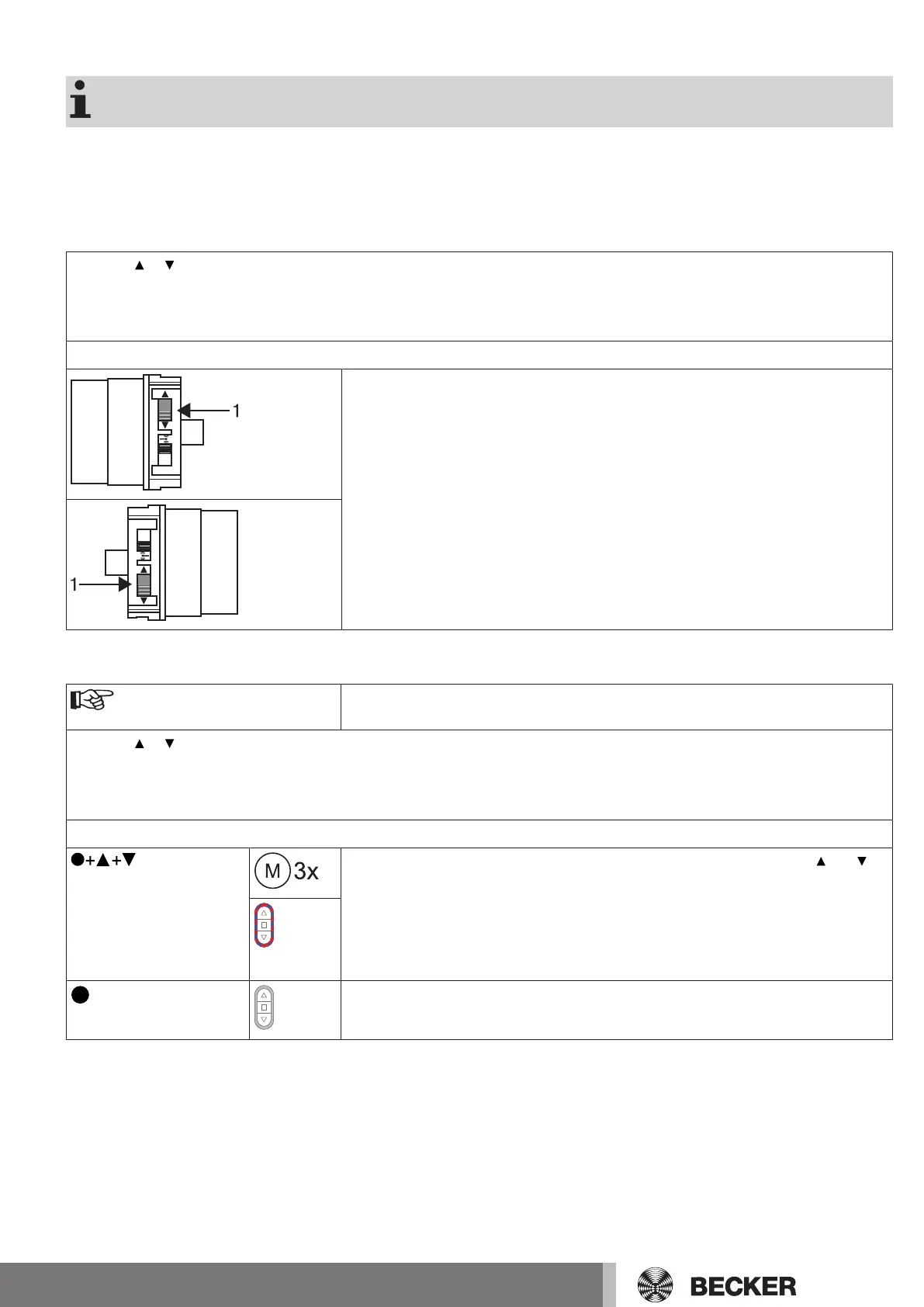
• Changing direction of rotation via the direction switch
• Changing direction of rotation via the transmitter
Changing direction of rotation via the direction switch
Press the or button.
▻
The shading solution runs in the desired direction
►
The running direction is OK.
If the shading solution runs in the wrong direction, the running direction must be changed. Proceed as follows:
Switch the direction switch (1) to the opposite position.
▻
The running direction will now have changed.
►
Check the running direction again.
Changing the direction of rotation with a CentronicPLUS transmitter
Select the required receiver as described in the chapter Selection of the receiver for
the setting mode [}12].
Press the or button.
▻
The shading solution runs in the desired direction.
►
The running direction is OK. Now change back to normal mode, as described in the previous step.
If the shading solution runs in the wrong direction, the running direction must be changed. Proceed as follows:
3s
First, press the programming button, then within 3seconds also press the and
button for 3seconds.
▻
The receiver confirms.
▻
The transmitter confirms with a red/blue rotation of the LED ring.
Check the running direction again.
3s
Then press the programming button for 3seconds to change to normal mode.
►
The LED ring goes out.
13-en


 To Next Page