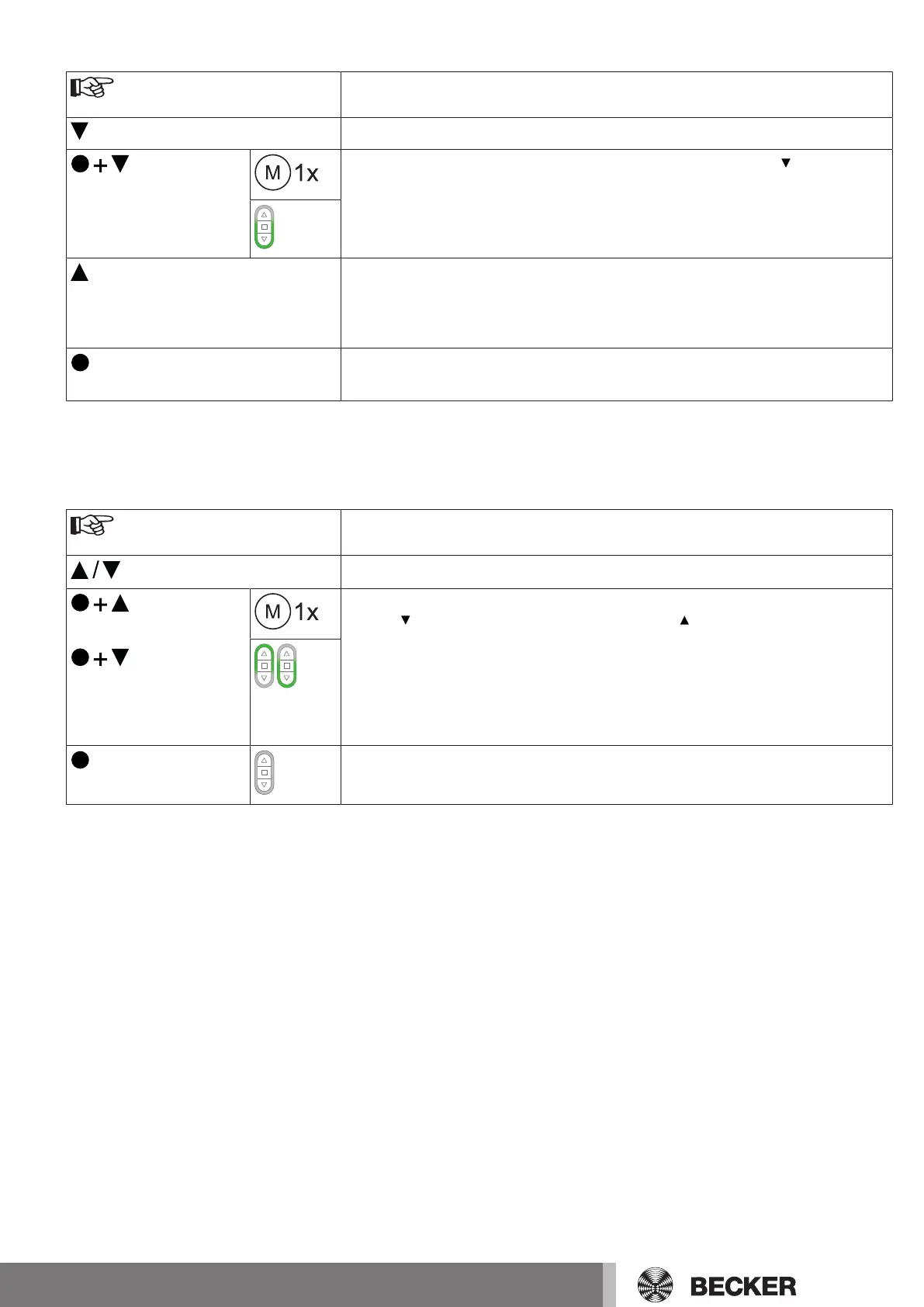
Lower point to upper stop
Select the required receiver as described in the chapter Selection of the receiver for
the setting mode [}12].
Close to the desired lower limit position.
Press the programming button and, within 3seconds, also press the button and
hold the two buttons down.
▻
The tubular drive confirms.
▻
The transmitter confirms by lighting up the lower third of the LED ring green.
Then retract to the permanent stop.
▻
The tubular drive switches off automatically.
►
The limit positions are now set.
3s
Then press the programming button for 3seconds to change to normal mode.
The LED ring goes out.
Changing the set limit positions
1) Shortening the range of travel (the desired limit position is located inside the current range of
travel)
Select the required receiver as described in the chapter Selection of the receiver for
the setting mode [}12].
Open/close to the desired new limit position.
or
First press and hold the programming button, then within 3 seconds also press and
hold the button for the extend limit position, or the button for the retract limit pos-
ition. Hold the two buttons down.
▻
The tubular drive confirms.
▻
The transmitter confirms by lighting up the upper/lower third of the LED ring.
►
The new limit position is now saved.
3s
Then press the programming button for 3seconds to change to normal mode.
►
The LED ring goes out.
15-en


 To Next Page