US-EN Installation and operation instructions
DRYPOINT
®
M intelligence 35
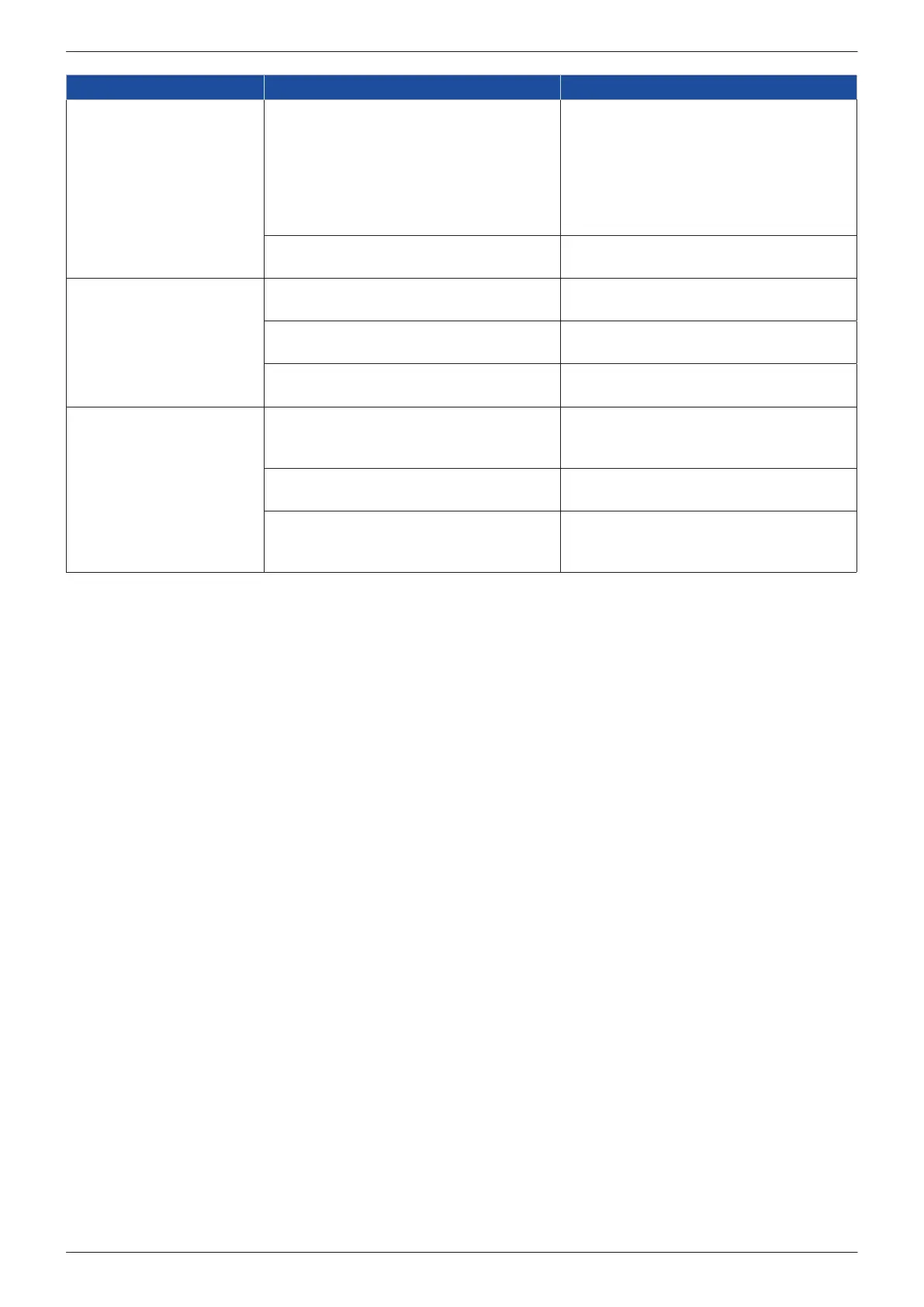
Symptom(s) Possible causes Remedy
Error signal upon switching
on unit
Required performance parameters not yet
reached
The moment the set performance range is
reached, the error message is automatically
reset (latest after 10 to 15 minutes)
→ otherwise, identify cause of the problem:
the ashing rate and interval of the red
LED indicate the type of the error/fault; if
necessary, contact manufacturer
PCB fault Contact manufacturer: if necessary, return
unit for repair or replace control unit
Settings cannot be changed
2 buttons not pressed simultaneously See chapter ... "Operation": Correct button
operation, testing with solenoid valve
Button not held long enough See chapter ... "Operation": Press the
buttons for approx. 0.2 seconds
Button physically damaged Contact manufacturer: if necessary, return
unit for repair or replace control unit
No power supply (green
power LED not lit)
Incorrect supply voltage Check the supply voltage to ensure that it
corresponds to that specied on the name
plate
PCB fault Contact manufacturer: if necessary, return
unit for repair or replace control unit
Unit overheating The unit automatically resumes operation
when the internal temperature has dropped
< 140 °F




 To Next Page