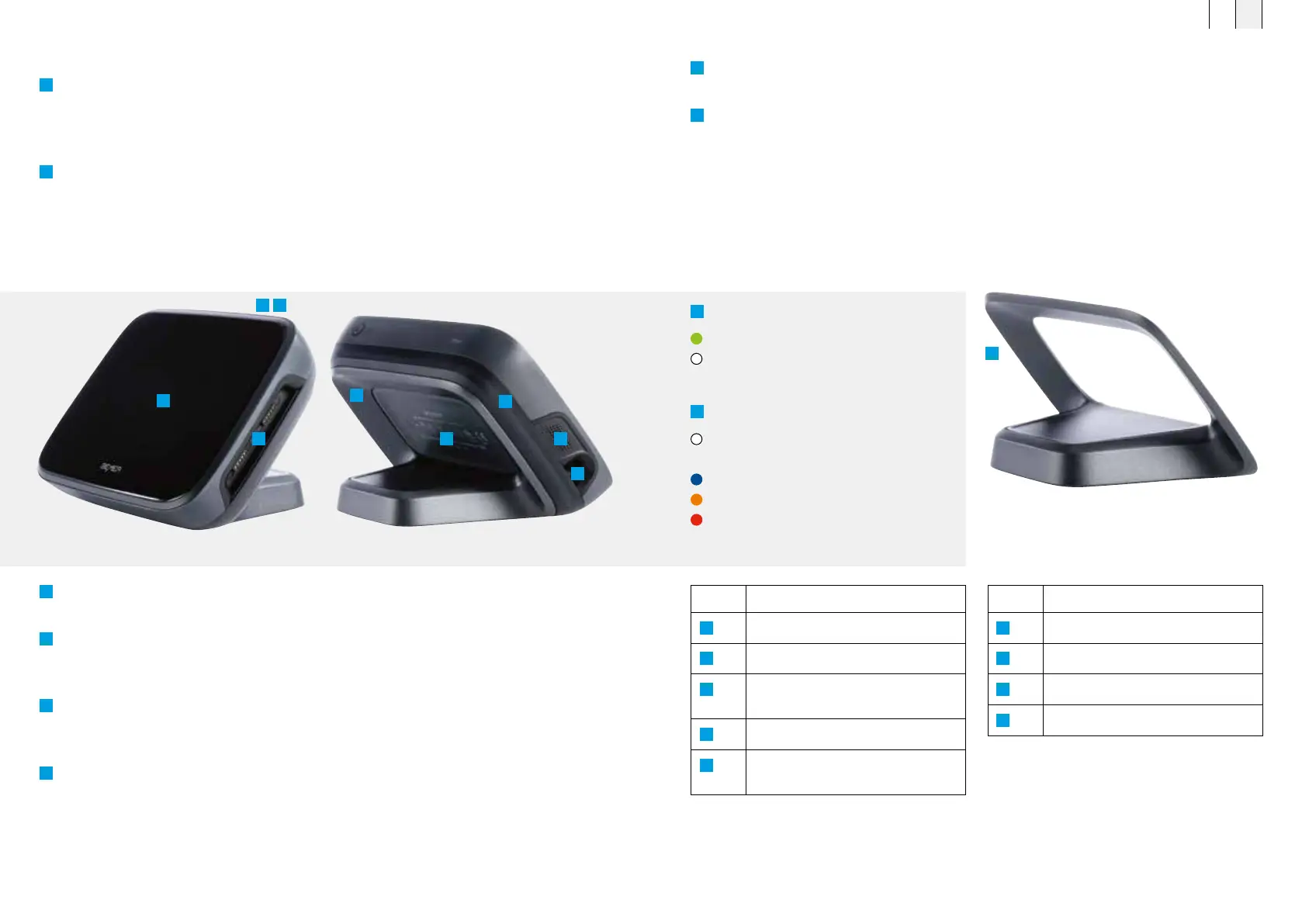
4.4 Main components of the BEMER Therapy System Evo
1
The LED indicator shows whether the B.Box Evo is switched on (white light) or the B.Box Evo
Battery Stand is charging (green light). In the charging state (green light), the device is also ready
for operation. If the LED indicator is white, the B.Box Evo battery holder is not being charged
(e.g., it is already fully charged) or no B.Box Evo Battery Stand is connected.
2
On the top of the B.Box Evo there is a push-button switch to turn the device on and off.
―
Short press (<2 seconds) puts the device into stand-by mode.
―
Long press (>2 seconds) turns the device off completely.
In all states, the applicators are disconnected from the mains to avoid e-smog.
3
The magnetic connection ports (Applicator 1 and Applicator 2) for the application modules are
located on the right side. Two applicators can be operated in parallel.
4
On the front there is a high-resolution control panel which serves as the user interface for the
controller. All settings for the B.Box Evo and its applicators are configured via this user interface.
Furthermore, there is a light sensor on the front for automatic adjustment of the display brightness.
5
The removable B.Box Evo Stand is also located here. This can be removed to allow use of the
rechargeable B.Box Evo Battery Stand. The rechargeable B.Box Evo Battery Stand consists of a
battery integrated into a special stand.
6
The ambient light ring is located on the back of the B.Box Evo and indicates the device status
via different light colors.
7
The loudspeaker for playback of acoustic signals and the relaxation melody that accompanies
the therapy (this can be optionally switched off) is located on the left side of the B.Box Evo.
8
Below the speaker output is the mains connection, via which the B.Box Evo is supplied with
power. When the B.Box Evo Battery Stand is connected, the B.Box Evo Power Supply also serves
as a charger.
B.Box Evo with all functional elements B.Box Evo with ambient light ring
This illustration shows the special B.Box Evo Battery
Stand that can be used for mains-independent use
of the B.Box Evo and its applicators.
1
LED display
Green = B.Box Evo Battery Stand is charging
White = device is switched on
6
Ambient light ring
White = device is ready for operation
Blue = active therapy
Orange = warning
Flashing red = error
No. Description
1
LED display
2
Main switch
3
Magnetic field connections
for applicators
4
Control panel
5
B.Box Evo Stand or
Battery Stand
No. Description
6
Ambient light ring
7
Loudspeaker
8
Power supply unit for B.Box Evo
9
Product label
1 2
4
7
8
9
6
5
5
3
FR EN
4544



 To Next Page