21:13A2A1
Seings – Display and brightness
BACK
AUTO-
BRIGHTNESS
SAVE
2
Voiceover is an operating aid (for visually impaired users). If voiceover is enabled,
a pre-recorded voice describing the controls is heard.
If the relaxation music is disabled during an ongoing treatment, the voiceover function
remains active if it was previously enabled.
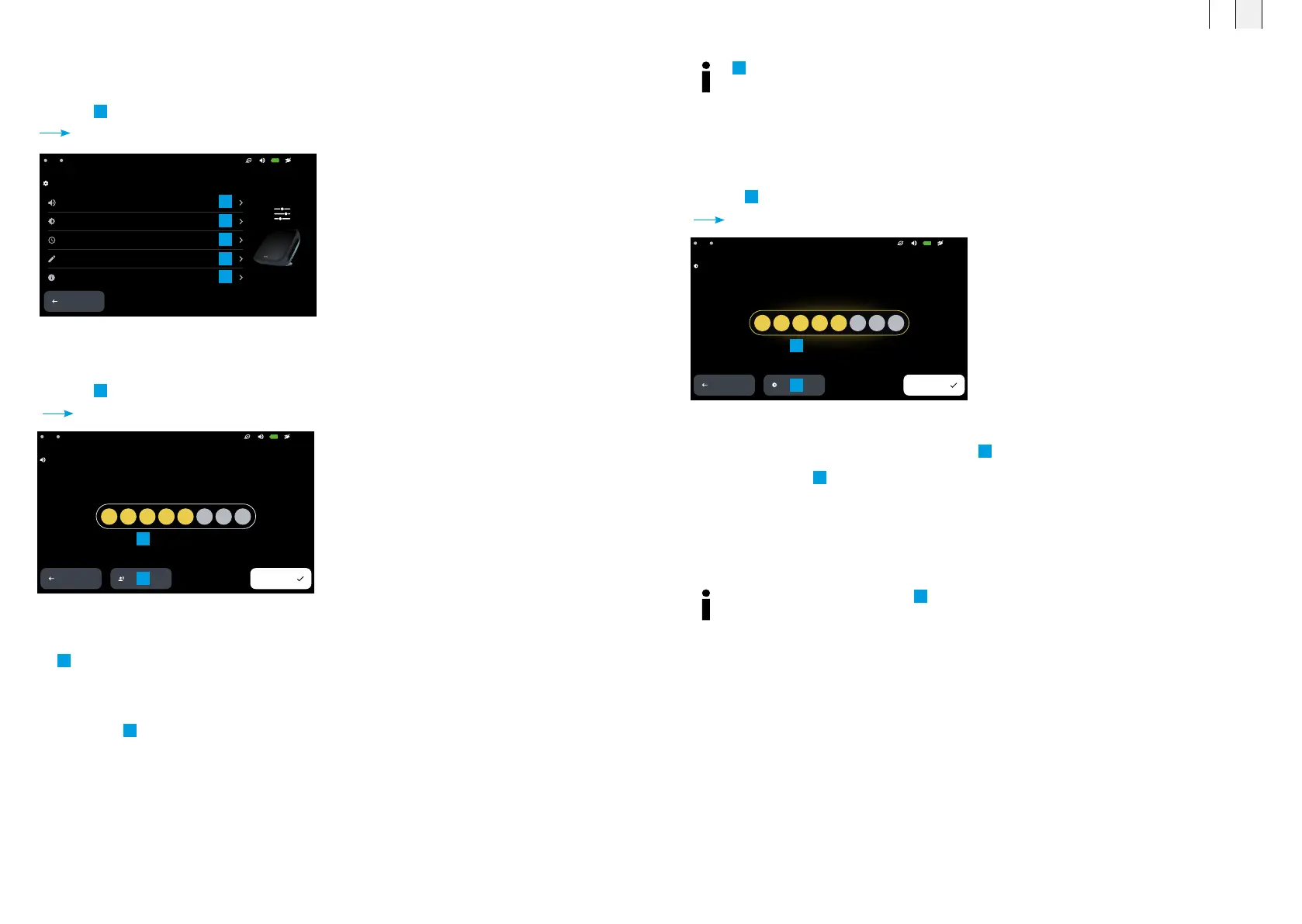
8.2.4 Adjust the display brightness
z Press
2
<Display and brightness>.
Settings – Display and brightness opens.
z Adjust the brightness of the display using the
1
<Brightness control>.
z Enable or disable
2
<Auto Brightness>.
z Press <Save> to save your changes and return to the settings menu.
z Press <Back> to exit the menu without saving your changes.
Settings – Display and brightness
1
2
If necessary, enable or disable
2
<Auto Brightness>. In automatic mode, the display
brightness is adjusted in accordance with the ambient light levels. If the control is grayed
out, auto brightness mode is enabled.
8.2.2 Settings (start screen)
Before starting an application, the basic settings should be configured.
z Press
12
<Settings>.
The settings menu opens.
8.2.3 Adjust the signal volume
z Press
1
<Volume and voiceover>.
Settings – Volume and voiceover opens.
z Adjust the volume for signals, voiceover and music via
1
<Volume control>.
To increase the accessibility of the BEMER therapy system for visually impaired users,
z Enable the
2
<Voiceover> function.
z Press <Save> to save your changes and return to the settings menu.
z Press <Back> to exit the menu without saving your changes.
Settings menu
21:13A2A1
Seings
Volume and voiceover
Display and brightness
Time
Expert mode editor
System
BACK
1
2
3
4
5
Settings: Volume control and voiceover
Seings – Volume and voiceover
BACK
SAVE
VOICEOVER
21:13A2A1
1
2
FR EN
6564



 To Next Page