8.2 Main menu
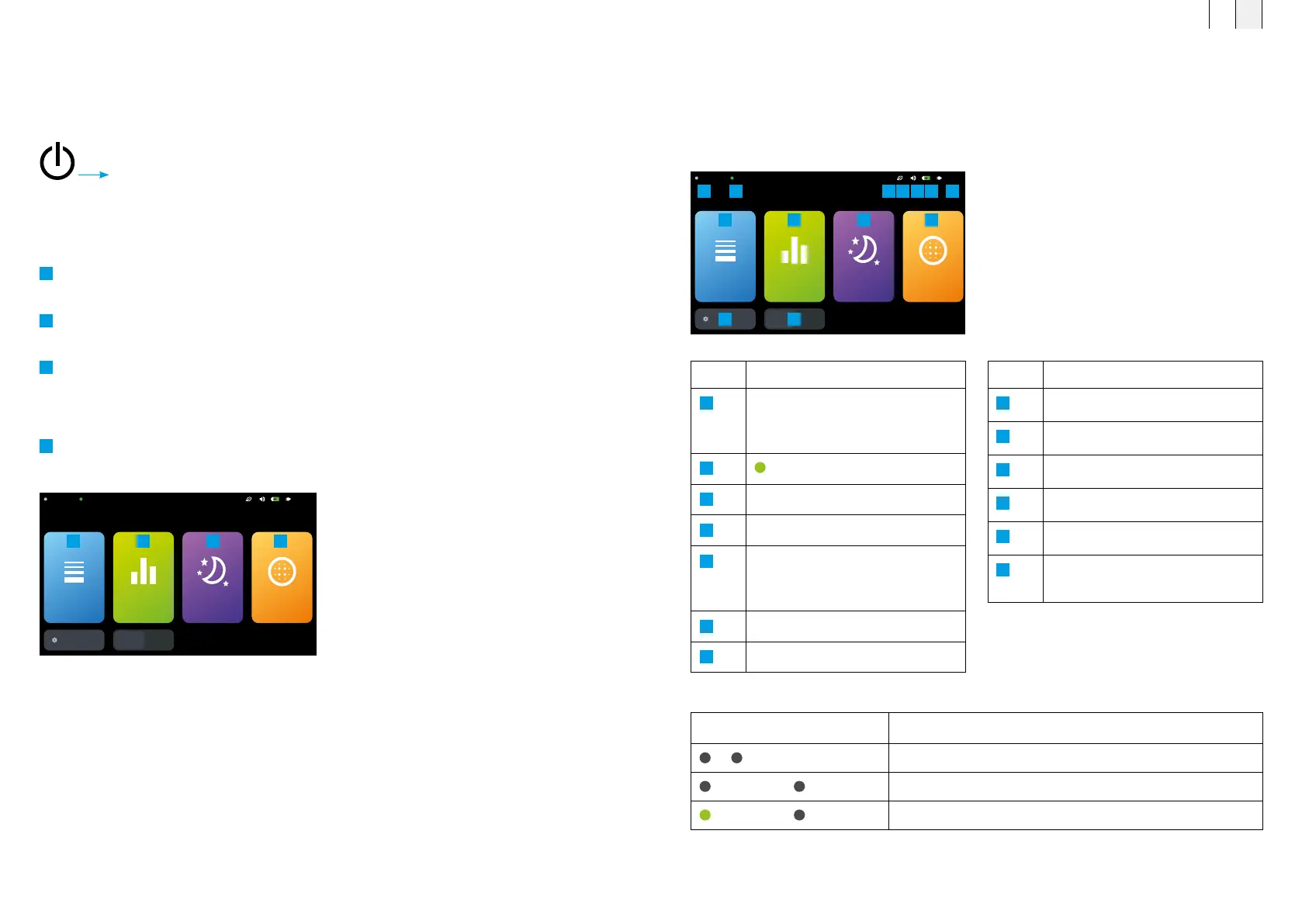
After you have switched on the B.Box Evo, the main menu is displayed via the user interface. You
can choose between the four different therapy variants. Six additional device status icons and the
current time are displayed in the upper part of the main menu.
(For a more detailed description see chapter 8.2.1 “Status bar”)
8.2.1 Status bar
Main menu of the B.Box Evo
showing all information and
operating elements
Symbol Description
A1 A2
No applicator connected to A1 / A2
A1 B.Body Evo A2 B.Pad Evo
B.Body Evo applicator connected to A1 / B.Pad connected to A2
A1 B.Body Evo A2 B.Pad Evo
Active therapy via Port 1
Description of the symbols on the status bar of the B.Box Evo
Table 1:
Description of the information and controls in
the B.Box Evo main menu
No. Description
1
Port A1 / A2, indication and
description of the connected
application module
2
Active therapy
3
Power save mode
4
Volume
5
Battery operation, charging status:
icon with lightning bolt – battery is
charging
6
Mains operation
7
Current time (in 12 h or 24 h format)
No. Description
8
Intensity menu
9
Program menu
10
Sleep program menu
11
Light therapy menu
12
Settings menu
13
Switch between ports
A1 / A2
A1
SETTINGS
A2
21:13A2 B.PadA1 B.Body
INTENSITY PROGRAMS SLEEP LIGHT
1 2
8
12
9
13
10 11
3 54 6 7
8.1 Switch the unit on (start screen)
z Switch on the device via the main switch.
The start screen appears after a few seconds.
The user interface offers three different application modes for
magnetic field therapy and one application mode for light therapy.
Magnetic field therapy
1
Intensity: 8 minutes
of therapy with constant magnetic field strength
2
Program: 8–20 minutes
of therapy with increasing magnetic field strength
3
Sleep program: 6–10 hour duration
with a total of 4 hours of therapy
Light therapy
4
Light therapy: 8 minutes of therapy
at three different intensity levels
8. Using the BEMER Therapy System Evo
B.Box Evo main menu
A1
SETTINGS
A2
21:13A2 B.PadA1 B.Body
INTENSITY PROGRAMS SLEEP LIGHT
1 2 3 4
FR EN
6362



 To Next Page