8.3 Main menu
In this main menu, the four different applications or therapies can be selected. The following
application modules can be connected per main menu item:
1
B.Body Evo, B.Bed Evo, B.Sit Evo, B.Spot Evo, B.Pad Evo
2
B.Body Evo, B.Bed Evo, B.Sit Evo, B.Spot Evo, B.Pad Evo
3
B.Body Evo, B.Bed Evo
4
B.Light Clear Evo, B.Light Restore Evo
B.Box Evo – controls
System information
A1
SETTINGS
A2
21:13A2 B.PadA1 B.Body
INTENSITY PROGRAMS SLEEP LIGHT
32 41
8.2.7.5 System information
Here you will find information about the system version, software version, firmware version, kernel
version, hardware version as well as the total operating time per applicator port (A1 and A2) and
the region code. This information is important when communicating with customer service.
z Press
5
<Info>.
System information opens.
A2A1
System information
System version:
Software version:
Firmware version:
Kernel version:
Hardware revision:
Region code:
2
BACK
Total
therapy duration A1
Total
therapy duration A2
8.2.7.1 Switch the ambient light on/off
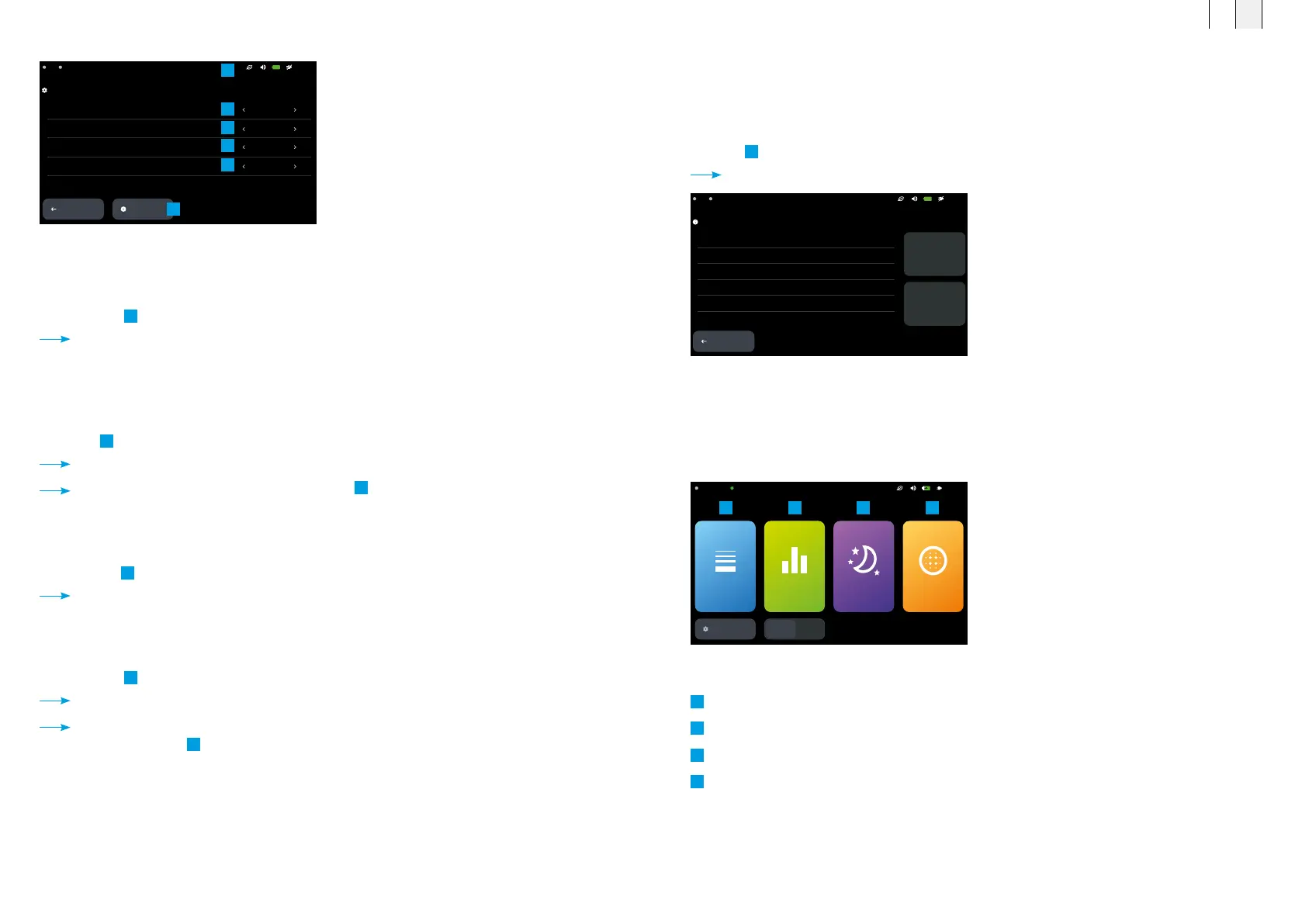
The illuminated ambient light ring (see chapter 4.4) can be enabled or disabled here.
z Switch the
1
<Ambient light> on or off via <
‹
> or <
›
>.
The value is saved.
8.2.7.2 Enable / disable energy saving mode
Energy saving mode can be enabled or disabled here. When energy saving mode is enabled,
the B.Box Evo is switched to stand-by mode after two minutes of inactivity.
z Switch
2
<Energy saving mode> on or off via <
‹
> or <
›
>.
The value is saved.
When <Energy saving mode> is enabled, an icon
6
appears in the status bar.
8.2.7.3 Select system language
The system language can be selected from 17 available languages.
z Select the
3
<System language> via <
‹
> or <
›
>.
The value is saved.
8.2.7.4 Set the time format
You can choose between the 12 h or 24 h display format.
z Select the
4
<Time format> via <
‹
> or <
›
>.
The value is saved.
When the 12 h <Time format> is selected, the morning (AM) or afternoon (PM) indicator
appears in the status bar
6
next to the current time.
Seings – System
Ambient light On
On
English
24h
Power save mode
System language
Time format
BACK
21:13A2A1
System
information
Settings menu – System
1
2
3
4
5
6
FR EN
6968



 To Next Page