Introduction 11
Remote control
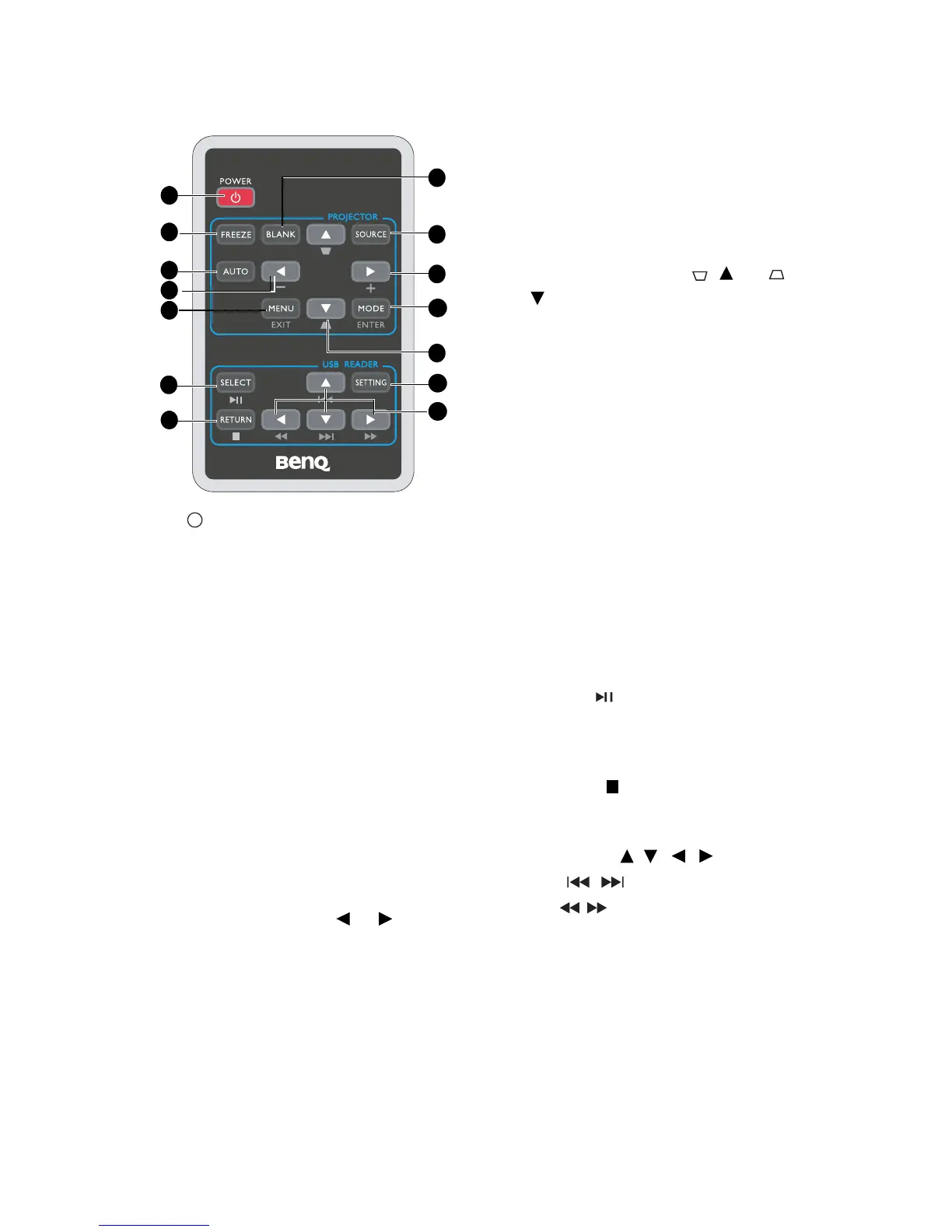
1. POWER
Toggles the projector between standby
mode and on. See "Starting up the
projector" on page 21 and "Shutting down
the projector" on page 33 for details.
PROJECTOR
2. FREEZE
Freezes the projected image. See "Freezing
the image" on page 31 for details.
3. AUTO
Automatically determines the best picture
timings for the displayed image. See
"Auto-adjusting the image" on page 26 for
details.
4. BLANK
Used to hide the screen picture. See
"Hiding the image" on page 31 for details.
5. Volume/Arrow keys ( /-, /+)
Magnifies or reduces the volume level. See
"Adjusting the sound" on page 32 for
details.
When the On-Screen Display (OSD)
menu is activated, the #5 and #7 keys are
used as directional arrows to select the
desired menu items and to make
adjustments. See "Using the menus" on
page 22 for details.
6. MENU/EXIT
Turns on the On-Screen Display (OSD)
menu. Goes back to previous OSD menu,
exits and saves menu settings.
See "Using the menus" on page 22 for
details.
7. Keystone/Arrow keys ( / Up, /
Down)
Manually corrects distorted images
resulting from an angled projection. See
"Correcting keystone" on page 26 for details.
8. SOURCE
Displays the source selection bar. See
"Switching input signal" on page 25 for
details.
9. MODE/ENTER
Depending upon which input signal is
selected, selects an available picture setup
mode. See "Selecting a picture mode" on
page 28 for details.
Enacts the selected On-Screen Display
(OSD) menu item. See "Using the menus"
on page 22 for details.
USB READER
10. SELECT/
Plays back and pauses the photo and
movie. Enacts the selected USB On-
Screen Display (OSD) menu item.
11. RETURN/
Stops playback. Goes back to USB Reader
main screen.
12. Arrow keys ( / / / )
Uses
/
to play previous or next file.
Use / to allow fast reverse play or
fast forward play during playback.
When the USB Reader On-Screen Display
(OSD) menu is activated, arrow keys are
used as directional arrows to select the
desired menu items.
13. SETTING
Turns on the USB Reader On-Screen
Display (OSD) menu. Exits and saves
menu settings. See "Using USB Reader
menus" on page 44 for details.
1
9
2
3
6
10
12
4
7
8
13
11
5
5



 To Next Page