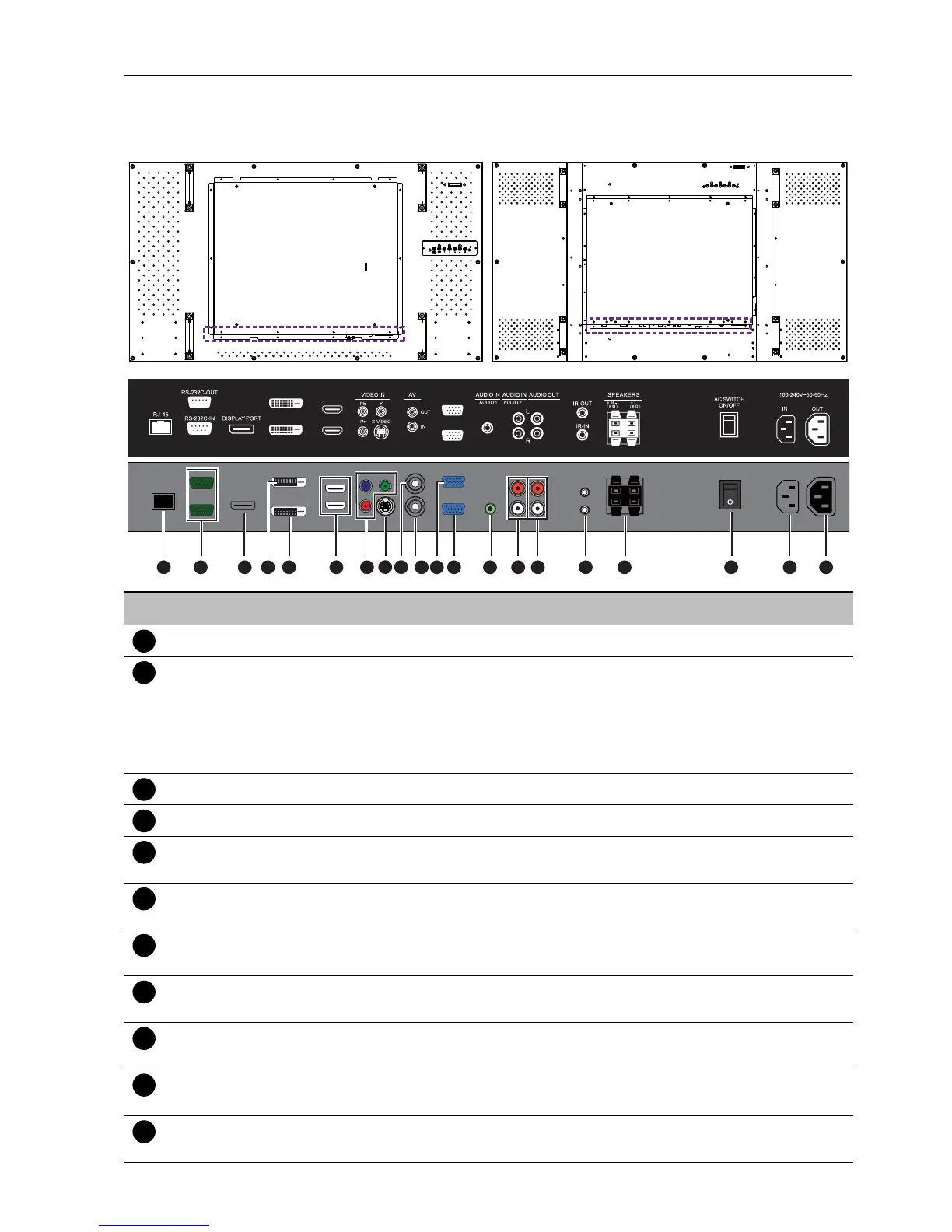
Parts of the display and their functions 15
Input/output terminals
No. Name Description
RJ-45 Connects to the RJ-45 port on your Ethernet or router.
RS232C IN/OUT For external control and multi-display operation.
• RS232C IN: receives control signals from a computer or
another display.
• RS232C OUT: outputs control signals from the RS232C IN
input to another display.
DISPLAY PORT Connects to a DisplayPort compatible device.
DVI-OUT Outputs DVI signals from the DVI-IN to another display.
DVI-IN Receives DVI signals from an external device (such as a
computer).
HDMI-1/HDMI-2 Receives HDMI signals from an external device (such as a Blu-ray
disc player).
VIDEO IN (YPbPr) Receives component video (YPbPr) signals from an external
device (such as a DVD player, HDTV device or Laser disc player).
VIDEO IN (S-
VIDEO)
Receives S-Video signals from an external device (such as a VCR
or DVD player).
AV OUT Outputs composite video signals from the AV IN input to another
display.
AV IN Receives composite video signals from an external device (such as
a VCR or DVD player).
VGA OUT Outputs analog RGB signals from the VGA IN input to another
display.
1
3 10 11 12 13 14 16 17 18 19 202 4 5
6
8 9
7 15
DVI-OUT
DVI-IN
HDMI-2
HDMI-1
VGA OUT
VGA IN



 To Next Page