Connection 19
Connection
Connecting audio/video signals
Pay attention to the following notes when you connect cables:
• Please turn off all devices.
• Familiarize yourself with the audio/video ports on the display and the devices you want
to use. Be aware that incorrect connections may adversely affect picture quality.
• Do not remove cables from the ports by pulling the cable itself. Always grasp and pull
the connectors at the end of the cable.
• Ensure that all cables are fully inserted and firmly seated.
Connecting the VGA input
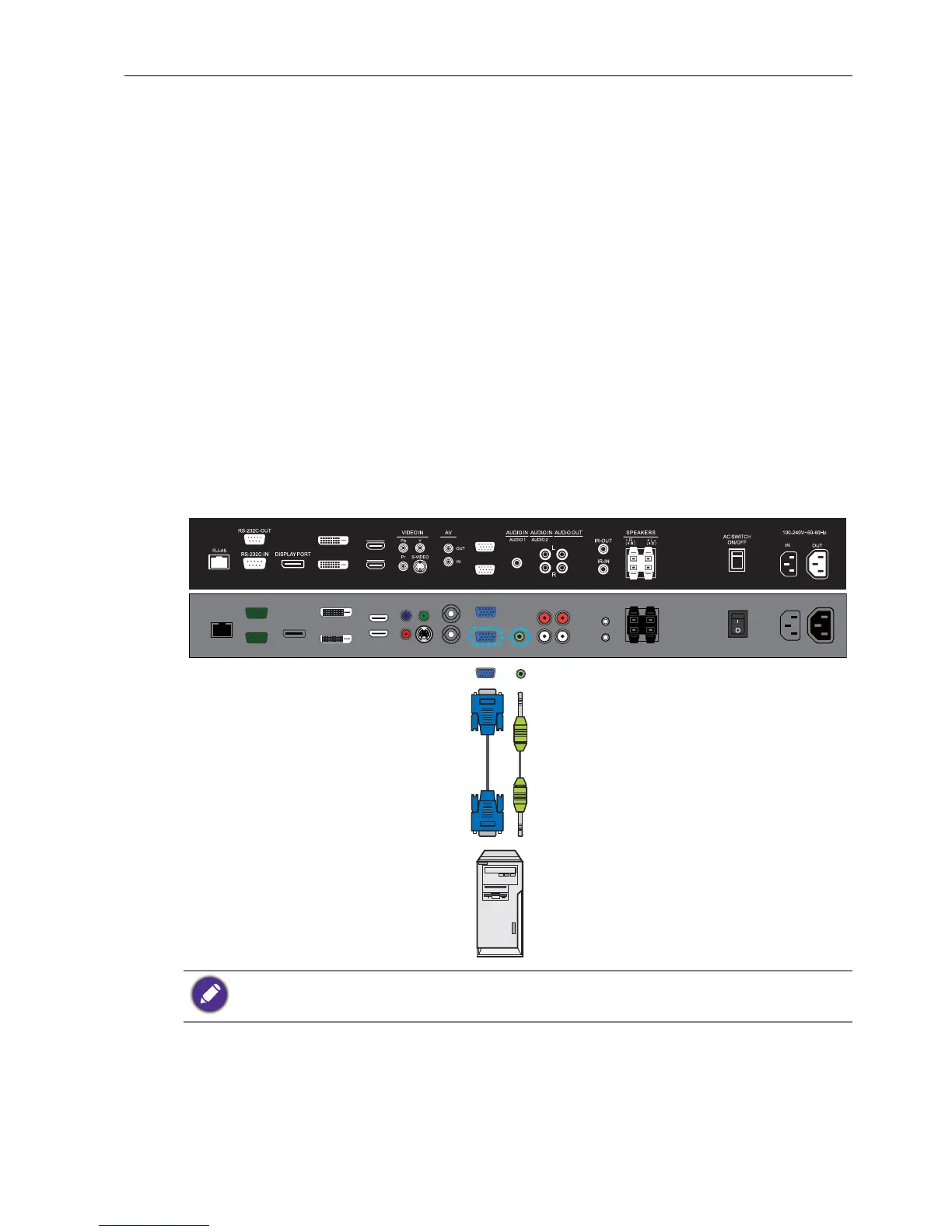
1. Connect the VGA IN jack on the display to the VGA output jack on a computer
using a D-Sub (15-pin) cable.
2. Connect the computer’s audio output jack to the AUDIO IN (AUDIO1) jack on the
display using a suitable audio cable.
3. To view images from this input, press the
VGA button on the remote control. To
select an appropriate audio source, see Audio Source on page 32 for details.
The audio cable is not supplied and should be purchased separately.
DVI-OUT
DVI-IN
HDMI-2
HDMI-1
VGA OUT
VGA IN
D-Sub (15-pin) cable Audio cable
Computer



 To Next Page