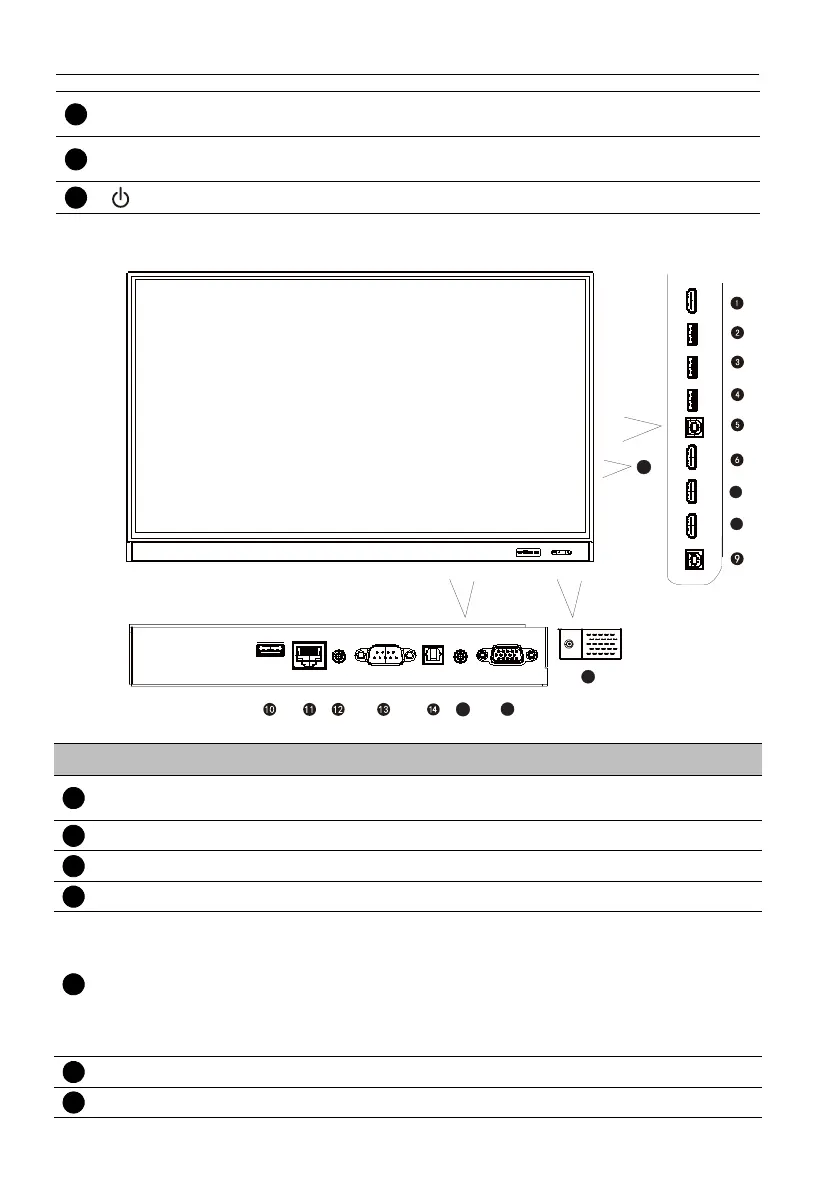
Parts of the display and their functions14
Input/output terminals
Ambient Light
Sensor
Detects the ambient room light conditions to automatically
adjust the display backlight brightness.
Remote Control
Sensor
Receives the signal from the remote control.
Power
Press to turn the display on or off.
No. Name Description
HDMI OUT
Connects to display devices with an HDMI input (HDMI 1, HDMI
2, HDMI 3, or OPS input).
USB 3.0 Accesses multimedia files on USB drives directly.
USB 3.0 Accesses multimedia files on USB drives directly (5V = 1.5A).
USB 3.0 Accesses multimedia files on USB drives directly.
TOUCH 1
External computer touch signal input. When connecting external
computer, besides connecting external computer VGA and audio
signals, external computer's USB port needs to be connected to
the corresponding group. Under the condition that driver is
installed, external computer can be touch controlled through the
equipment (touch function is effective in VGA and HDMI channel
by default).
HDMI IN 1 Receives HDMI signals from an external device.
HDMI IN 2 Receives HDMI signals from an external device.



 To Next Page