Menu operations46
• Press on the remote control or click a blank area outside the menu to exit the
menu.
System settings
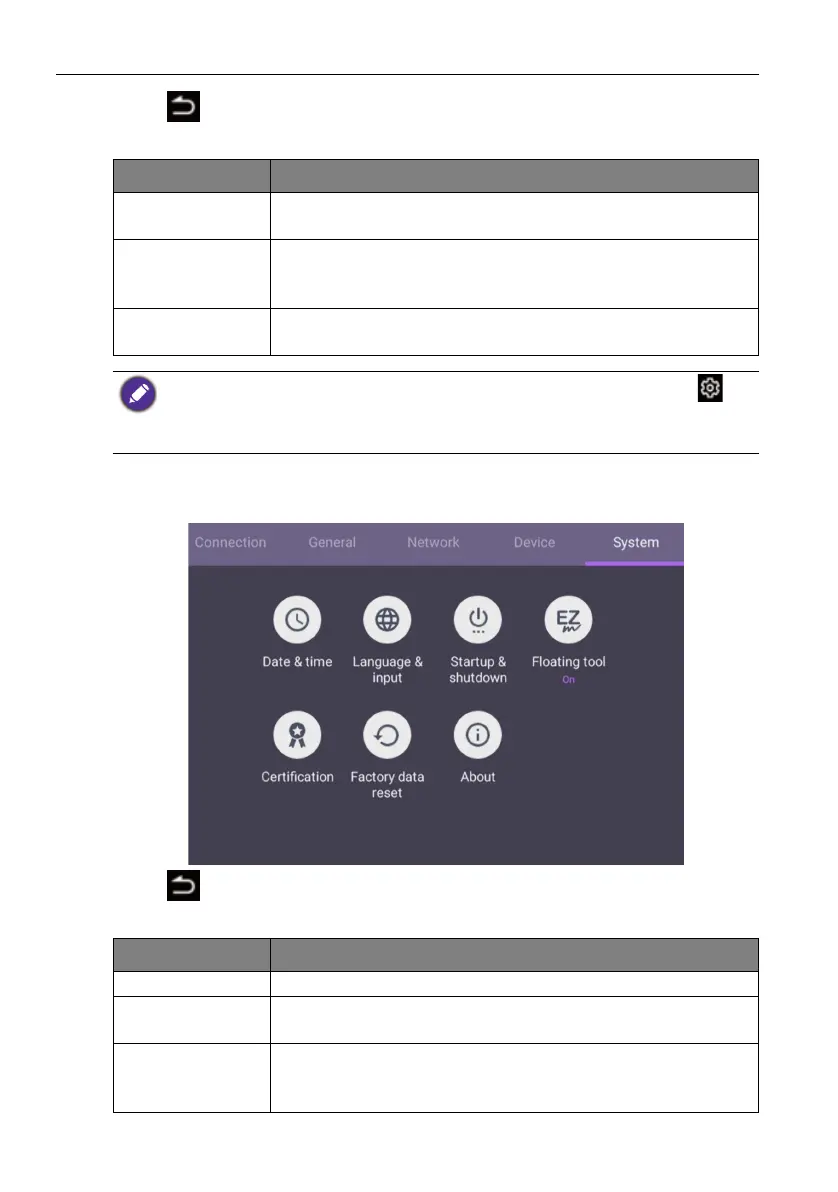
On the home screen, select Setting > System to enter system settings.
• Press on the remote control or click a blank area outside the menu to exit the
menu.
Menu Description
Key lock Press OK on the remote control or click the switch to lock or
unlock the buttons on the front panel of the display.
IR lock Press OK on the remote control or click the switch to lock or
unlock the remote control IR sensor on the front panel of the
display.
Touch lock Press OK on the remote control or click the switch to lock or
unlock the screen.
• If keypad, IR and touch are locked all at once, please follow the steps to unlock: Press on
the remote control for five seconds.
• For image retention, please see Notes on the LCD panel of this display on page 7 for more
information.
Options Description
Date & time Click to set date, time, and their formats in Android.
Language &
input
Click to set Language, Keyboard & Input methods in
Android.
Startup &
Shutdown
Click to set the Startup channel, OPS startup option,
Wake on Lan, and Power off reminder. Refer to Startup &
Shutdown on page 48 for more information.



 To Next Page