Berges electronic • D–51709 Marienheide-Rodt • Tel. 02264/17-0 • Fax 02264/17126
Operating manual 21.12.98
ACP 3000 — 0.37–15.0 04_GB
44
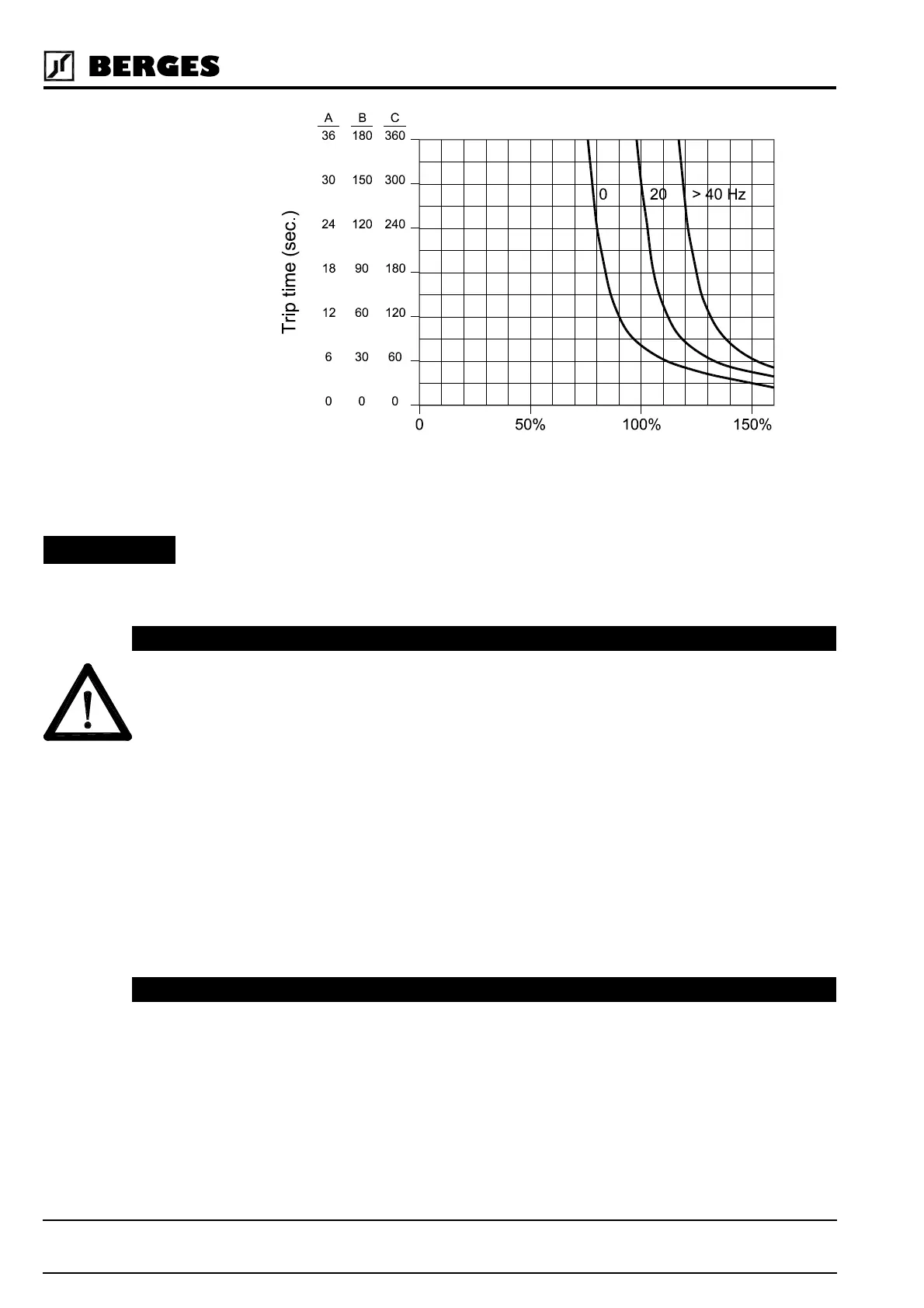
Motor protection by means of the parameter
67-TOL
is recommended for single motor
drives.
When operating multiple motors from a single inverter, use a separate external motor
protection device on each motor and set parameter 67-TOL to it's factory setting of
0 (disabled).
◊ Value range: 0–100% Default: 0%
THIS FUNCTION REQUIRES MAINTAINED CONTACT RUN/STOP CONTROL TO
FUNCTION.
IF THE SETTING OF
68-NRST
HAS BEEN EXCEEDED AND FAULT F10 IS DIS-
PLAYED, RESETTING THE FAULT WILL RESULT IN AN IMMEDIATE START. ENSURE
THAT AUTOMATIC RESTARTING WILL NOT CAUSE INJURY TO PERSONNEL OR
DAMAGE TO EQUIPMENT.
The inverter will automatically perform a reset, after delay set by
69-DRST
, from 1 to 8 times
when any fault trip with a code of F11 and greater has occurred. If the FWD or REV terminal
is still active (2-wire operation) the inverter will attempt a restart (see
21-MODE
and section
7.2). The count will reset if a another fault is not incurred within 10 minutes. If the pro-
grammed count is exceeded within 10 minutes, the inverter will not restart, but will display
a fault trip message F10. RESETTING THE FAULT CAN RESULT IN INSTANT START-
ING. SEE WARNING ABOVE.
This function is inactive for 68-NRST = 0.
◊ Value range: 0–8 Default: 0
After a fault trip of F11 or greater has occurred, and
68-NRST
is greater than zero, the in-
verter will wait for the specified number of seconds before attempting a restart. Program-
mable from 0.00 to 60.00 seconds in 0.05 second increments. Restart will be controlled by
the setting of
82-START
.
◊ Value range: 0.00–60.00 s Default: 0.00 s
Figure 5.3
Percent Load
68-NRST – Trip Restart Number 2P
69-DRST – Restart Delay Time [s] 2P
ATTENTION!


 To Next Page