Rev 9 2022
13
Maintenance & Repair Removal of Covers
This will act as the basic plaorm of how to remove the le and right covers from the machine safely they are the rst
steps in almost all of the procedures. Removing the covers is the rst step in many maintenance procedures.
Removal of the le cover
1. Unplug the machine
2. Remove water bole, tank and brushes
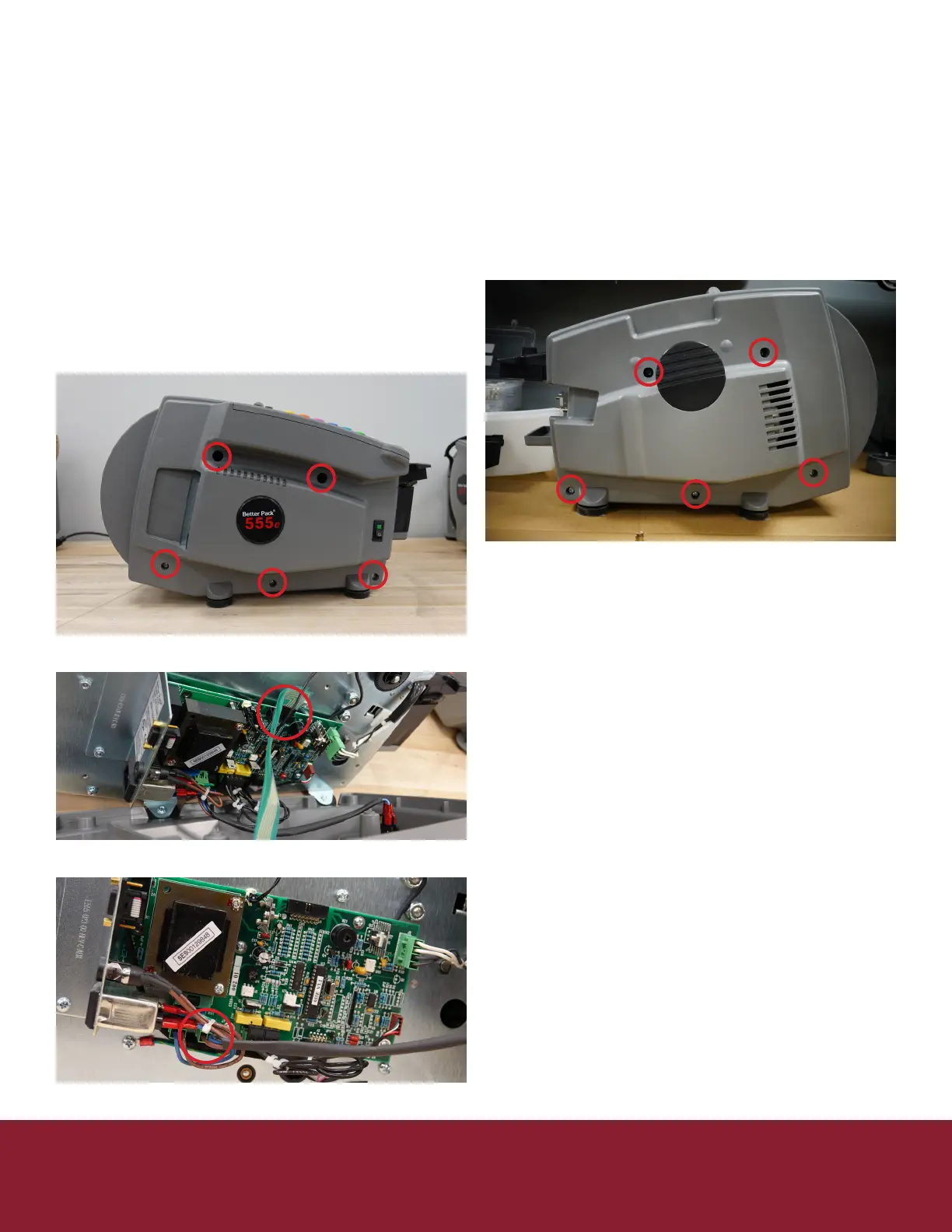
3. Remove the 5 screws holding on the le side cover
(Figure 15-1)
a. Be cauons as the keypad ribbons could
tear
4. Remove the keypad ribbons (Figure 15-2)
5. Remove the switch connector from the
controller board (Figure 15-3)
Removal of the right cover
1. Unplug the machine
2. Remove water bole, tank and brushes
3. Remove the 5 screws holding on the right side
cover (Figure 15-4)
Figure 15-1
Figure 15-4
Figure 15-2
Figure 15-3


 To Next Page