24
Rev 9 2022
Maintenance & Repair Solenoid Replacement
If your machine is making an electronic grinding noise when the tape is dispensing from the machine more oen than
not it is the solenoid that controls the cuer yoke assembly having dirty contacts. This is a relavely simple procedure
that can be accomplished within an hour for someone with no experience and the right tools. If this process is followed
and the noise persists please contact Beer Packages Machinery Support at (813) 345-3070 for conrmaon before
replacing the solenoid. We recommend when replacing that whole Solenoid Shelf Assembly be purchased as the
solenoid oats in the rubber feet. Depending on the age of your machine the access plate and solenoid shelf might be
a single piece and you will need to purchase the access plate and corresponding screws as well see below for all part
numbers.
Part Numbers
• E55504801 – Solenoid Shelf Assembly
• (Oponal) E5552350 - Access Plate
• (Oponal) EA70 - Access Plate Screw QTY 2
Tools Needed
• Philips head screwdriver
• 3/8” wrench
Procedure
1. Unplug Machine
2. Remove the water bole, and tank assembly
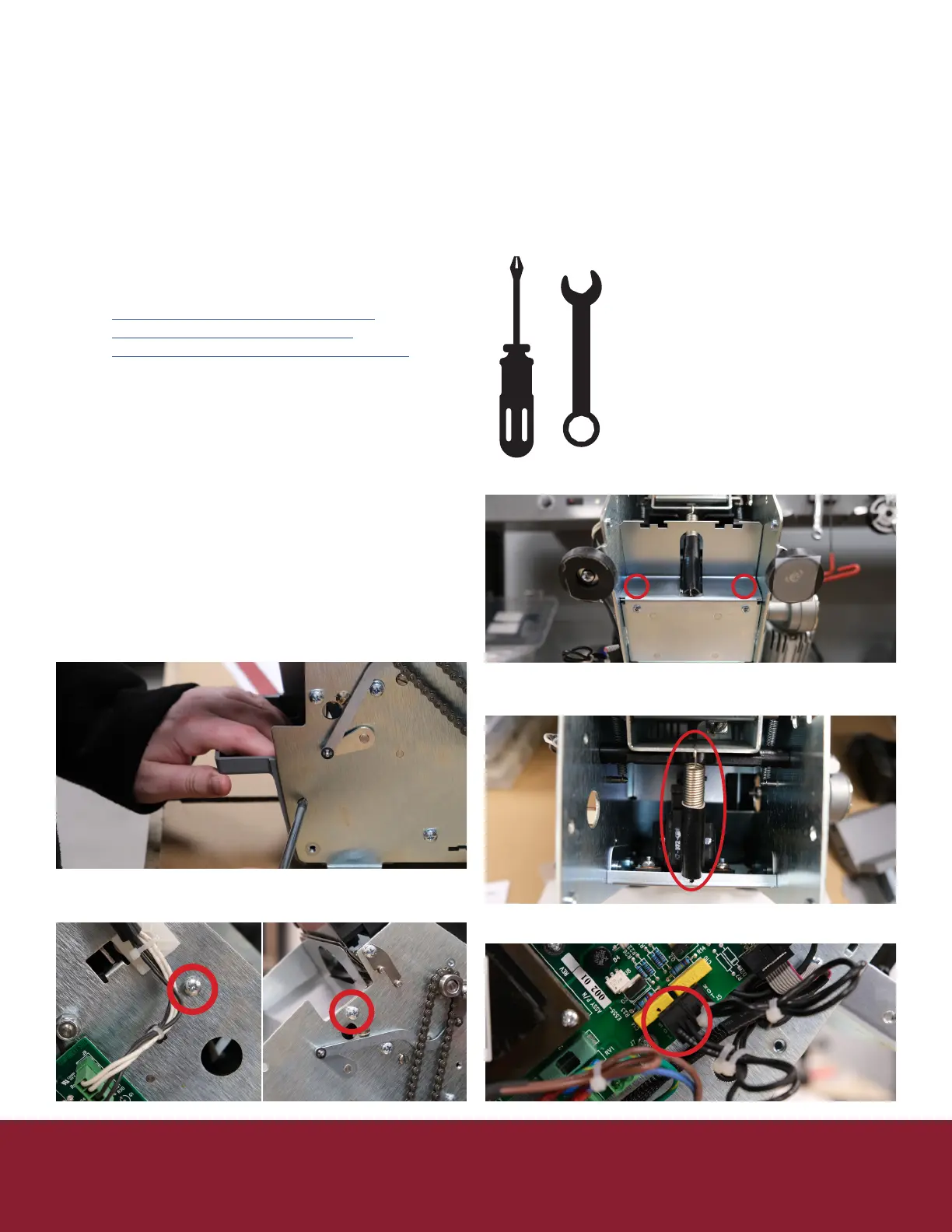
3. Remove right side cover (5 Philips screws)
4. Remove le side cover (5 Philips screws) be
careful as the ribbons connecng the keypad can
be ripped easily.
5. Unplug keypad ribbons from controller board
6. Remove the tank shelf (gray plasc housing
boom front of machine) by pulling down on the
top while pressing in on the side retaining clips.
7. Remove the Bae Safety (2 or 3 Philips screws
depending on model)
8. Remove the access plate (2 Philips screws)
9. Remove the spring
a. Clean out any tape debris
10. Unplug the solenoid from the controller board


 To Next Page