Rev 9 2022
17
Maintenance & Repair Keypad/Keypad
Membrane Replacement
Part Numbers
• ES Model
◊ E55500301 – Membrane and Keypad
◊ E55500301PAD – Keypad Only
◊ E55500301SW – Membrane Only
• ESA/EFA Model
◊ E55500302 – Membrane and Keypad
◊ E55500302PAD – Keypad Only
◊ E55500301SW – Membrane Only
Tools Needed
• Philips head screwdriver
• Flat head screwdriver
Procedure
1. Unplug Machine
2. Remove the water bole, and tank assembly
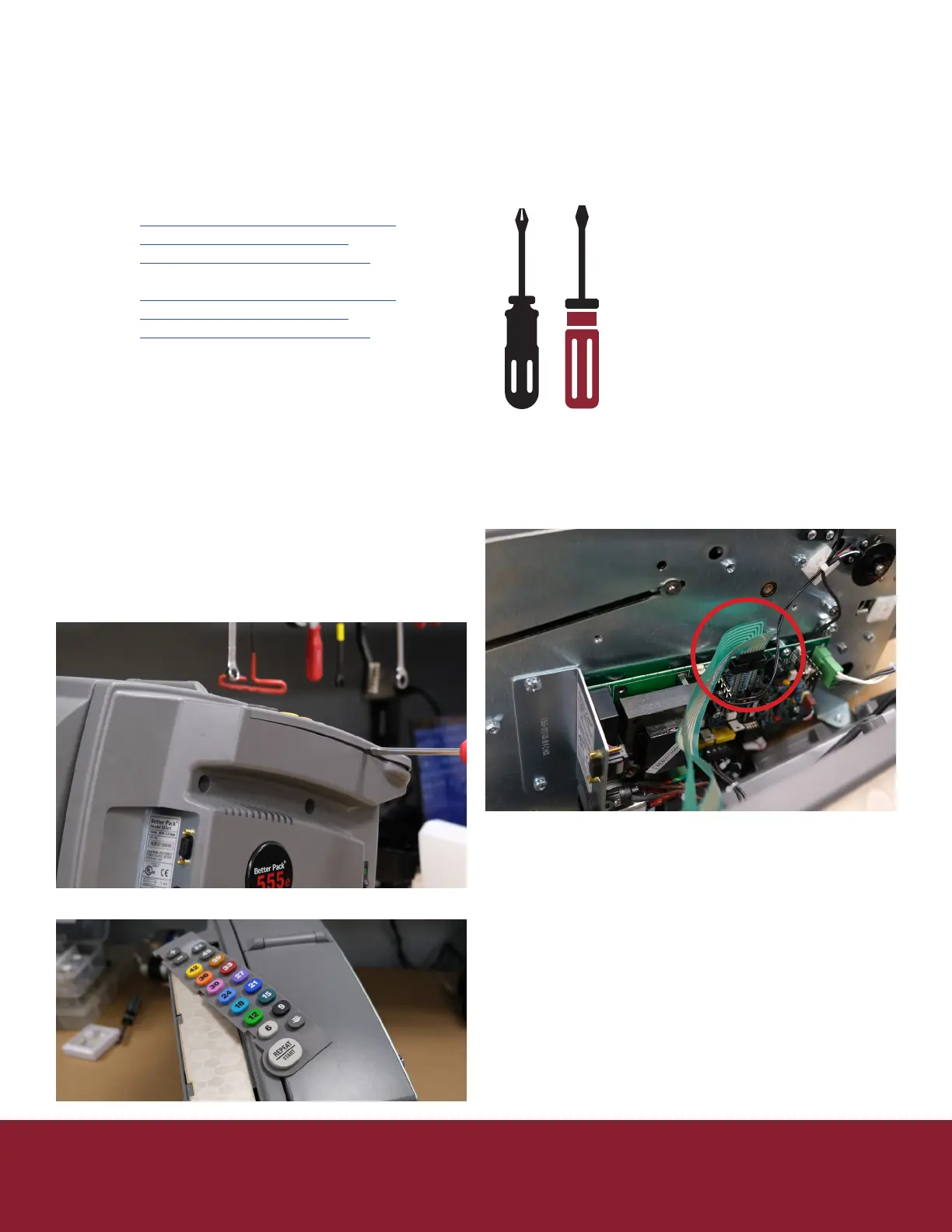
3. Remove le side cover (5 Philips screws) be
careful as the ribbons connecng the keypad can
be ripped easily.
4. Unplug keypad ribbons from controller board
5. Remove the keypad bezel by inserng a thin
athead screwdriver in-between the keypad
bezel and cover
6. Remove keypad
7. If membrane needs replacement remove it
pulling the ribbon through
8. If membrane replacement is needed place new
membrane feeding ribbon cable through cover
9. Place new keypad
10. Snap the bezel cover back into place
11. On le cover plug keypad ribbons back into
controller board
12. Be sure not to miss any pins as this will eect the
length selected
13. Reinstall le cover be sure not to pinch or drive a
screw through the keypad ribbons.
14. Replace water tank, brushes, and water bole


 To Next Page