EasyManua.ls Logo

Bewator Bewacard BC615 - Keypad Layout

Bewator Bewacard BC615
64 pages
Print Icon
To Next Page IconTo Next Page
To Previous Page IconTo Previous Page
Loading...
BC615 Installation and User Manual 13
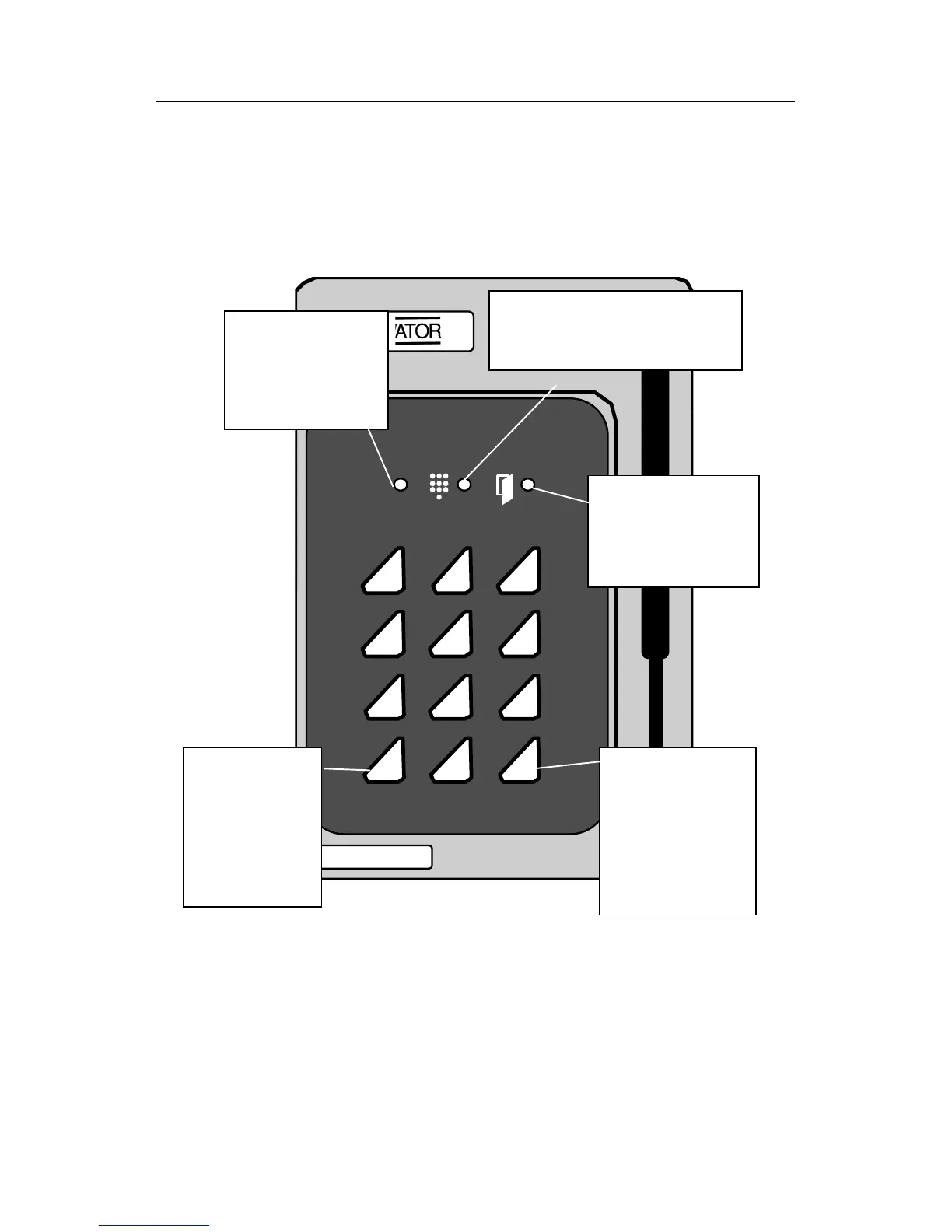
Keypad layout
Diagram of the LEDs and pushbuttons on the BC615 keypad.
123
456
789
A0B
Red LED.
Indicates errors. E.g.
cancellation of card
following 3 incorrect
PIN codes.
Green LED.
Lit when the door is
unlocked. E.g.
Accepted card
transaction.
Yellow LED.
Indicates keypresses. Lit when PIN
code should be entered.
A.
Initiates program-
ming sequence,
e.g. A01 to log on
cards. Also used
when choosing
PIN code.
B.
Press B + the 6-digit
password whenever
you want to program
BC615. Press B to
leave programming
mode.
All LEDs are flashing in programming mode. The LEDs also have
other indications explained in full later.

Table of Contents

Related product manuals