EasyManua.ls Logo

Bewator BM3 - The Keypad and Indicators; Keypad Function A; Keypad Function B

Bewator BM3
224 pages
Print Icon
To Next Page IconTo Next Page
To Previous Page IconTo Previous Page
Loading...
BM3 Installation & User Manual 11
ENG
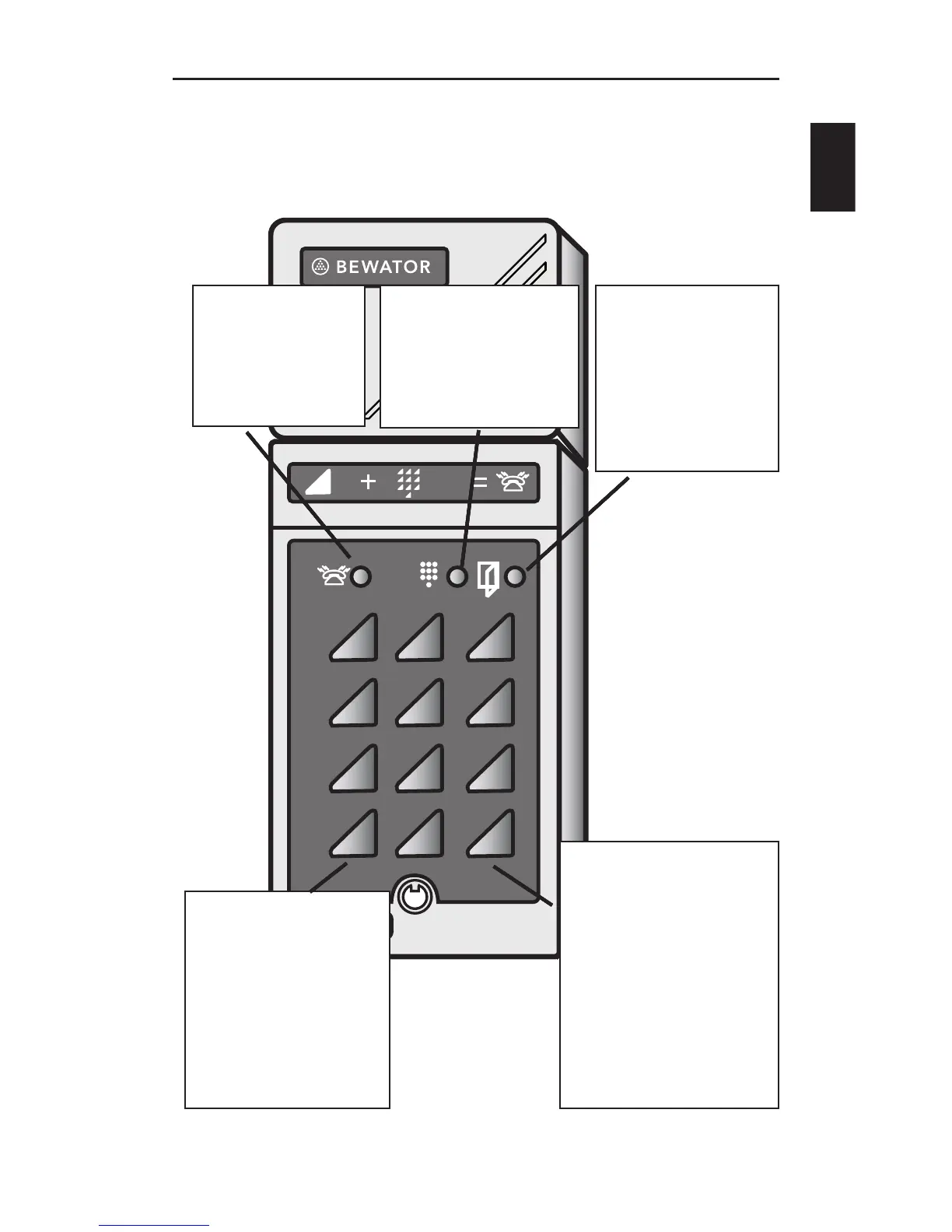
The keypad
1 2 3
65
98
4
7
B0
A
B
Red LED
Indicates
busy tel-
ephone line.
Red LED
Indicates
busy tel-
ephone line.
Yellow LED
Indicates key-
presses.
Yellow LED
Indicates key-
presses.
Green LED.
Lit to indicate
door released.
Green LED.
Lit to indicate
door released.
A.
Starts a program
ming sequence,
e.g. A29 to
change calling
time.
A.
Starts a program
ming sequence,
e.g. A29 to
change calling
time.
B.
Press B + the
desired extension
to make a call.
Press B + the 6
digit password
to programme
Bewacom
B.
Press B + the
desired extension
to make a call.
Press B + the 6
digit password
to programme
Bewacom

Table of Contents

Related product manuals