Configuration SIS System
65
english
5.2.7 How to enter the Headset Specifications
• In order to regulate the headphone volume of the interpreter
stations you can enter the impedance (ohm) and sound pressure level
(dB SPL) of the connected headphone.
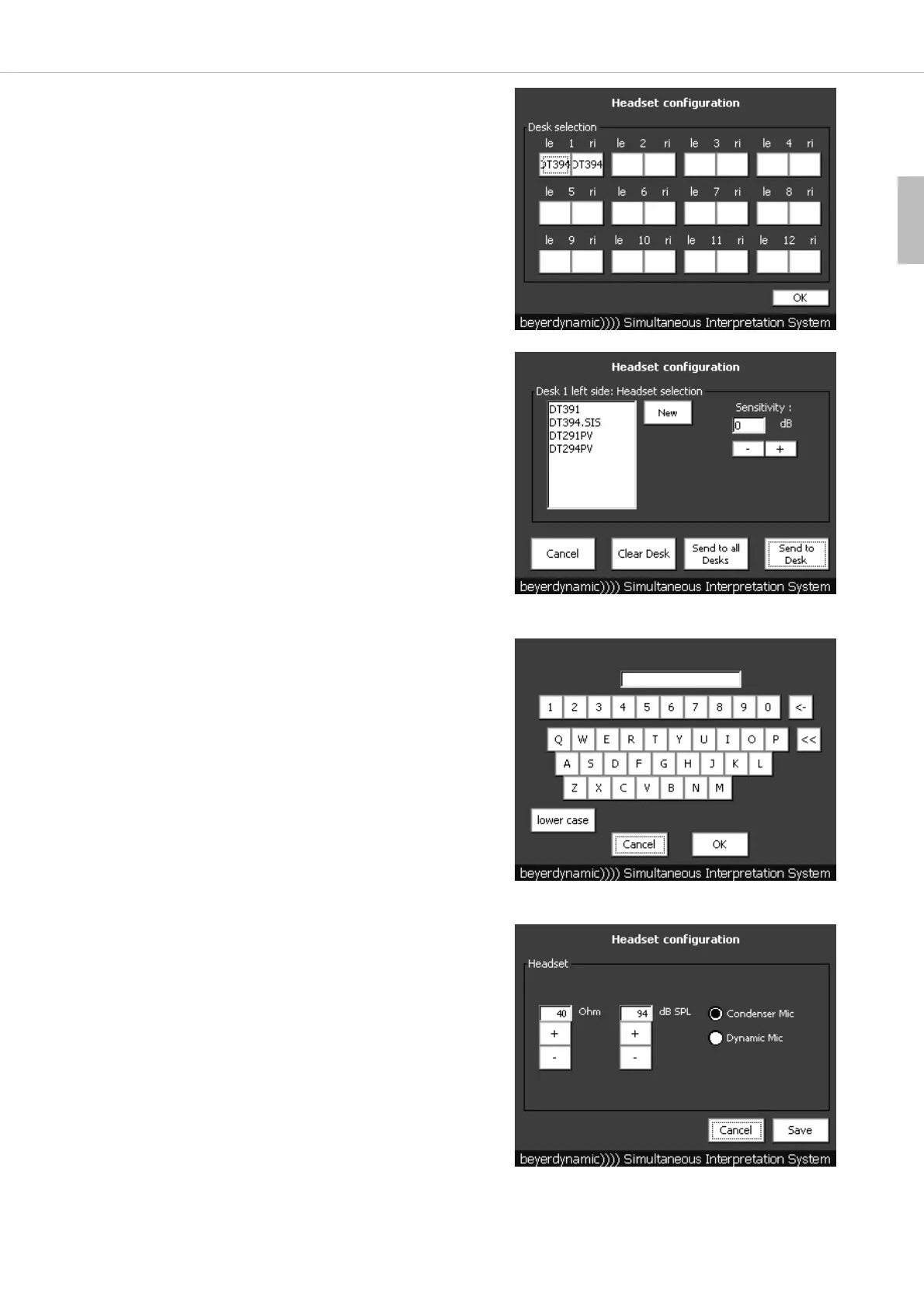
• Press the “Headset” button in the main menu.
• You can enter the appropriate headset connected to each side (left or
right hand side) of the individual interpreter stations.
• Press on the surface of the left (le) or right (ri) hand side for which you
want to enter the headset.
Important:
1 corresponds to the 1
st
interpreter station connected to the control
unit. 2 corresponds to the 2
nd
interpreter station connected to the
1
st
interpreter station and so on.
• For different headsets some specs such as impedance (ohm), sound
pressure level (dB SPL) and microphone (condenser, dynamic) had been
already entered at the factory.
• Select the appropriate headset from the list.
• Under “Sensitivity” you can adjust the sensitivity of the microphone
between -12.5 dB and +12.5 dB. The settings in the “-dB” area are
recommended for interpreters speaking very loud; the settings in the
“+dB” area are recommended for interpreters speaking very low.
• The settings can be sent to all interpreter stations by pressing the “Send
to all Desks” button or to an individual interpreter station by pressing
the “Send to Desk” button.
• If the connected headset is not in the list, you can enter it by pressing
the “New” button.
• As soon as you have pressed the “New” button a window with a
keyboard will be opened.
• With this keyboard you can enter the name of the connected headset
and press the “OK” button.
• If you press the “lower case” button, you can enter small letters.
• With the “<-” button you can delete individual characters.
• With the “<<” button you delete the whole line.
• With the “Cancel” button you can cancel the entry.
• After having pressed the “OK” button you can enter the impedance (ohm)
and the sound pressure level (dB SPL) of the connected headset with the
“+” and “-” buttons.
• Select if the headset has a condenser or dynamic microphone.
• In order to save the settings press the “Save” button.
• Now the new headset will be displayed in the list and can be selected.
• When all described settings have been entered, press the “OK” button.



 To Next Page