Set up
50
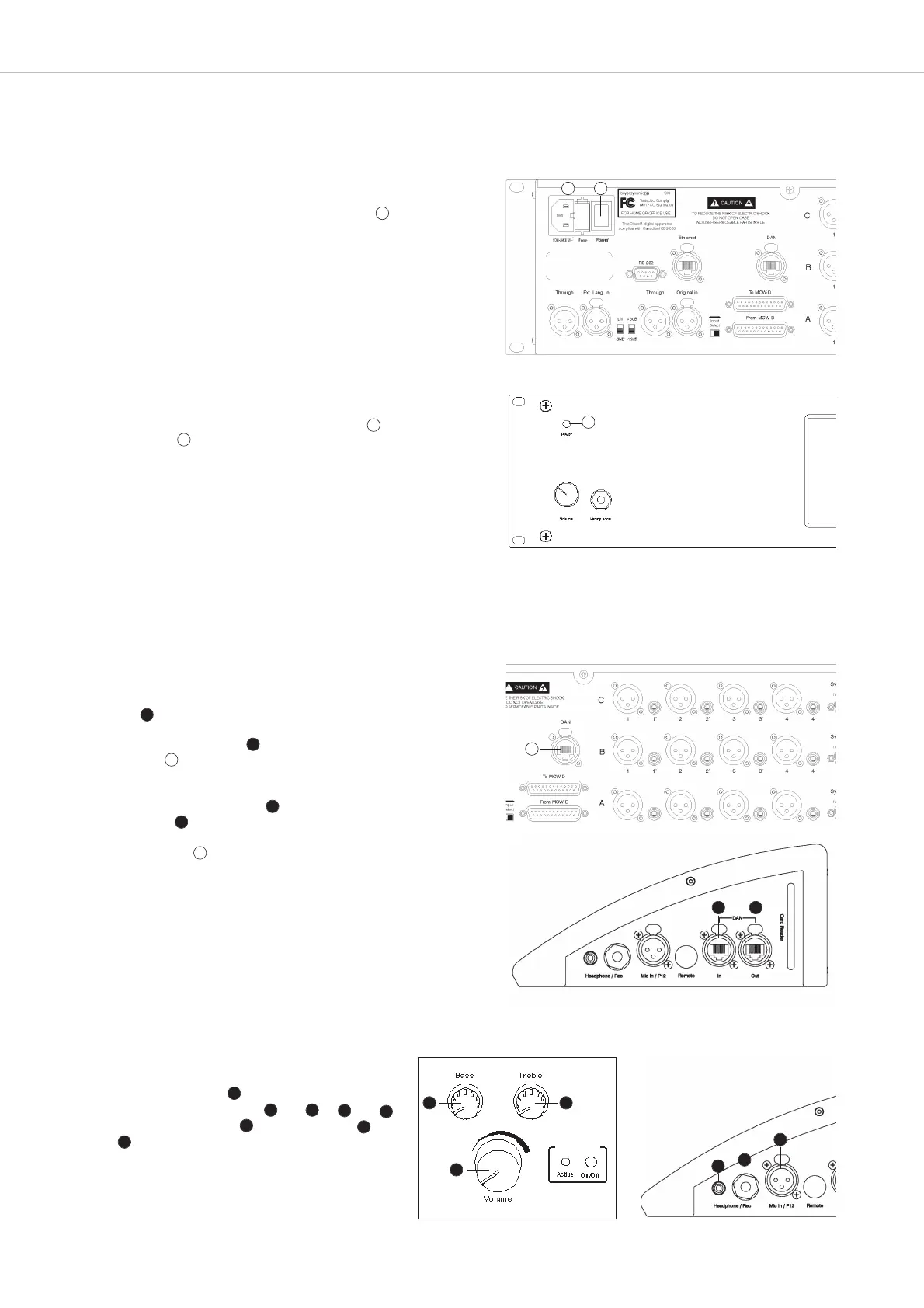
• Switch on the control unit with the on/off switch . The green
“Power” LED will illuminate. After approx. 30 seconds the main
screen will appear on the touch panel.
4. How to set up the System and put it into Operation
In this chapter you will learn how to set up the SIS interpretation system and how to put it into operation.
How to prepare the Control Unit
• Connect the power cable to the power connection and to a power
socket (100 - 240 V, 50 - 60 Hz)
How to connect the Interpreter Station
• Connect the supplied power supply unit to the interpreter station and to
power .
• Connect the DAN In input of the first interpreter station to the DAN
connection of the control unit. Use a CAT.5 cable with RJ 45 plug for
this.
• Connect the DAN Out output of the first interpreter station to the
DAN In input of the second interpreter station and so on. In this daisy
chain a maximum of 12 interpreter stations can be connected to the
DAN connection of one SIS control unit.
How to put the System into Operation
• Set the volume control of the interpreter station to
minimum. Connect a headset and or and
or connect a microphone and a headphone
or .
18
18
18
23
18
17
18
8
8
8
11
19
19
19
20
19
17
11
12 13
21
20
19
4
19
4
EarPatron
21
21
20



 To Next Page