Configuration SIS System
66
5.2.8 Presets
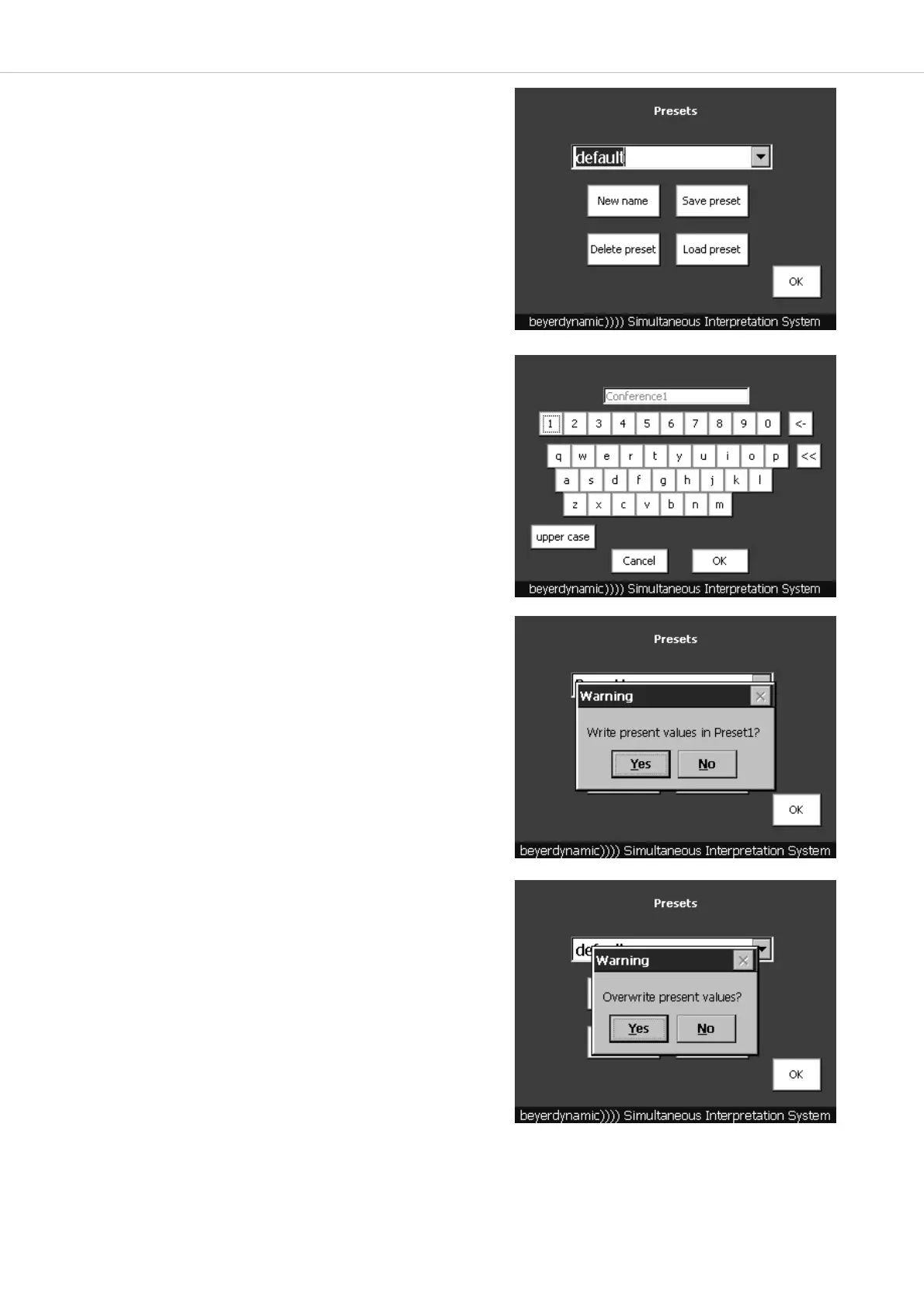
• Presets are settings of the SIS control unit which have been set before.
One default preset has been entered at the factory.
• You can create new presets where you can save all language and
headset settings you have entered.
• Press the “Preset” button in the main menu.
How to create a new Preset
• Press the “New name” button. A window with a keyboard will be
opened where you can enter the name of a new preset.
• In addition to the existing default preset you can create 19 presets so
that in total there are 20 presets.
• Press the “OK” button when you have entered a name.
• With the “Cancel” button you can cancel the entry. With the “<-”
button you can delete individual characters. With the “<<” button you
can delete a whole line.
How to save Presets
• If you want to overwrite and save a preset, select it from the
pull-down menu.
• Press the “Save preset” button.
• The message “Write present values in ...?” will be displayed.
• If you want to save all settings as preset, press the “Yes” button. The
main menu will be displayed again.
How to load Presets
• If there are other presets available in addition to the default preset, you
can select the desired preset from the pull-down menu and press the
“Load preset” button.
• The message “Overwrite present values?” will be displayed.
• Press the “Yes” button. The selected preset will be opened in the main
menu.



 To Next Page