Chapter 4. Basic Operations 22
4.3 Program Information
How to use > Press
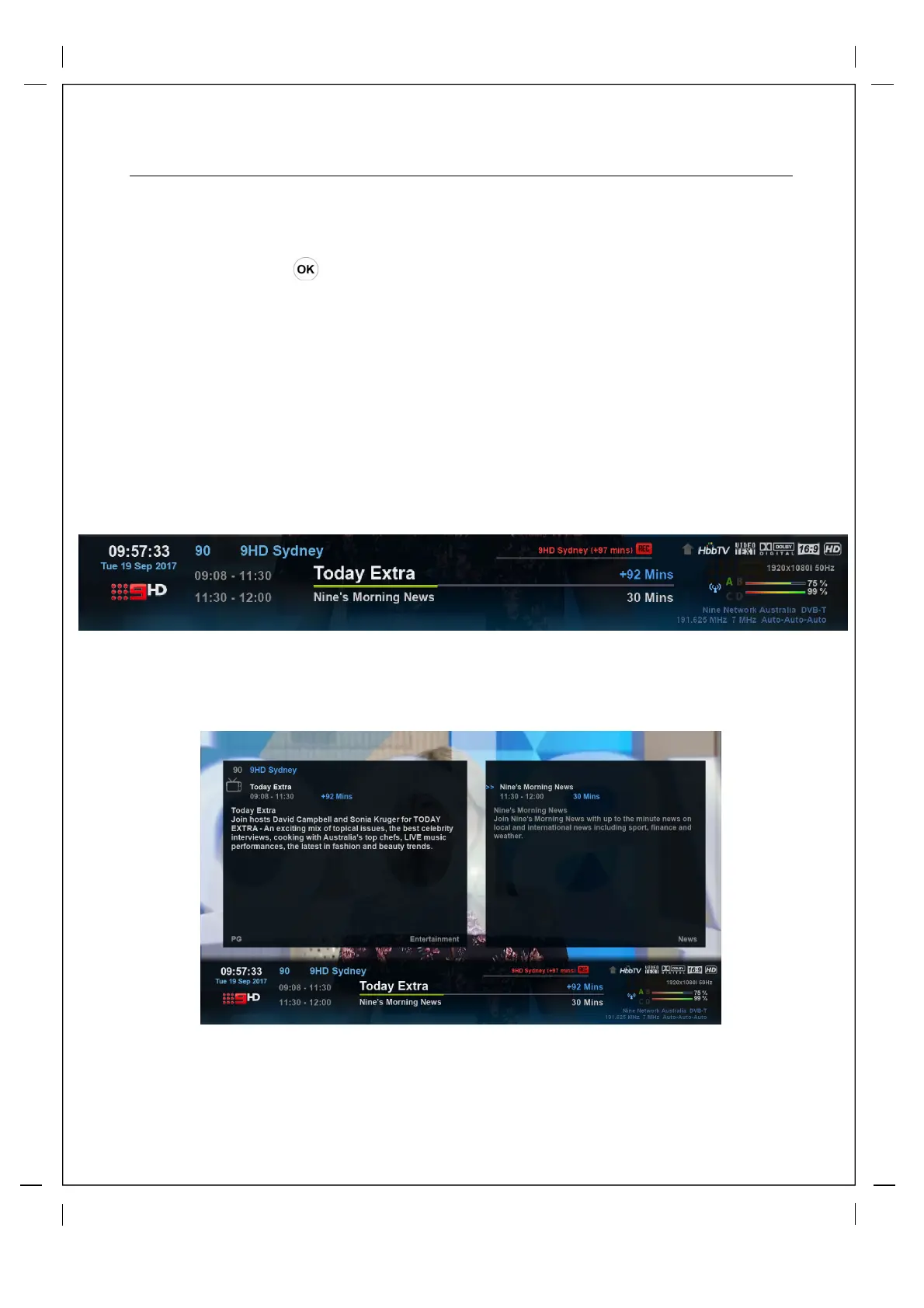
Whenever you change the channel, infobar is always displayed for 5 seconds (default setting).
Infobar is designed to provide you comprehensive information of the channel that you are
currently watching.
Press OK to call up infobar.
Current channel
Logo (picon) / LCN / Name
Current Program Name
Start / Finish
---------
------
------
--------
-------
Current Program
Progress Bar
--------
Current Program
Remaining Time
--------
Active Recording
------
Current Tuner
--------
Next Program
Start / Finish
Next Program
Name
Next Program
Duration
Available formats and enhancement
(White when service is available)
---
---
---
-----
-----
------
Channel Video Resolution
Signal Strength
Broadcast Frequencies
--------
-----
--
Pressing OK again while the first infobar is up will call up the 2nd infobar.
The 2nd infobar will give you further program information for the "current" and the "next" program
and will not timeout in by default, you can press 'OK' again to close it or you can change the
timeout settings for both the 1st and 2nd infobar by pressing Menu>Setup>System>GUI Settings.



 To Next Page