7 Introduction
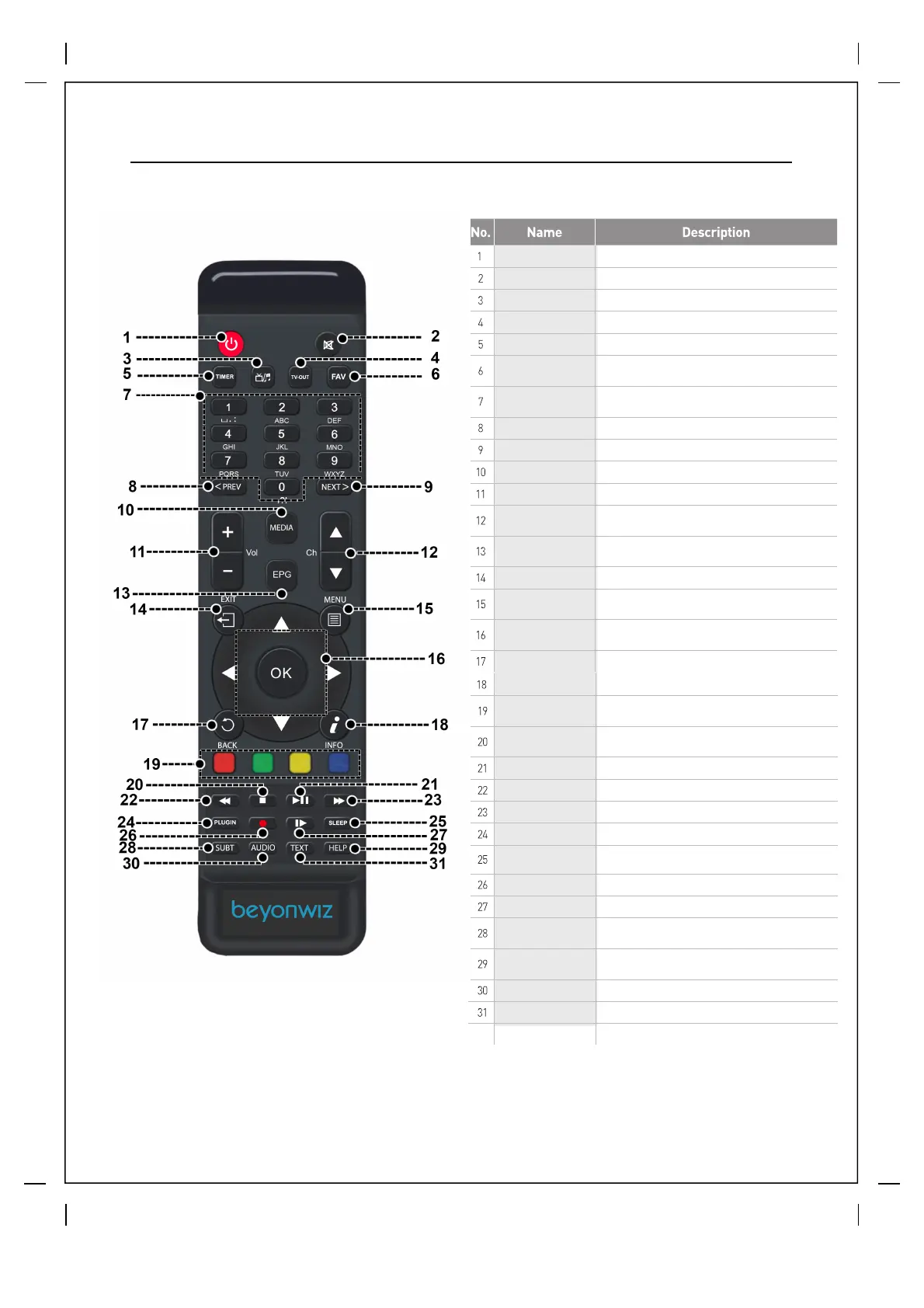
1.3 Remote Control
No. Name Description
1
2
3
4
5
6
7
8
9
10
11
12
13
14
15
16
17
18
19
20
21
22
23
24
25
26
27
28
29
30
31
Power
Mute
TV/Radio
Timer
Favourites
EPG / Guide
Volume
Channel
I
nformation
Back
Stop
Media
Play/Pause
Exit
Menu
Navigation / OK
Coloured Nav
Numbers / Keyboard
Previous
Next
Record
Slow Motion
Rewind
Fast Forward
Sleep
Plugin
Subtitle
Help
Audio
Text
TV-Out
Switch between standby / On. Long press for power options menu.
Switch between TV and Radio Services
Change Video output mode - 567i - 576p - 720p - 1080i - 1080p - 2160p
Opens the Timer List menu
Opens your favouriteschannel list
Launches the Electronic Program Guide (TV Guide) - Long press Options
Mute / Unmutes Sound
Volume controls UP/DOWN
Channel changing controls UP/DOWN
List current program information - Long-press for more options
Go back to previous viewed channels
Stops recordings / Returns to Live TV when in Timeshift
Pause Live TV and Recordings and press Play to resume
Exits to previous Menus
Enters the Main Menu
Brings up Info Bar in Live TV and Recordings - Used to Select menu items
These buttons are utilized in the EPG and Menus for options
Zap to channel directly - Enter Keyboard text when required
Previous page / Zap history. Previous program in timeshift mode
Press record in Live TV to start instant recordings - Press in EPG for options
Enters slow motions mode
Rewind live TV or recordings - Press again for next speed
Fats Forward Live TV or recordings press again for next speed
Open Sleep menu
Launches Plugins menu
Toggle Subtitles / Closed Captions On / Off
Next page / Zap history. Next program in timeshift mode
Launches Your Recordings
Launches Help Screens
Toggles Audio format (e.g. AC3, Stereo). Long press for more options
Launches onscreen Keyboard in text entry screens



 To Next Page