26
BIFFI FAIL SAFE ELECTRIC ACTUATORS, MODEL EFS2000V4
InstructIon and operatIng Manual
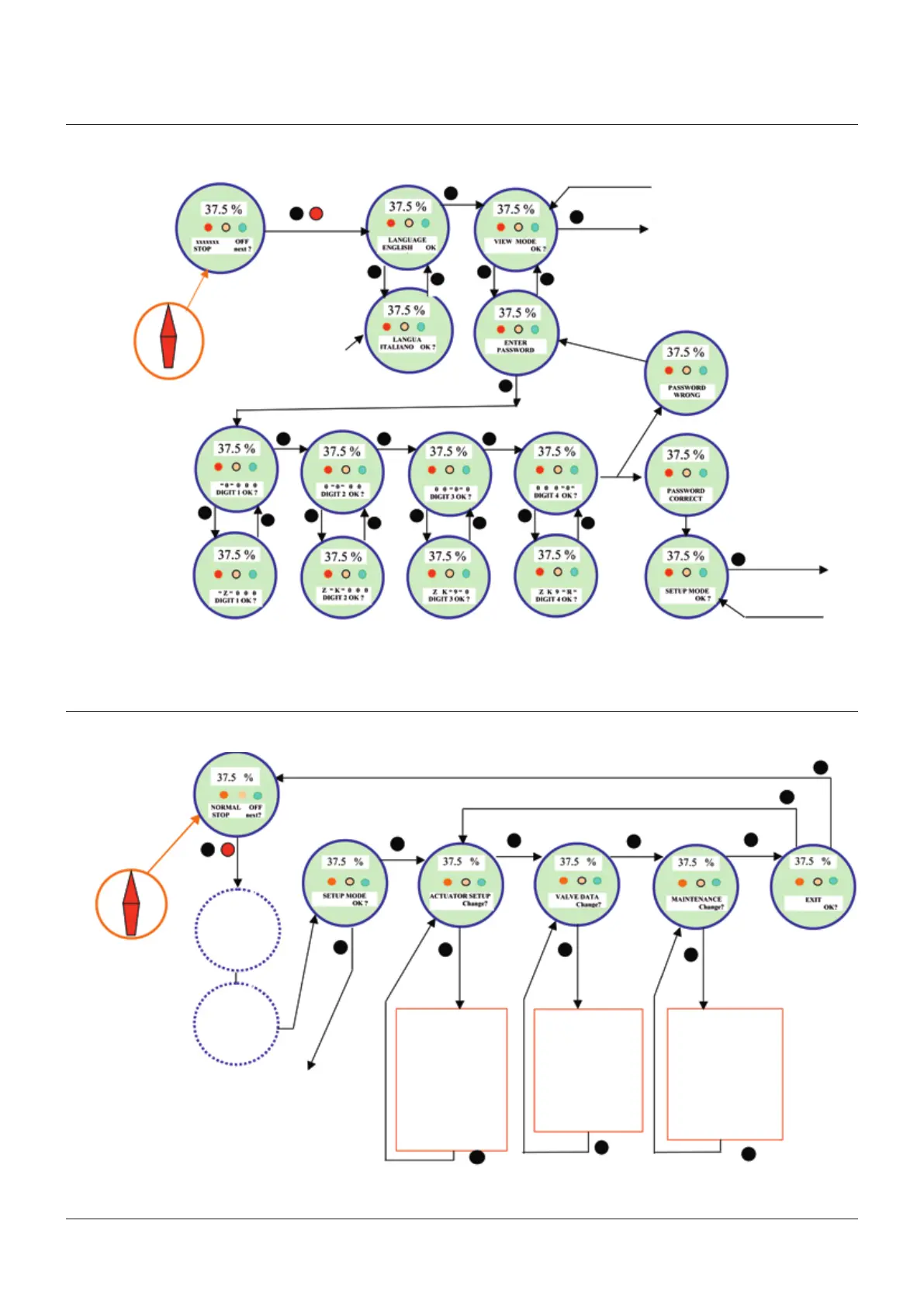
11 SET-UP MENU
The below figure shows the procedure to move in the set-up routines.
Display
Local
Off
3-position selector
Yes
Stop
No
From EXIT ?
To view menu
Press NO until the
desired language
appears and then
press YES
To setup
menu
From EXIT ?
Press NO until the desired character appears and then press YES
Remote
Display
Local
Off
Remote
3-position selector
Yes
Stop
No
Select
language
Routine:
• Set password change?
• Clear alarm log change?
• Set tor. prof. ref. change?
• Set tor. curve ref. change?
• Clear recent log change?
• Set mainten. date change?
• Set data logger change?
• Set PST refer. change?
• PST commands change?
• Set ESD refer. change?
Enter
password
To exit from SETUP menu, press YES or
NO simultaneously or move the 3-position
selector to LOCAL or REMOTE.
1. Routines with * are available only
ifthe relevant module was enabled.
2. Nameplate menu is not available
inset-up mode.
To view
menu
Routine:
• Stroke limits change?
• Torque set-up change?
• EFS set-up change?
• Remote control change?
• Local control change?
• Output relays change?
• Positioner change?
• Failsafe change?
• Output 4-2 mA change?
• Interlock change?
• Miscellaneous change?
Routine:
• Tagname change?
• Serial number change?
• Manufacturer change?
• Break-OP torque change?
• Break-CL torque change?
• Max stem trust change?
• Flange type change?
Press YES or NO to answer at the appropriate prompts (change? OK? etc.)
Yes
Yes
No
Yes
No
Yes
No
Yes
No
Yes
Yes
Yes
Yes
YesYesYes
Yes
No
No
No
No
No
No
No
Yes
Yes
Yes Yes
Yes



 To Next Page