13
BIFFI FAIL SAFE ELECTRIC ACTUATORS, MODEL EFS2000V4
InstructIon and operatIng Manual
7.8 EFS local report
By the VIEW and SETUP menu of the local
operator interface, the status of the EFS
module can be viewed (see chapter ‘Local
controls’, ‘EFS report’). The following data are
available:
• EFS card code
• EFS card manufacturing week and year
• EFS status: ready, not ready
• Base-EFS error counter
• Coil of clutch status: ON, OFF
• Manual override selector status: AUTO,
MANUAL
• Last PST result: passed, reset, failed, OV-TR
(over-travel failed), T-PST (time of spring
action failed), T-RET (time of return to initial
position failed)
• Next PST: date of next PST cycle, in AUTO
PST mode
• Temperature: °C
• Mushroom push button status: ON, OFF
• Heater status: ON, OFF
• T-PST: (T-PST-baseline), last-T-PST, in sec
• T-RET: (T-RET-baseline), last-T-RET, in sec
• OV-TR: (OV-TR-baseline), last-OV-TR, in % of
opening
7.9 Entering the VIEW and SETUP menu mode
If the option “SELECTOR in OFF: disabled” is
configured, move the selector to OFF and then
press simultaneously OPEN/YES and STOP
push buttons to enter in the VIEW and SETUP
menu.
If the option “SELECTOR in OFF: enabled” is
configured, move the selector to OFF and within
20 sec, press simultaneously OPEN/YES and
STOP push buttons to enter in the VIEW and
SETUP menu. If VIEW and SETUP operation are
not entered a new ESD action will be carried
out.
It is possible to enter in VIEW and SETUP menu
after the ESD action has been carried out, but
the actuator cannot be operated electrically.
8 ACTUATOR OPERATION
8.1 Actuator local controls
For EFS "standard" version
After configuring the actuator, if no alarm is
present, place the 3-position selector in LOCAL
and control the actuator by OPEN, CLOSE
and STOP push-buttons. If "push-to-run" was
selected the actuator can be driven to the
desired position by pressing and holding the
OPEN/YES or CLOSE push-button. As the push-
button is released, the motor is de-energized. If
"latched" was selected, as the OPEN or CLOSE
push-button is pressed the motor is energized,
and it runs on also after the push-button is
released. To stop the motor, press the STOP
push-button. To reverse the direction, press the
STOP push-button and then press the push-
button relevant to the opposite direction. In
"latched with instant reverse" mode, the local
controls work as in the "latched" mode, but to
reverse the motor direction you only need to
press the push-button relevant to the opposite
direction.
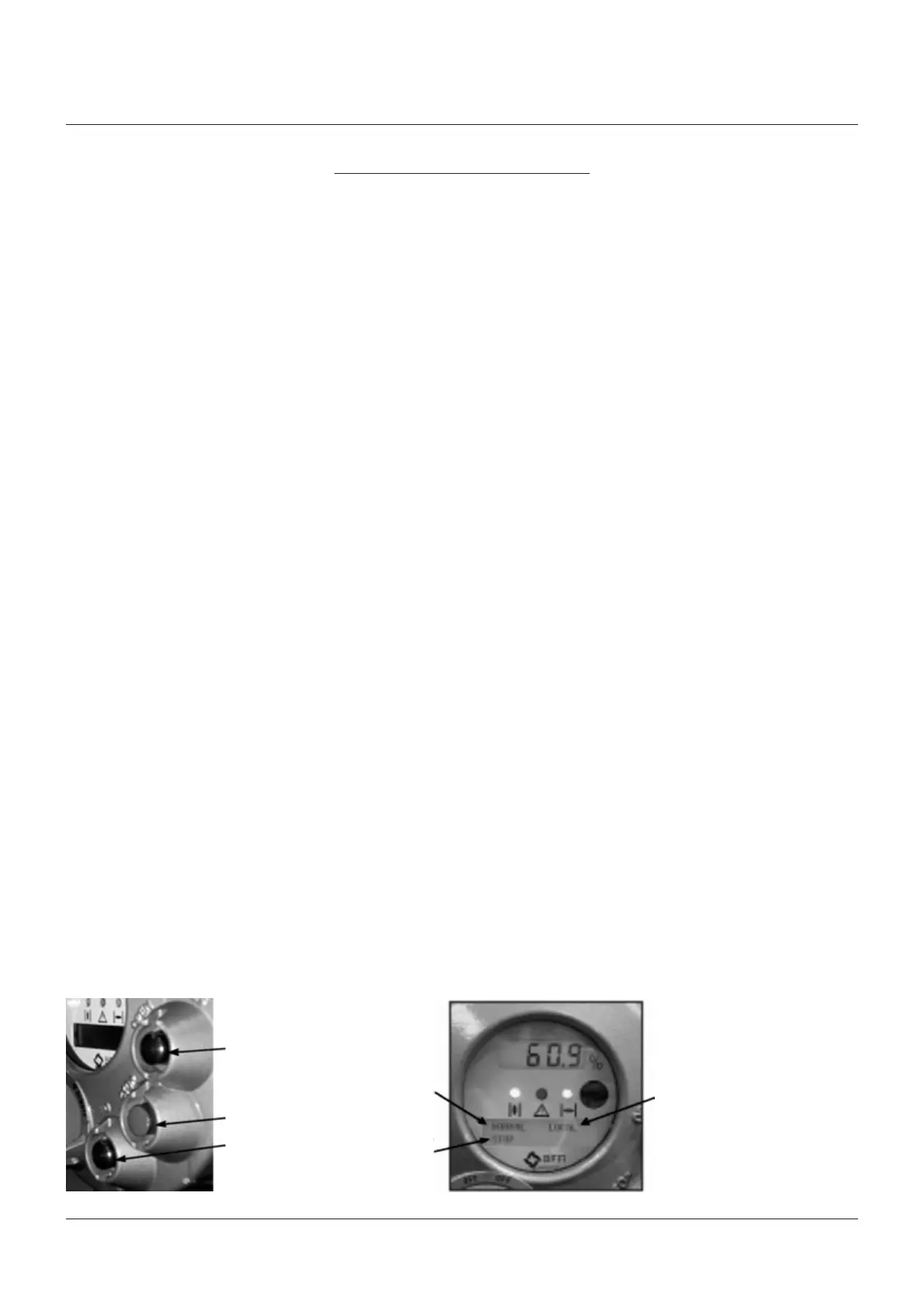
8.2 Local indication
The upper display indicates the valve position
as a percentage of opening (open = 100%).
The lower display has two alphanumeric lines.
The upper line indicates the actuator status and
the 3-position selector status. The lower line
indicates the actuator operation, or the position
request percentage value, according to the
configuration. Two LED’s indicate the actuator
position/operation, while a third LED indicates
alarms.
OPEN/YES
STOP
CLOSE/NO
Local selector
position
Status
Operation or position
request R%



 To Next Page