20
1
2
3
3
345
BIFFI FAIL SAFE ELECTRIC ACTUATORS, MODEL EFS2000V4
InstructIon and operatIng Manual
10 LOCAL CONTROLS
10.1 Description of the local operator
interface
The following functions are available by the
EFS2000v4 local operator interface:
• Actuator control
• Actuator configuration
• Actuator status visualisation
• EFS action control
The figures on the following pages describe
the function of each component of the local
operator interface
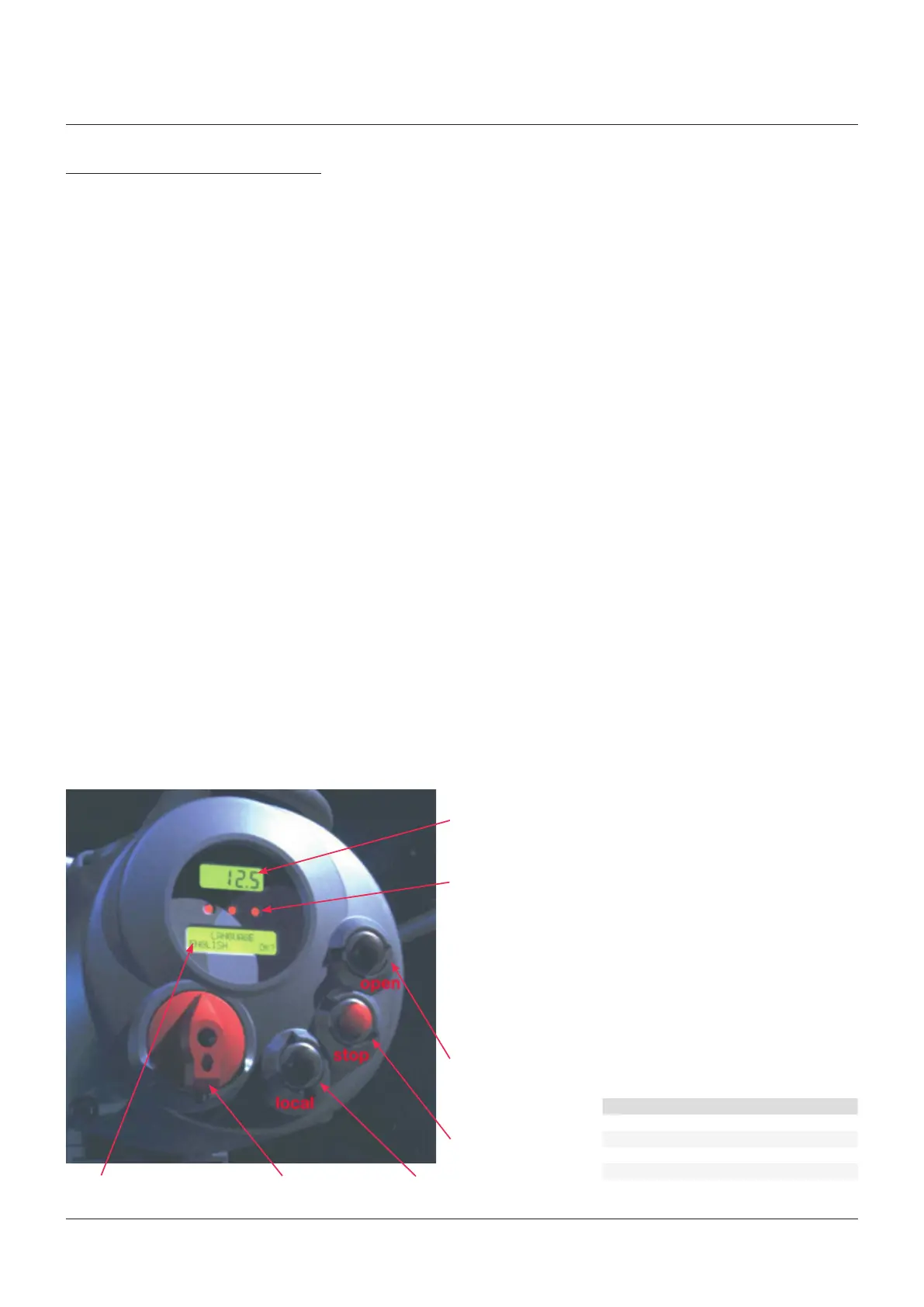
10.2 Local operator interface
Numeric display to indicate the present valve
position as a percentage of the opening. Display
resolution 0.1%.
Three LED’s to indicate the actuator status
according to the following logic:
• green ON/red OFF: the actuator is stopped in
open position
• green OFF/red ON: the actuator is stopped in
closed position
• green OFF/red flashing: the actuator is
running in closing direction
• green flashing/red OFF: the actuator is
running in opening direction
• green ON/red ON: the actuator is stopped in
intermediate position
• yellow ON: alarm
• yellow flashing: warning
The above color combination is supplied as
standard, but it may be changed (red with
green, green with red, and yellow with red),
during actuator setting operations.
Local controls: OPEN/YES, CLOSE/NO, and
STOP push buttons.
The STOP push button resets any existing
command and is active both in local and
remote.
If the 3-position selector is in LOCAL, the
OPEN/YES, and CLOSE/NO push buttons work
as OPEN and CLOSE commands.
If the 3-position selector is in REMOTE or
in OFF, the OPEN/YES and CLOSE/NO push
buttons work as YES and NO to answer the
prompt (next? OK? view? change? exit?) of the
alphanumeric display.
In OFF, the OPEN/YES and CLOSE/NO push
buttons allow to scroll down the menu, to
view and change the actuator configuration
or to scroll the list of variables, status and
alarms. In REMOTE, the above push buttons
allow scrolling through the list of variables,
status, alarms and reports, but the actuator
configuration cannot be viewed or changed.
Alphanumeric display: during normal
operation the alphanumeric display shows the
present status (NORMAL, INT EFS, ALARM,
WARNING, INTERLOCK), the 3-position
selector status (LOCAL, OFF, REMOTE) and the
actuator action (OPEN, OPENING, CLOSED,
CLOSING, STOP or R%: xxx.x). If the local
selector is in OFF or REMOTE, pressing the YES
push button it is possible to scroll through the
list of variables, alarms and reports:
- Output torque - Mot temp
- Motor speed - Term temp
- Main voltage - Log status
- Current - Wireless report
- Temperature - Node report*
3-position selector to set the following
operation modes:
- LOCAL: for local control only
- OFF: no control is active but the actuator is
still connected to the mains
- REMOTE: for remote control only
PARTS LIST
Item Description
1 Numeric display
2 Three LED’s
3 Local controls
4 3-position selector
5 Alphanumeric display
- Time - FDI report*
- Date - Base report
- Alarm - Term report
- Warning - Ain/Aout report*
- Ktemp - EFS report
The data with * are only present if the relevant
modules are present.



 To Next Page